
📑Table of Contents
Which AI service gives you the most bang for your buck? That question haunted me every time a new model launched and pricing pages across providers changed without warning. So I built the DevGENT AI Pricing Comparison tool to put an end to the guesswork — a single hub where you can compare AI cost across 9 providers in one place.
The tool covers three dimensions that matter most: subscription plans, API token pricing, and image generation rates. Whether you’re a solo developer trying to keep bills in check or a team lead evaluating vendor lock-in, having clear AI cost data side by side changes how you make decisions.
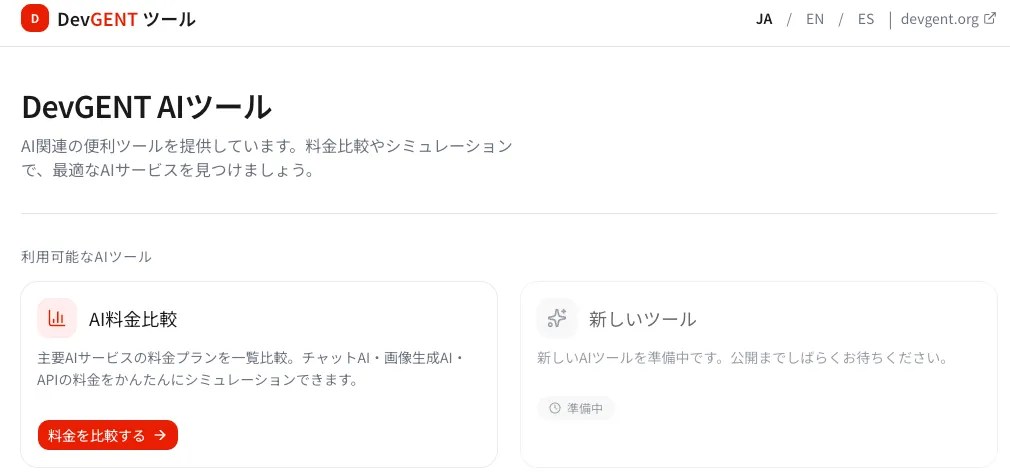
Here’s a quick overview of what the tool covers:
| Category | What It Covers | Providers |
|---|---|---|
| Subscription | Monthly/annual plan pricing, included features | ChatGPT, Claude, Gemini, Grok, Midjourney, and more |
| API Token | Input/output cost per 1M tokens, context window | OpenAI, Anthropic, Google, DeepSeek, Mistral, and more |
| Image Generation | Per-image cost by resolution | DALL-E 3, Midjourney, Stability AI, and more |
Source: DevGENT AI Pricing Comparison (as of July 2026)
What Is the AI Cost Comparison Tool? 3 Essential Features
The DevGENT AI Pricing Comparison is a free web application that consolidates AI cost data from 9 major providers into a single, easy-to-navigate interface. I built it because I was tired of opening 9 browser tabs just to compare prices before every purchasing decision.
The tool supports 3 languages (English, Japanese, Spanish), 3 currencies (USD, JPY, EUR), and displays a lastVerified date on every data point so you always know how fresh the information is. When providers quietly update their pricing — and they do, often — I update the tool accordingly.
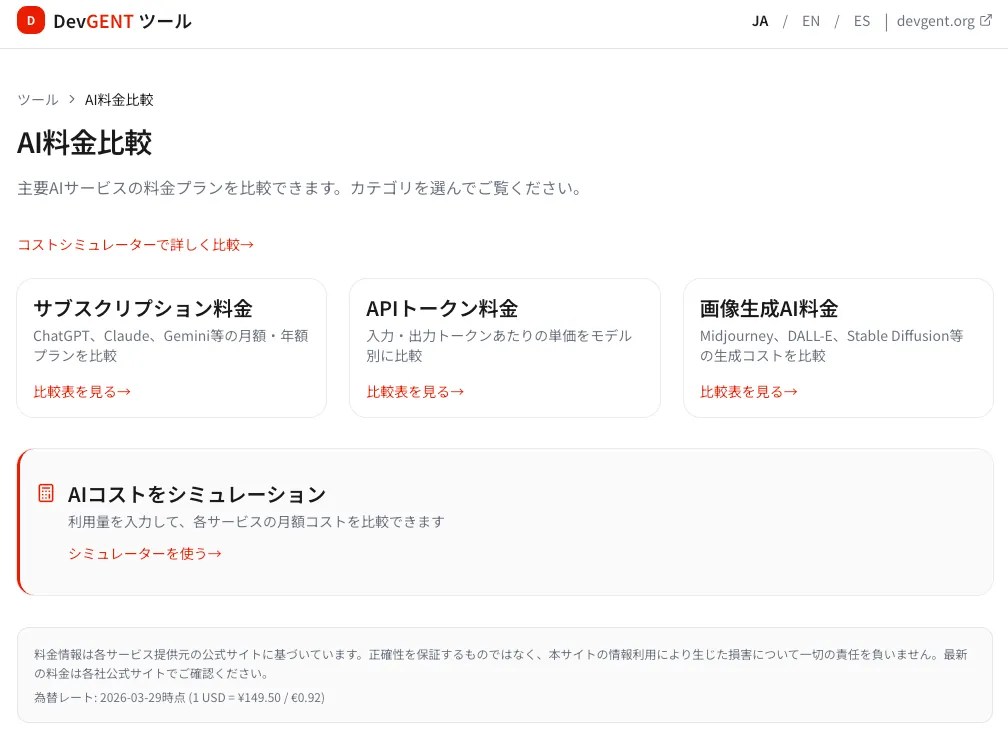
① Subscription Plans
Compare Free, Plus, Pro, and Team tiers across providers. Switch between monthly and annual billing to see savings.
② API Token Pricing
Input/output costs per 1M tokens for every major model. Context window sizes included so you can assess value per token.
③ Image Generation
Per-image costs by resolution for DALL-E, Midjourney, Stability AI, and others — side by side.
④ AI Cost Simulator
Enter your actual usage patterns and get a personalized monthly cost estimate across all providers instantly.
Subscription Pricing Table
The subscription comparison is the most visited section of the tool, and for good reason — most people start here. It shows Free, Plus, Pro, and Team plans across providers on a single table, with monthly and annual pricing side by side.
You can toggle currencies (USD/JPY/EUR) to see prices in your local context. I find this especially useful when advising teams outside the US, where exchange rate fluctuations can meaningfully shift the cost calculus.
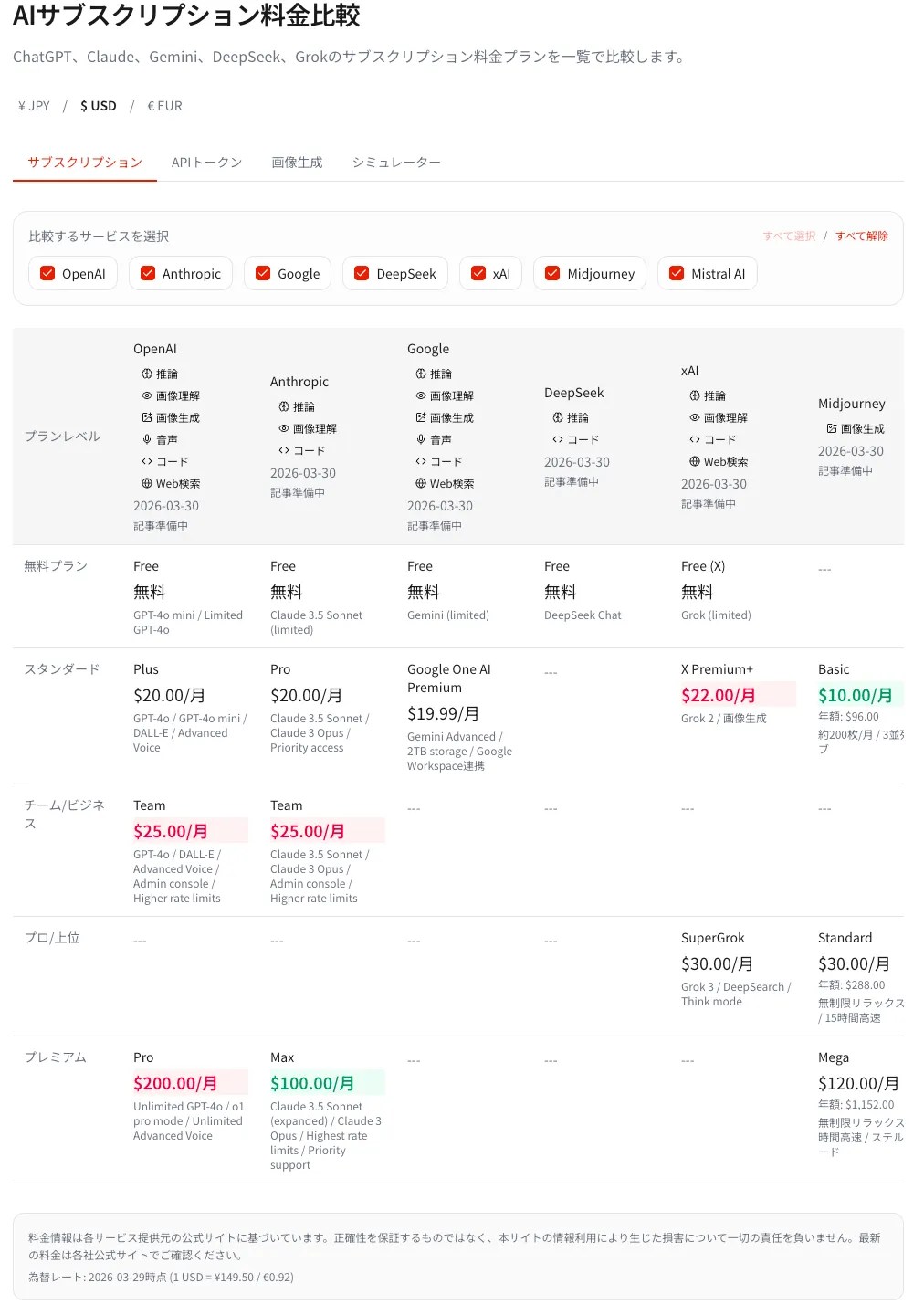
Each row also lists key included features, so you’re not just comparing dollar amounts but actual value. A $20/month plan that includes unlimited messages is a completely different product from one with a 40-message cap.
API Token Pricing Table
For developers integrating AI into applications, the API token pricing table is where the real decisions get made. The table shows input and output cost per 1 million tokens for every major model, plus the context window size for each.
Context window matters because a 200K-token window lets you feed an entire codebase in a single request, which changes the economics entirely. A slightly more expensive model with a larger context window may actually cost less per task when you factor in fewer round trips.
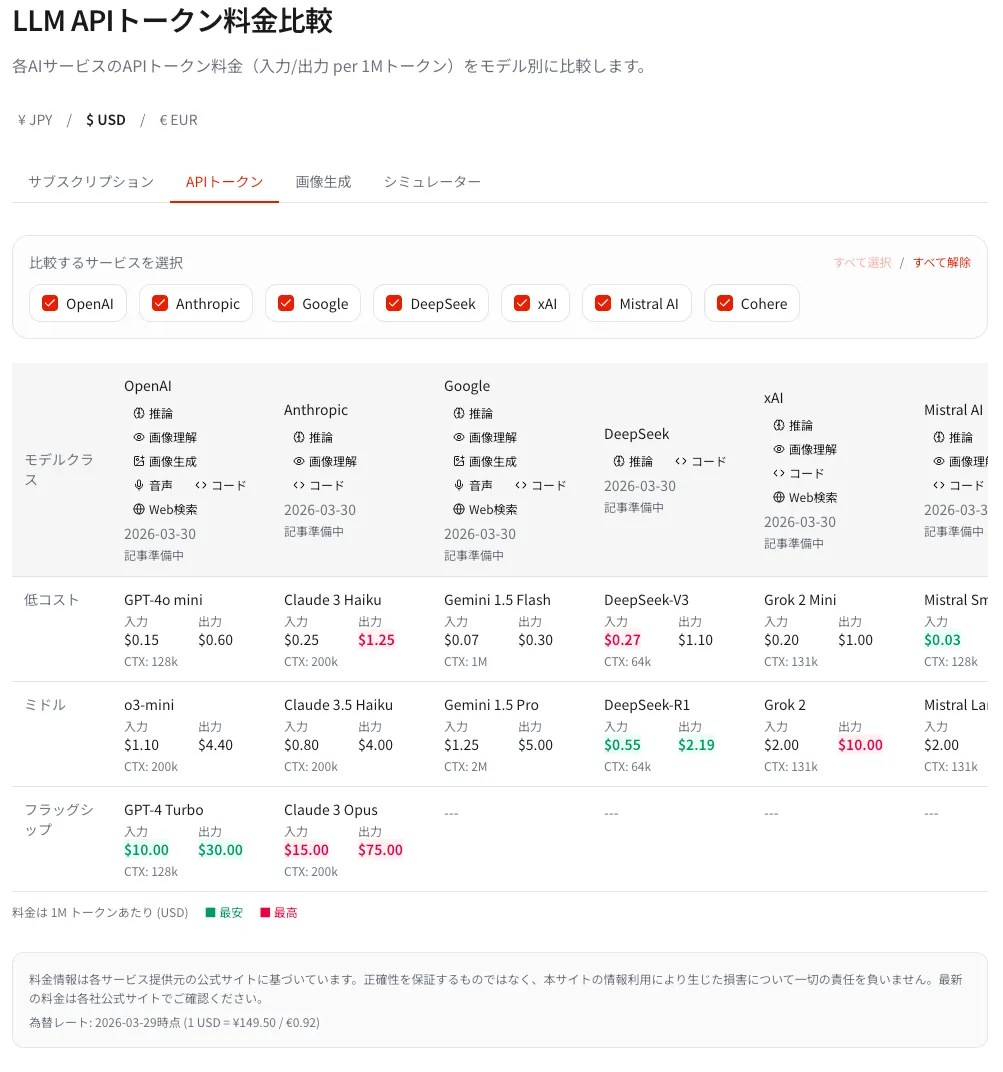
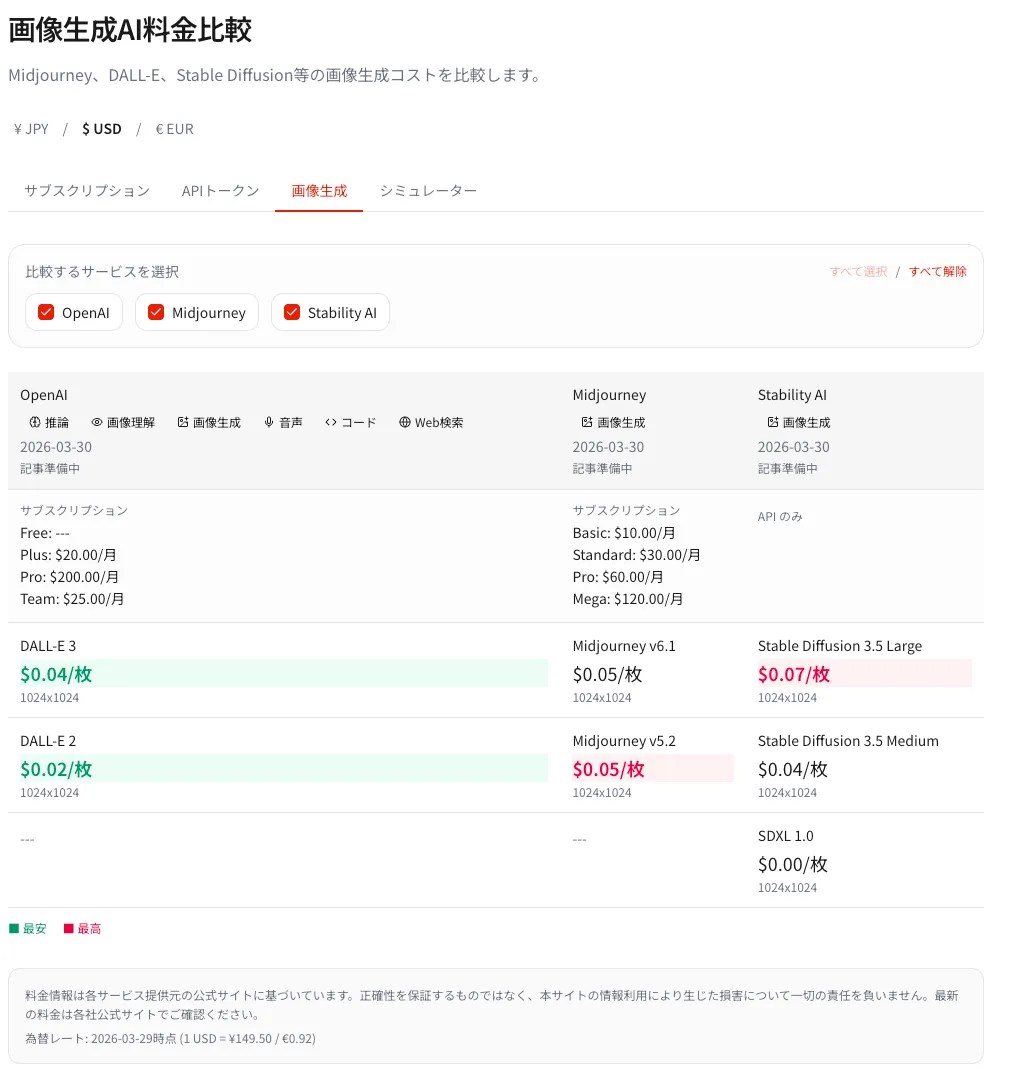
Image Generation Pricing Table
Image generation pricing is the most opaque category in the AI space. Providers mix per-image, per-credit, and subscription models in ways that make direct comparison nearly impossible — unless you have a table like this one.
The table breaks down cost per image by resolution tier (standard, HD, ultra), covering DALL-E 3, Midjourney, Stability AI, and others. In my experience, most teams dramatically underestimate image generation costs until they see the per-image numbers laid out clearly.
How to Use the AI Cost Simulator — Instant Monthly Estimates
The AI Cost Simulator is the most powerful feature of the tool. Instead of guessing at token counts, you describe your actual usage patterns and the simulator calculates estimated monthly costs across all providers simultaneously.
I tested it with a coding use case at 50 messages per day on medium-length inputs, and the cost differences between models became crystal clear. What looked like a minor price difference on the pricing page translated to a $30–$80 monthly swing depending on the model — a gap that adds up fast for a team of 5.
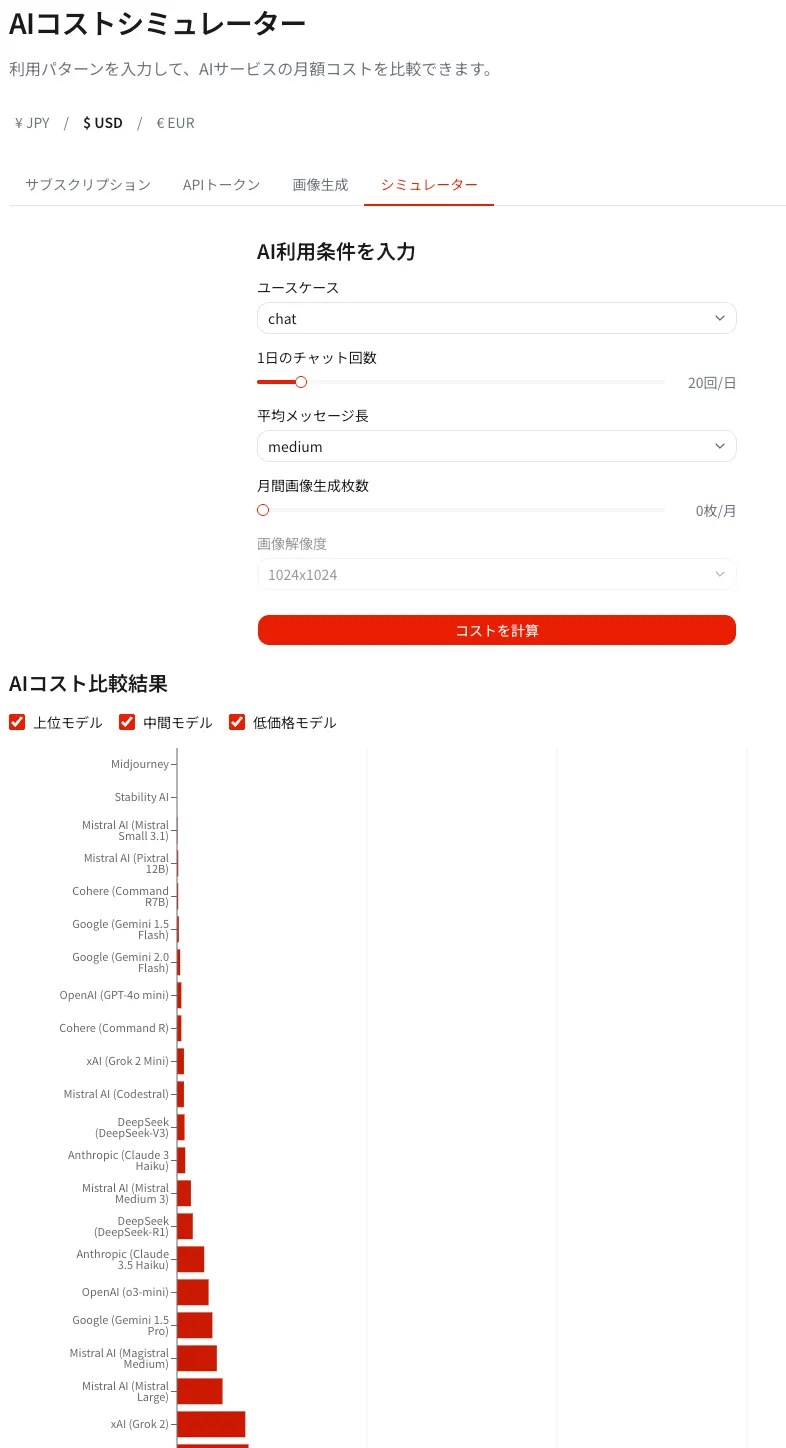
The simulator takes 5 input parameters:
- Use case — choose from 6 preset scenarios (coding, writing, analysis, customer support, translation, general chat)
- Messages per day — how many interactions you expect daily
- Message length — short, medium, or long (with token multipliers applied)
- Image generation — number of images per day, if applicable
- Currency — USD, JPY, or EUR
Use Case Presets and Message Length
Each use case preset maps to a token baseline derived from real-world usage patterns I measured while building the tool. Selecting the right preset is the single biggest factor in getting an accurate AI cost simulation.
| Use Case | Avg. Input Tokens | Avg. Output Tokens | Notes |
|---|---|---|---|
| Coding | 1,500 | 800 | Code context tends to inflate input tokens |
| Writing | 500 | 1,200 | High output, shorter prompts |
| Analysis | 2,000 | 600 | Large documents fed as input |
| Customer Support | 300 | 400 | Short exchanges, high volume |
| Translation | 800 | 800 | Input ≈ output in token volume |
| General Chat | 400 | 500 | Baseline conversational usage |
Source: DevGENT AI Cost Simulator — token baselines based on real usage patterns (July 2026)
Message length applies a multiplier on top of the preset baseline:
| Message Length | Multiplier | Typical Scenario |
|---|---|---|
| Short | 0.5× | Quick Q&A, one-liners |
| Medium | 1.0× | Standard interactions (default) |
| Long | 2.0× | Document analysis, extended sessions |
Source: DevGENT AI Cost Simulator (July 2026)
Reading Your Simulation Results
Results are sorted by total estimated monthly cost in ascending order, so the most affordable option is always at the top. Each result shows the cost broken down into API charges and image generation charges separately, making it easy to see where the money actually goes.
Providers are classified into three cost tiers — Low, Mid, and High — based on your specific inputs. The tier classification updates dynamically as you adjust your parameters, which is useful for sensitivity analysis: “How does my cost change if I double my daily message volume?”
One insight I consistently share with developers: the gap between the cheapest and most expensive option in the AI cost simulation is almost always larger than people expect. For a coding team sending 100 messages per day at medium length, the spread from cheapest to most expensive can exceed $200/month per seat.
3 Often-Overlooked Points in AI Cost Comparison
After talking with dozens of developers and teams about AI spending, I’ve noticed the same blind spots come up repeatedly. Understanding these three points will save you from costly mistakes when interpreting any AI cost data.
⚠️ Subscriptions and API Pricing Are Completely Different Products
- A ChatGPT Plus subscription ($20/month) gives you access to ChatGPT.com — it does not give you API access.
- API access is billed separately through the OpenAI API platform and is metered by token volume.
- Many developers assume their subscription covers API usage. It doesn’t. Budget for both separately if you need both.
⚠️ Token Price Alone Doesn’t Tell the Whole Story
- A model with a 200K-token context window can process an entire codebase in one call — a 4K-token model can’t, no matter how cheap the per-token rate is.
- Output quality also varies significantly. A cheaper model that requires 3 retry attempts costs more in practice than a pricier model that nails it in one.
- Use the simulator to model your real workflow, not just the per-token rate in isolation.
⚠️ Exchange Rate Risk Is Real
- All major AI providers price in USD. If you’re budgeting in JPY or EUR, a 10% currency shift can blow your monthly budget without any change in usage.
- The DevGENT tool lets you toggle between USD/JPY/EUR to make this visible, but the underlying prices are USD-denominated.
- Teams outside the US should build a currency buffer into their AI cost estimates — I recommend 10–15% overhead.
Frequently Asked Questions
Is the DevGENT AI Pricing Comparison tool free to use?
Yes, it’s completely free. You can access all three comparison tables and the AI Cost Simulator at app.devgent.org/en/ai-pricing/ without creating an account. No sign-up required.
How often is the pricing data updated?
Each data point displays a lastVerified date so you can see exactly when it was last confirmed. I check for pricing changes whenever a provider makes an announcement and update the tool accordingly. AI pricing changes frequently — the verification dates are there so you can make informed decisions about how much to trust any given figure.
Does the Subscription table include free tiers?
Yes. Free tiers are included where they exist. The table shows Free, Plus, Pro, and Team plans for each provider, along with key limitations (message caps, model access, etc.) so you’re comparing actual value rather than just the dollar amounts.
What’s the difference between the comparison tables and the AI Cost Simulator?
The comparison tables show published pricing as-is — raw data from provider pricing pages. The AI Cost Simulator takes your actual usage patterns (use case, messages per day, message length, image generation volume) and calculates a personalized monthly estimate. Use the tables for research and the simulator for budgeting decisions.
Can I use the simulator for team cost estimates?
The simulator currently calculates per-user costs. To estimate team costs, multiply the monthly figure by the number of seats. I’m considering adding a team multiplier input directly — if that’s a feature you’d find useful, let me know via the site.
Which providers are included in the AI cost comparison?
The tool currently covers 9 providers: OpenAI (ChatGPT / DALL-E), Anthropic (Claude), Google (Gemini), DeepSeek, xAI (Grok), Mistral AI, Cohere, Midjourney, and Stability AI. Coverage expands as new providers become relevant to production use cases.
Wrapping Up: Make Every AI Dollar Count
AI costs are real and growing. The difference between a well-informed purchasing decision and a poorly-informed one can easily be hundreds of dollars per month per developer — and that gap compounds as teams scale.
I built the DevGENT AI Pricing Comparison tool because I wanted a single source of truth for AI cost data that I could trust when advising my own projects. The AI Cost Simulation feature in particular changed how I evaluate models: instead of reading pricing pages, I now run scenarios that match my actual workflow and let the numbers speak.
Stop Guessing — Start Comparing AI Costs with Real Data
Free, no sign-up required. Compare 9 providers across subscriptions, API tokens, and image generation in seconds.

Author
krona23
Over 20 years in the IT industry, serving as Division Head and CTO at multiple companies running large-scale web services in Japan. Experienced across Windows, iOS, Android, and web development. Currently focused on AI-native transformation. At DevGENT, sharing practical guides on AI code editors, automation tools, and LLMs in three languages.


🔥 Most Popular
- Claude Desktop Won't Install? Windows & Mac Fixes That Worked (2026)
- Obsidian Visualization Tools: Graph, Canvas, Excalidraw (2026)
- What Is VS Code? Features, Extensions & Copilot — Complete Guide (2026)
- LM Studio Bionic Preview: Local Open-Model Agent for Docs and Code
- Japan's AI Third Pole Strategy: Reducing US LLM Dependency and Performance Realities



Leave a Reply