![Cursor vs Windsurf: Complete Comparison Guide [2026 Edition]](https://devgent.org/wp-content/uploads/2026/03/wp-upload-cursor-vs-windsurf-eyecatch.webp)
Updated August 20, 2026
📑Table of Contents
- Cursor vs Windsurf: My Bottom Line
- How I Evaluated Them
- Quick Overview
- Pricing Comparison as of April 12, 2026
- What Happens on the Same Task?
- UI and Workflow Differences
- Cursor: Who It Fits Best
- Windsurf: Who It Fits Best
- Decision Matrix
- Who I Would Not Recommend Them To
- Editor + CLI Agent Is Also a Real Option
- FAQ
- Related articles
- Conclusion
Windsurf is now Devin Desktop, with Devin Local replacing the older local-agent path. Legacy Cascade and Windsurf wording is retained to help readers map older documentation. Check Cursor pricing and the Devin Desktop page before subscribing.
Cursor and Devin Desktop (formerly Windsurf) still sit at the center of most AI editor comparisons, but the answer is no longer as simple as it was a few months ago. Note that Windsurf was renamed “Devin Desktop” by Cognition in June 2026, and its local agent was rebuilt from Cascade into Devin Local (your plans, extensions, and settings carry over unchanged). After using both in real work, I no longer think this is a one-sided race.
I started with Cursor in late 2024, moved to Windsurf because Cascade felt dramatically better at context gathering, and now find myself seriously reconsidering Cursor again. As of April 12, 2026, my practical conclusion is this: Cursor is easier to recommend, while Windsurf still feels stronger when you want the AI to fan out across related files.
Cursor vs Windsurf: My Bottom Line
The biggest gap is no longer raw code completion quality. In day-to-day work, the real difference comes from how each editor approaches agent execution, context collection, and review before you accept changes.
If you want the safer default, start with Cursor. If you care most about auto-discovering related files and moving through larger codebases with less setup, Windsurf still has a real edge. That is why my recommendation today is no longer “pick Windsurf by default” but “start with Cursor, then test Windsurf on the same task.”
How I Evaluated Them
I am not ranking these tools on feature lists alone. The four criteria below reflect what actually changes the experience once you start shipping code with them.
1. Agent performance
How well each tool handles multi-file changes, related files, and failure modes.
2. Pricing and usage
Free-tier usefulness and how quickly paid usage starts to feel expensive.
3. UI and review flow
Diff review, approval clarity, and how hard it is to get lost.
4. Adoption friction
Community support, familiarity, and how easy they are to recommend to teams.
Quick Overview
| Category | Cursor | Devin Desktop |
|---|---|---|
| Company | Anysphere | Cognition |
| Base | VS Code fork | VS Code fork |
| Core strength | Reviewability and familiar workflow | Automatic context gathering and broad exploration |
| Main agent | Composer / Agent Mode | Cascade |
| Best fit | Teams, cautious reviewers, VS Code-first developers | Large refactors, broader codebase exploration, agent-heavy workflows |
Pricing Comparison as of April 12, 2026
Pricing is where the conversation changed the most. Windsurf used to be easy to recommend partly because the older $15 Pro / $30 Teams / 500 credits framing made it feel like the value leader. That is not the clean reality anymore.
On April 12, 2026, the official pricing pages show Cursor Pro at $20, Pro+ at $60, Ultra at $200, while Windsurf now lists Pro at $20, Max at $200, and Teams at $40. In other words, the old individual price advantage for Windsurf is mostly gone.
| Plan type | Cursor | Devin Desktop |
|---|---|---|
| Free | Hobby with limited Agent and Tab usage | Free with Light quota and strong day-one editing value |
| Main paid tier | Pro $20 / Pro+ $60 / Ultra $200 | Pro $20 / Max $200 |
| Team tier | Teams $40/user | Teams $40/user |
| Usage model | Clearer tier ladder for heavier users | Daily/weekly quota framing on the official page |
Sources: Cursor Pricing, Windsurf Pricing (checked April 12, 2026)
Important note
- You will still find older Windsurf comparisons quoting $15 Pro and credit-based language.
- That older framing matches my own earlier experience, but it is no longer the safest basis for a current recommendation.
- In practice, Cursor now feels easier to justify at current pricing because the product improved while the pure price gap disappeared.
What Happens on the Same Task?
I have asked both tools to handle the same kinds of work: WordPress mu-plugin fixes, adding tests to existing projects, and refactors spanning multiple files. This is where their personalities become obvious.
| Task | Where Cursor helped | Where Devin Desktop helped | Better fit |
|---|---|---|---|
| mu-plugin fix | Easier diff review and approval flow | Broader awareness of neighboring files and hooks | Cursor if you want tighter control |
| Test generation | More predictable when the scope is tightly specified | Better at expanding context around the target area | Cursor for precision, Windsurf for wider exploration |
| Multi-file refactor | Keeps the blast radius easier to contain | Feels smoother when the task genuinely spans many related files | Windsurf when broad context matters more than strict containment |
What Cursor gets right
- Readable diff-and-approve loop
- Lower risk of accidental edits slipping through
- Familiar for VS Code users
What Cursor still misses
- It sometimes stays too local and misses ripple effects
- Manual context setup can feel tedious
What Windsurf gets right
- Excellent automatic file discovery
- Stronger first pass on larger codebases
- Less context babysitting
What Windsurf still gets wrong
- Can overreach into files that did not need touching
- Error states can still feel opaque
UI and Workflow Differences
Both tools can feel productive, but they do not feel productive in the same way. Cursor gives you a stronger sense of control, while Windsurf gives you a stronger sense of momentum.
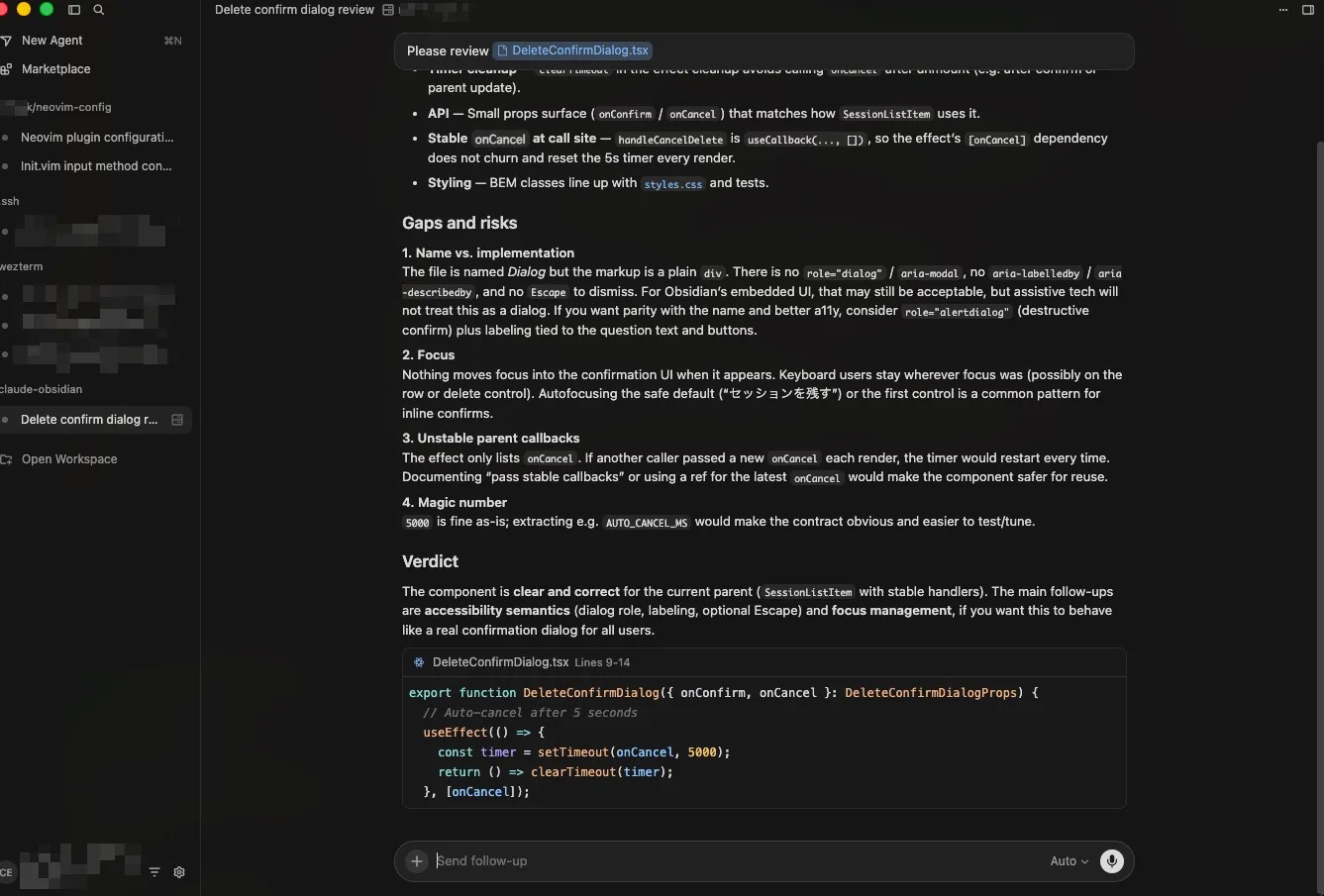
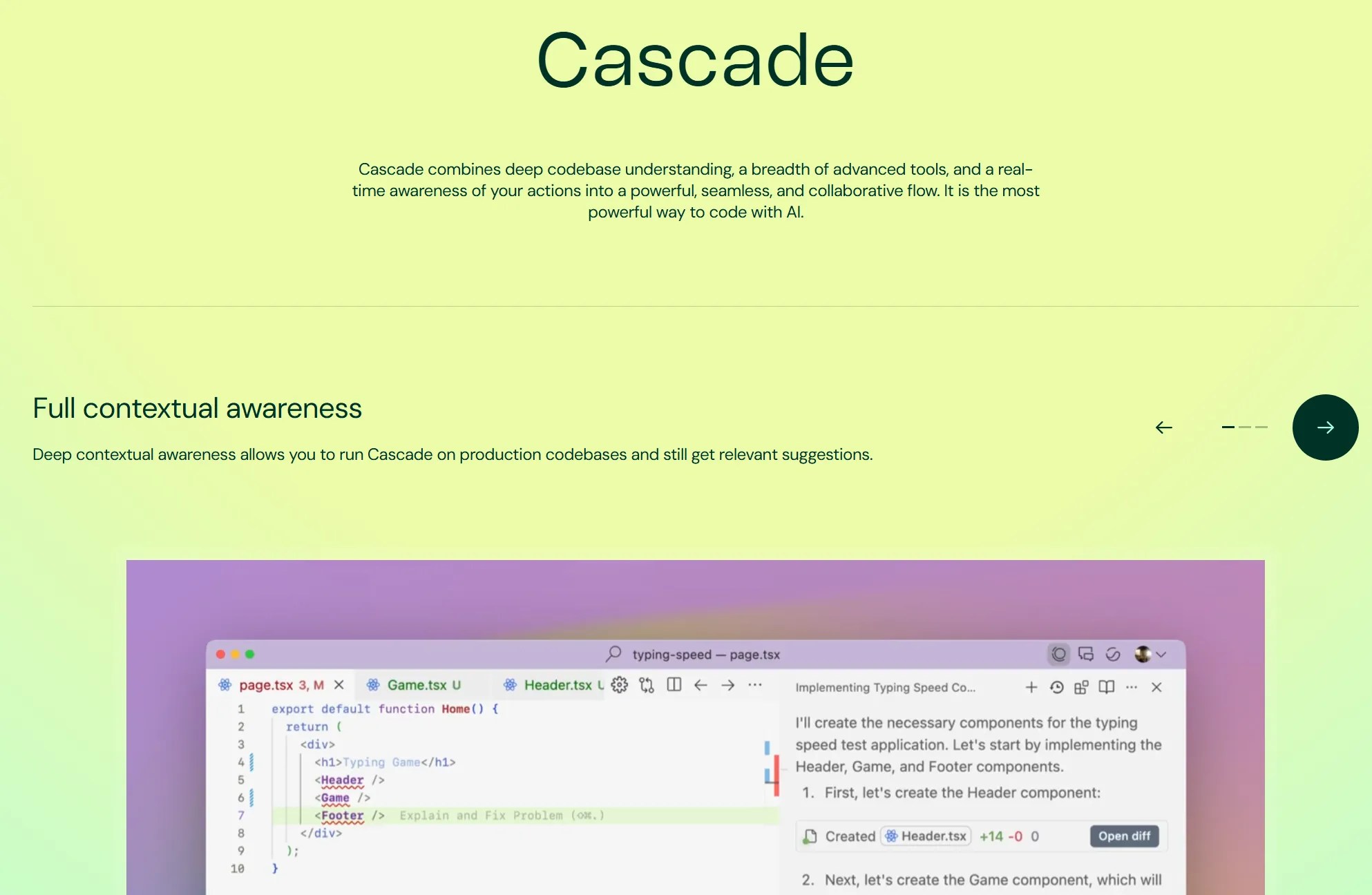
What to look for
- If you care most about checking edits before they land, Cursor feels easier to trust.
- If you want to stay in conversation mode and avoid manually feeding files, Windsurf feels smoother.
- When something goes wrong, Cursor still tends to be easier to reason about.
Cursor: Who It Fits Best
🎯 Best for: developers who want a safer, easier on-ramp from VS Code
I started using Cursor in late 2024 as my first serious AI editor. Earlier versions often felt limited on harder agent tasks, but that gap is much smaller now. Agent Mode is noticeably stronger, and the broader ecosystem around Cursor makes it easier to justify for real teams.
That matters because recommendation is not just about raw capability. It is also about whether a tool is easy to explain, easy to troubleshoot, and easy to trust once more people start using it.
Why I still like it
- The diff approval flow is easy to read and easy to stop.
- It feels natural for existing VS Code users.
- Recent improvements made it much less frustrating on multi-file work.
What still annoys me
- Manual context setup can still get in the way.
- It sometimes finishes the task too narrowly and misses downstream fixes.
Windsurf: Who It Fits Best
🎯 Best for: developers who want the AI to discover more of the codebase for them
I moved to Windsurf in early 2025 because Cursor’s agent felt too limited at the time, while Cascade felt dramatically better at understanding surrounding context. That first impression was real. On bigger tasks, Windsurf could feel more capable with less manual prompting.
Today, though, the story is more balanced. Cursor improved, and Windsurf’s pricing story became less obviously favorable. Windsurf still shines on broader multi-file work, but it no longer feels like the undisputed default.
Why it impressed me
- Automatic context gathering can feel genuinely great on large codebases.
- It reduces the need to babysit file selection.
- Its first-pass output on broader tasks can be stronger.
Why I hesitate today
- Opaque Cascade failures still hurt confidence when they happen.
- It can reach too far and create extra review work.
- It is harder to recommend to users who rely on strong community troubleshooting.
Decision Matrix
| Situation | Recommendation | Why |
|---|---|---|
| Solo developer | Start with Cursor | It is easier to troubleshoot and easier to compare from a stable baseline. |
| Team rollout | Cursor | The VS Code continuity makes it easier to explain and adopt. |
| Large refactor | Windsurf | Its broader context gathering feels more natural here. |
| Keep your existing IDE | Consider GitHub Copilot | It avoids the forked-IDE transition entirely. |
| Security-heavy environment | Often Windsurf | Its enterprise/security positioning is stronger on paper. |
If you are stuck, test them in this order: Cursor first, Windsurf second, same task both times. That sequence makes the tradeoffs easier to see.
Who I Would Not Recommend Them To
- Cursor is harder to recommend if you hate manual context setup and want the AI to infer everything for you.
- Windsurf is harder to recommend if you want richer community support and easier self-service troubleshooting.
- GitHub Copilot may be the better answer if you do not want to switch IDEs at all.
Editor + CLI Agent Is Also a Real Option
Another reason this comparison got more nuanced is that many developers no longer expect the editor to do everything. In my own workflow, there are more moments where a lighter editor plus a CLI agent makes more sense.
If you want the broader landscape first, read our AI Code Editor Comparison. If cost is your main concern, the dedicated Cursor pricing guide and Windsurf pricing guide are the next places to go.
FAQ


Author
krona23
Over 20 years in the IT industry, serving as Division Head and CTO at multiple companies running large-scale web services in Japan. Experienced across Windows, iOS, Android, and web development. Currently focused on AI-native transformation. At DevGENT, sharing practical guides on AI code editors, automation tools, and LLMs in three languages.
Conclusion
In the current Cursor vs Windsurf comparison, Cursor wins on recommendability and review flow, while Windsurf still wins on broader context handling.
A few months ago, I would have found Windsurf easier to recommend. Today, Cursor has improved enough that it feels like the safer first choice. Start there, then test Windsurf on the same task if broad agent context matters most to you.


![Devin Desktop (formerly Windsurf) vs Zed: AI Features, Performance & Pricing [2026]](https://i0.wp.com/devgent.org/wp-content/uploads/2026/03/windsurf-vs-zed-eyecatch.webp?fit=300%2C167&ssl=1)

🔥 Most Popular
- Claude Desktop Won't Install? Windows & Mac Fixes That Worked (2026)
- Obsidian Visualization Tools: Graph, Canvas, Excalidraw (2026)
- What Is VS Code? Features, Extensions & Copilot — Complete Guide (2026)
- LM Studio Bionic Preview: Local Open-Model Agent for Docs and Code
- Japan's AI Third Pole Strategy: Reducing US LLM Dependency and Performance Realities



Leave a Reply