
Pricing check: August 17, 2026
📑Table of Contents
- Cursor Pricing 2026 — All 6 Plans at a Glance
- How Cursor Pricing Works — The Credit System Explained
- Why Cursor Switched to Credits — The Strategic Story
- My Real Usage Data — How Far $20 Pro Actually Goes
- How Far Auto Mode Can Actually Take You
- Cursor → Windsurf → Zed → Considering Cursor Again — My Switching Story
- All 6 Cursor Pricing Plans in Detail
- Bugbot, Background Agents, and PR Reviews — 2026 Usage Billing
- BYOK and Hybrid Workflows — $20 Cursor + External CLIs as De Facto BYOK
- Teams $40/Seat vs Pro $20 × Headcount — Where’s the Breakpoint?
- Cursor Pricing Estimator — Three Monthly Scenarios
- Cost by Model — How Many Requests Does $20 Get You?
- 6 Ways to Save on Cursor Pricing
- Cursor Pricing vs Other AI Code Editors (2026)
- Cursor Pricing FAQ
- References & Sources
- Summary — Which Cursor Plan Is Right for You?
Current individual pricing is Pro $20/month with $20 of Other Models usage, Pro Plus $60/month with $70, and Ultra $200/month with $400. Cursor Models and Other Models are separate usage pools, and model choice plus token volume determine how quickly usage is consumed. After the included amount, you can enable on-demand usage at the same API rates or upgrade. Recheck annual billing, taxes, and regional availability at checkout. See the official Models & Pricing docs.
“How much does Cursor pricing actually cost?” Since the credit-based system rolled out in June 2025, the answer changed completely. I’ve been on the Cursor Pro plan since 2023, took a detour through Devin Desktop (formerly Windsurf) and Zed as my main IDEs, and I’m now seriously considering moving back to Cursor as my primary editor after the recent agent improvements. My Pro subscription has stayed active the entire time — and honestly, by mixing Cursor with Claude Code and Codex CLI, I’ve never burned through the $20 credit pool in a single month.
Most English-language Cursor pricing articles focus on benchmarks or the CEO’s apology. This guide goes further: I share real consumption data from 2+ years on Pro, how far Auto mode can actually take you, and the strategic reason Cursor had to switch to credits in the first place. By the end you’ll know exactly which Cursor pricing tier fits your workflow.
This update reflects metered Auto usage, the new Teams Premium seat, Bugbot’s move to usage-based billing, and the end of the always-available one-year student Pro offer. The old claim that Auto costs no credits is no longer accurate.
💡 The one-line takeaway
In 2026, your Cursor bill isn’t really decided by which plan you pick — it’s decided by how you combine Auto mode with external CLIs like Claude Code or Codex CLI. Heavy users who judge by sticker price alone consistently misread their real monthly cost.
📌 What you’ll learn
- Complete comparison of all 6 Cursor pricing plans with the official pricing page screenshot
- The June 2025 credit-system shift and a 5-axis “old vs new” comparison
- The 5 drivers that drain credits fastest (model choice, Max Mode, context, agent, tool-call chains)
- My actual usage data — task-by-task credit feel and Auto-mode practicality
- Cursor → Windsurf → Zed → considering Cursor again — my switching journey and what it taught me about pricing
- The “hidden tier” backstory of Pro+ and the context behind the CEO’s apology (now listed on the official pricing page)
Cursor Pricing 2026 — All 6 Plans at a Glance
Cursor offers six tiers, from the free Hobby plan to enterprise-grade contracts. Here’s the official pricing page and a side-by-side summary.
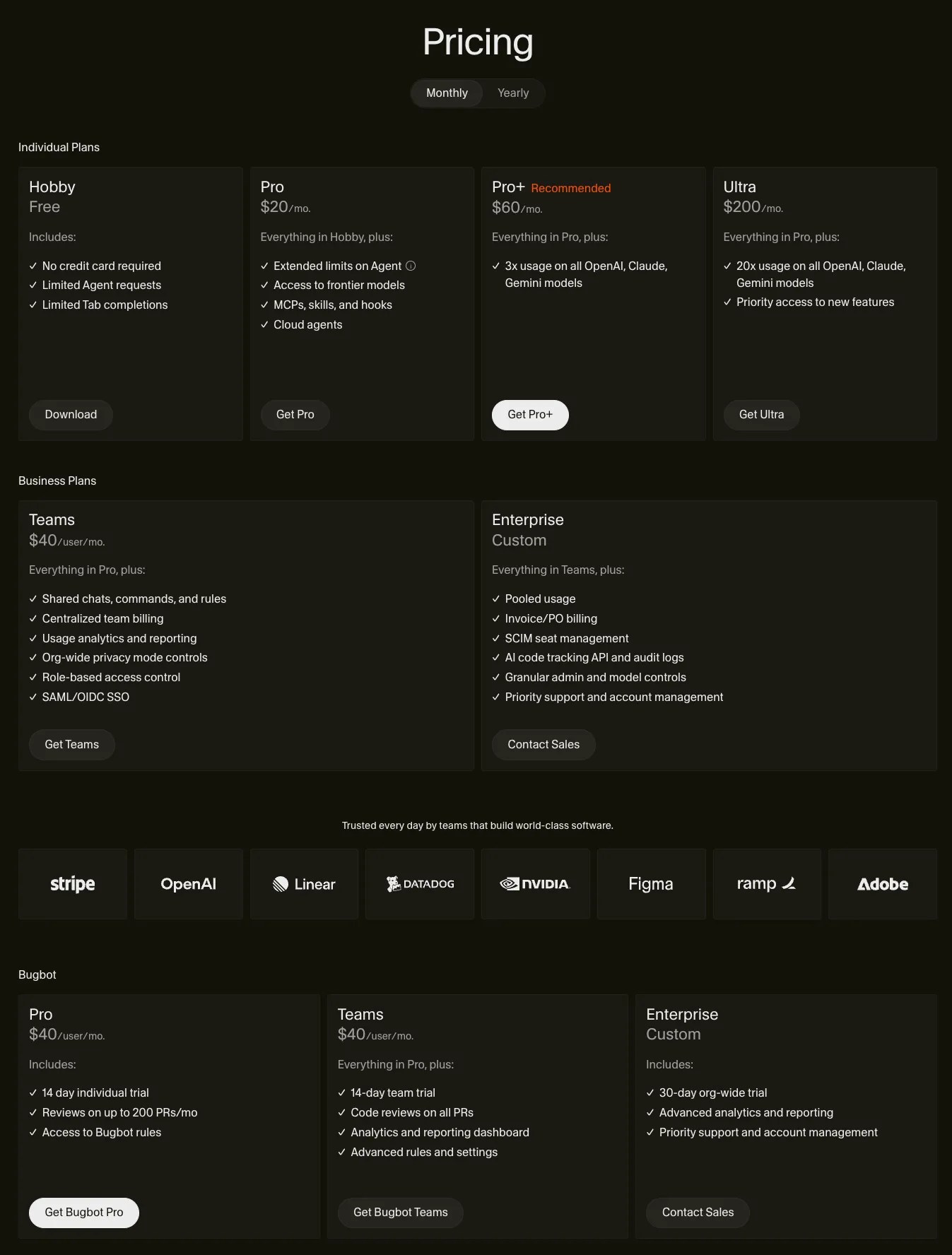
| Plan | Monthly | Annual | Premium credits | Best for |
|---|---|---|---|---|
| Hobby | Free | — | $5 worth | Trial users, light users |
| Pro | $20 | $192 ($16/mo) | $20 worth | Solo developers (most popular) |
| Pro+ | $60 | $576 ($48/mo) | $70 + bonus | Heavy Agent users |
| Ultra | $200 | $1,920 ($160/mo) | $400 + bonus | Full-time AI-native developers |
| Teams Standard | $40/seat | $384/seat ($32/mo) | First-party + third-party pools | Standard team users |
| Teams Premium | $120/seat | $1,152/seat ($96/mo) | 5x Standard usage | Heavy Agent users |
| Enterprise | Contact | Contact | Custom | Large orgs, security needs |
Sources: Cursor official pricing and official Teams pricing update (verified August 17, 2026)
One bit of history worth noting: right after the June 2025 credit-system rollout, Pro+ was treated as a “hidden tier” — it wasn’t on the public pricing page at all and only surfaced inside the app when a Pro user hit the credit limit. As of 2026, Pro+ is now listed openly on the official pricing page. I cover the full backstory in the strategy section below.
How Cursor Pricing Works — The Credit System Explained
The biggest thing to understand about Cursor pricing in 2026 is the credit pool introduced in June 2025. Cursor moved from “500 fast requests per month” to “$20/month = $20 worth of API-rated credits.” That single change rewrote how you should think about cost.
Old vs New — What Actually Changed
| Dimension | Old Pro (until June 2025) | New Pro (June 2025 onward) |
|---|---|---|
| Billing unit | 500 fast requests / month | $20 worth of credits (API-rated) |
| Monthly cap | Hard cap at 500, then slow queue | $20 cap, then pay-as-you-go overage |
| Predictability | High (counts requests) | Lower (depends on model + task) |
| Unlimited tier | Slow requests were unlimited | Auto mode consumes included usage |
| Overage risk | None (no overage charges) | Yes (pay-as-you-go can stack) |
Source: Cursor official blog (June 2025 pricing), August 2025 pricing update
The crucial detail is that Auto mode is now metered against your included usage. Cursor’s official rate is $1.25 per million input tokens, $6.00 per million output tokens, and $0.25 per million cached input tokens. Auto still chooses a model for reliability and task fit, but it is no longer a zero-cost unlimited tier.
5 Things That Drain Credits Fastest
To avoid the “I blinked and my credits were gone” problem, know what accelerates consumption.
① Model selection
The biggest variable. Opus consumes 5–10x what Flash does. Default to Auto and you sidestep this entirely.
② Max Mode (extended context)
In my experience, Max Mode burns several times the credits of normal mode. Only flip it on when you genuinely need the entire codebase loaded.
③ Context window (@file / @folder)
Pulling in large files via @ mentions inflates token count. If you keep individual files modest, the cost stays surprisingly low.
④ Agent mode vs Tab autocomplete
Tab autocomplete is cheap. Agent mode chains multiple tool calls per message, so a single task can drain a chunk of credits.
⑤ Editing dense formats directly
From my own usage, asking Cursor to read or write HTML files directly drains credits the fastest. HTML balloons in token count. I split it up or hand it off to a different tool.
Specs Worth Knowing
- Credits don’t roll over — they reset each month
- BYOK (Bring Your Own Key) is configurable but coexists with the credit system, so flexibility is limited in practice — a hybrid setup with an external CLI tends to work better
- Pay-as-you-go overage is opt-in. Always set a hard spending cap in settings before enabling it
If you want the feature-level basics first, see What is Cursor: Features and Capabilities Explained.
Why Cursor Switched to Credits — The Strategic Story
Once you understand the mechanics, the next question is: why did Cursor force this change at all? Knowing the backstory helps you understand the early Pro+ “hidden tier” episode, makes sense of the CEO’s apology, and gives you a read on where pricing might go next.
The Cost Structure Behind the $900M Round
Anysphere — Cursor’s parent — raised $900M at a $9.9B valuation in 2025. With that cash, Reddit and Hacker News exploded with “Why are they raising prices?” The honest answer: third-party LLM API costs were spiking, and the flat-rate model was structurally unsustainable.
Cursor doesn’t own its models. It rents API capacity from Anthropic, OpenAI, and Google, and those costs scale linearly with usage. Under the old “500 fast requests + unlimited slow” plan, heavy Sonnet users were squeezing Cursor’s margins.
The CEO Apology and the Pro+ “Hidden Tier” Episode
The June 2025 rollout sparked a backlash. Reddit threads filled with complaints like “all-day coding with Claude 4 capacity suddenly shrank to one hour” and “the request counter disappeared from the UI.” Cursor CEO Michael Truell issued a public apology:
“We recognize that we didn’t handle this pricing rollout well, and we’re sorry. … Our communication was not clear enough.”
— Michael Truell (CEO, Cursor)
The most telling detail at the time: the Pro+ tier ($60/month) was missing from the public pricing page entirely. It only surfaced inside the app once a Pro user hit the credit ceiling. Truell himself admitted Cursor was “still figuring out how to include the tier without introducing too much complexity,” a clear sign the pricing structure wasn’t fully settled. As of April 2026, Pro+ has since been added to the official pricing page and now appears as a regular tier — the “hidden tier” episode has been resolved.
Cursor vs Anthropic — The “Do You Own the Model?” Difference
Anthropic (Claude / Claude Code) owns its models, so it can absorb API costs internally. Instead of raising prices, it controls usage through weekly limits. That’s the visible difference. Cursor doesn’t own models, so when third-party API rates rise, Cursor’s cost rises in lockstep.
This isn’t a “Cursor is worse” argument. It’s a tradeoff: predictable pricing vs flexibility to use any frontier model. Cursor’s strength is letting you switch between Anthropic, OpenAI, and Google models from a single editor — and the price for that flexibility is the credit-pool risk. Once you frame it that way, the credit system feels less arbitrary.
My Real Usage Data — How Far $20 Pro Actually Goes
Most English-language Cursor articles either explain the concepts or share a single month’s usage report. I’ve been on Pro since 2023, so here’s what continuous use looks like — including a real screenshot of my credit dashboard.

My Workflow Since 2023
I’ve kept a Cursor Pro subscription active since around 2023. Even when I switched my primary editor to Windsurf and later Zed, I never canceled Pro — it’s the kind of subscription I want to keep “warm” so I can return any time. These days I use Cursor as a secondary editor and route work between it, Claude Code, and Codex CLI depending on the task.
The result: I almost never burn through the $20 credit pool, and I’ve never been hit with a surprise pay-as-you-go bill. The trick is “don’t try to do everything inside Cursor.” Push heavy work to Claude Code or Codex CLI, and Cursor’s $20 holds up just fine even after the credit-system change.
Credit Consumption by Task Granularity
| Task type | Felt usage (per day or per task) | Notes |
|---|---|---|
| Light tasks (Tab autocomplete, short questions) | ~1–few % per day | Barely noticeable when staying in Auto mode |
| Medium tasks (multi-file Agent edits) | ~1–few % per day | Stays cheap if you keep Agent on Auto |
| Heavy tasks (large refactors, long Agent runs) | Tens of % at a time | This is where I push to Claude Code / Codex CLI instead |
| Max Mode | Several times normal | Only enable when full-codebase context is genuinely required |
| Editing HTML files directly | My heaviest usage by far | I deliberately avoid this — split the file or use a different tool |
Source: Author’s Cursor Pro usage data (2023–March 2026)
💡 My Operating Rule
Run light and medium tasks in Cursor’s Auto mode, and the moment a task starts eating tens of percent of credits, push it over to Claude Code instead. That single rule has kept me inside Pro $20 for years. Trying to do everything inside Cursor isn’t the most cost-effective approach in 2026 — pairing it with CLI agents is.
How Far Auto Mode Can Actually Take You
The key Cursor pricing question is now “how useful is Auto, and how much usage does it consume?” Auto draws from the same included pool, so both task volume and input/output token size determine how long Pro’s included usage lasts.
What Auto Mode Handles Well
- Day-to-day code completion and editing that doesn’t need a major rewrite
- Adding functions, writing tests, light refactoring
- Single-file fixes and straightforward bug work
- Generating docs, adding comments, renaming for clarity
Output quality suggests Cursor is routing Auto traffic to older GPT-5.3-class models or each provider’s mid-tier model. It’s not cutting edge, but it’s more than capable for the tasks above.
Where Auto Falls Short — and What I Do Instead
Big refactors, complex algorithm design, and architecture decisions are where Auto starts to feel underpowered. The thing is, I don’t reach for premium models inside Cursor when that happens — I switch to Claude Code or Codex CLI.
The reason is purely economic. Manually selecting Sonnet 4.6 or Opus inside Cursor drains the $20 credit pool fast. Claude Code is flat-rate via a Max plan, and Codex CLI runs through ChatGPT Plus or API metering — both billed on separate accounts. Pushing heavy work to those tools preserves Cursor’s credit pool for what it does best.
📊 My Stance
I’m firmly in the “Auto mode is enough” camp. Auto covers more than people expect, and anything it can’t handle goes to Claude Code. The “I must manually pick Sonnet inside Cursor” camp ends up needing Pro+ or Ultra almost immediately. If you care about cost, run Cursor on Auto by default — that’s my advice from years of doing exactly that.
Cursor → Windsurf → Zed → Considering Cursor Again — My Switching Story
The most useful pricing perspective is from someone who actually switched editors. None of the competing English-language pricing articles share this view. Here’s my journey across three editors and what each one taught me about cost.
Cursor → Windsurf (Better Agent at the Same Price)
My first move was Cursor to Windsurf. At the time, Windsurf’s Cascade agent was clearly stronger than Cursor’s, and Windsurf’s Pro plan was also $20/month. Same price, better experience — that was reason enough.
Windsurf → Zed (Lightweight Rust + Claude Code Centralization)
Then Windsurf to Zed. Zed is written in Rust and absurdly lightweight, and around the same time I had moved most of my agentic work to Claude Code. With the heavy lifting happening outside the editor, I no longer needed deep AI features built into the IDE itself. “Fast lightweight editor + strong CLI agent” became the right shape for me.
Zed → Cursor Reconsidered (Recent Improvements)
And now I’m seriously considering moving back to Cursor as my primary editor. Over the past few months Cursor’s agent and integration story has improved a lot, and the gap with “lightweight editor + external CLI” setups has narrowed. Keeping my Pro subscription alive since 2023 means I always have a “seat” to come back to.
💰 After 3 editors — what’s $20 Pro really worth?
My honest gut feeling is that Pro at $20/month can still deliver something closer to $50 of value. The combination of (1) Auto routing at relatively low token rates, (2) unlimited Tab autocomplete, and (3) MCP / Skills / Agent integration is hard to recreate elsewhere for less. The flip side: Auto is metered too, so long agent runs can now consume Pro’s pool.
For deeper editor comparisons, see Cursor vs Windsurf: Complete Comparison and AI Code Editor Comparison (6 Editors).
All 6 Cursor Pricing Plans in Detail
Now let’s go plan by plan.
Hobby (Free)
Free — start here
$0/month, $5 worth of premium credits, Tab autocomplete capped at ~2,000/month, 2-week Pro trial included, no credit card required. Plenty for non-developers and light users.
Serious development eventually requires Pro, but Hobby is the right starting point to confirm Cursor fits your workflow.
Pro ($20/month)
Most Popular — the solo-dev default
$20/month, or $192/year ($16/month, 20% off). Pro guarantees $20 of API Agent usage plus bonus capacity, unlimited Tab autocomplete, and MCP / Skills / Hooks support. Auto consumes the included pool.
By keeping work on Auto and pushing heavy tasks to external CLIs, I’ve stayed on Pro $20 since 2023 without overage. It’s the standard answer for solo developers.
Pro+ ($60/month)
For power users (formerly the “hidden tier”)
$60/month, $576/year ($48/month). Pro+ guarantees $70 of API Agent usage plus bonus capacity. Right after the June 2025 rollout this was a “hidden tier” — invisible on the public pricing page and only revealed inside the app — but it’s now listed openly on the official pricing page.
Worth considering for daily Agent users or anyone who wants to manually pick premium models often. Personally, I find Pro $20 + external CLIs more cost-effective than upgrading to Pro+.
Ultra ($200/month)
Top tier — for full-time AI-native developers
$200/month, or about $160/month ($1,920/year) on annual. Cursor guarantees $400 of API Agent usage plus bonus capacity—roughly 20x Pro. Expensive frontier models still burn through that pool faster.
Best suited to full-time AI-native developers and anyone who can expense it through a company.
⚠️ Even Ultra can run out of credits
A widely shared r/programming thread reports: “Signed up for Ultra $200. By day 3, running Opus 4.5, I got the ‘you’ll be out of credits in 2 days’ warning.” If you hammer frontier models inside Cursor and refuse to offload to external CLIs, Ultra can still hit the wall.
My take: right now I’d add Claude Code Max $200 before paying for Ultra. Cursor is an excellent front-door, but concentrating every heavy task in one tool burns more total budget than splitting roles — that’s the conclusion I reached after cycling through three editors. Ultra only really makes sense if you want to stay inside Cursor all day and never touch an external CLI.
Teams Standard / Premium ($40 / $120 per seat monthly)
Teams — with admin controls
Standard is $40/seat/month ($32 annually), with separate first-party pools for Auto and Composer 2.5 and third-party API usage. Premium is $120/seat/month ($96 annually) and includes 5x Standard usage.
Teams can mix seat types. Standard fits most members; Premium is designed for the small number of heavy Agent users who drive most usage.
Enterprise (Contact Sales)
Enterprise — custom contracts
Pooled credit usage across teams, audit logs, SCIM provisioning, priority support, custom data retention. For organizations of 50+ or with strict security requirements.
Bugbot, Background Agents, and PR Reviews — 2026 Usage Billing
In May 2026, Bugbot moved from a separate $40-per-seat subscription to usage-based billing. Individual plans draw Bugbot runs from included usage, while Teams bills them from on-demand spend. Cursor says an average review costs $1.00–$1.50, varying with PR size, complexity, and effort level.
Have I tried Bugbot? No. GitHub’s built-in PR review has covered my needs. The old $40-seat barrier is gone, so individuals can now test Bugbot through included usage; the decision is whether its average $1.00–$1.50 per review delivers enough value for your PR volume.
Where Background Agents do make sense: I don’t use them day-to-day, but I’d reach for them for long-running refactors, test runs, and overnight fix tasks — anything you don’t want hogging your local machine.
Is $40/seat worth upgrading for? Honestly, still weak for individuals and 2–3 person teams. A team that does constant PR review round-trips might see value, but I’d evaluate the whole management bundle (SSO, admin dashboard) rather than Bugbot in isolation.
BYOK and Hybrid Workflows — $20 Cursor + External CLIs as De Facto BYOK
BYOK (bring-your-own-key) is an angle no competing article digs into. Cursor’s built-in BYOK is constrained in practice, but running Cursor Pro $20 alongside a Claude Code or Codex CLI flat plan acts like BYOK from a cost-control standpoint.
My actual setup: Cursor Pro $20 as the baseline; only in heavier months do I add Claude Code on top. Running both tools permanently pushes you past $20 + $100/month fast, so “add only when needed” beats a fixed two-subscription stack.
When raw API keys win: long-context loops, batched jobs that don’t need the IDE — these are easier to budget through a dedicated CLI or direct API call than through Cursor’s credit pool.
If Cursor officially supported BYOK? It would move the needle. Picking an escape hatch for heavy models from inside the IDE would eliminate a lot of the friction in my current hybrid setup and make Cursor a much stronger default again.
Teams $40/Seat vs Pro $20 × Headcount — Where’s the Breakpoint?
No competitor I’ve read calculates this crossover. Here’s my working rule for when Teams starts to beat individual Pro subscriptions:
| Team size | Sticker comparison | Recommendation |
|---|---|---|
| 1–3 people | Individual Pro: $20 × headcount vs Teams: $40 × headcount | Stick with individual Pro. Teams’ admin features are overkill at this scale |
| 4–5 people | Transition zone (SSO / consolidated billing start mattering) | Start evaluating Teams. If you need to standardize usage policies, move |
| 6+ people | Teams: $40 × headcount (SSO / SCIM / audit) | Teams or Business is the realistic answer. Admin overhead savings dominate |
Do you actually need SSO / SOC 2 / admin dashboards? From a solo-developer viewpoint they feel unnecessary — but the moment a company adopts the tool, they flip from “nice to have” to “non-negotiable.” For any org with security or audit requirements, Teams is effectively the floor.
For a small startup: start with individual Pro, and migrate to Teams once you need shared rules or centralized billing. Jumping straight to Teams usually means paying an extra $20/seat for management features no one uses yet.
Cursor Pricing Estimator — Three Monthly Scenarios
Auto mode’s token economics come from Vantage’s pricing analysis: roughly $0.25/M tokens (cache read) and $1.25/M tokens (input). Those numbers let you rough out a monthly estimate from first principles.
📐 Simple formula
Daily coding hours × tokens/hour × selected-model rate × working days = monthly estimate
① Weekend hobbyist
A few hours on weekends, mostly autocomplete. Auto is enough.
Monthly: $0–$20
→ Hobby (free) or Pro $20
② Full-time, Auto-heavy
2–4 weekday coding hours, 80% Auto / 20% Sonnet.
Monthly: $20–$40
→ Pro $20 with pay-as-you-go capped at $20 for busy months
③ Agent-heavy
Sonnet/Opus running inside Agent daily, large-scale refactors constantly.
Monthly: $60–$200
→ Pro+ $60 or Ultra $200 (still risk burning out if frontier-only)
Sanity check from my own bills: the direction is right. Auto-centric months stay inside Pro; months where I intentionally used more Sonnet or GPT tier models are the only ones where cost spiked. Which means “skew of usage” predicts the bill better than an average does.
Cost by Model — How Many Requests Does $20 Get You?
This is the rough breakdown when you manually pick a premium model. The same “one request” can cost 5–10x more depending on which model you choose, so it pays to know the numbers.
| Model | Approx. requests for $20 | Approx. cost per request | Best for |
|---|---|---|---|
| Auto (automatic routing) | Included pool | $1.25/M input; $6/M output | Daily completion, chat, light Agent |
| Gemini 3 Flash | ~550 | ~$0.04 | Fast queries, lightweight tasks |
| GPT-5.4 | ~500 | ~$0.04 | General coding assistance |
| Sonnet 4.6 | ~225 | ~$0.09 | High-quality code generation and review |
| Opus | ~50–80 | ~$0.25–0.40 | Complex design, large refactors |
Source: Cursor official model pricing (March 2026); request counts estimated from average token usage
Max Mode adds roughly 20% on top of those rates. The rule is: only enable it when you genuinely need to load a large codebase at once.
6 Ways to Save on Cursor Pricing
1. Make Auto your default
Auto consumes included usage at the official token rates. Daily completion and chat are well within Auto’s range. Set Default Model to Auto in settings.
2. Push heavy work to external CLIs
Send big refactors and complex logic to Claude Code or Codex CLI. Far cheaper than manually selecting Sonnet/Opus inside Cursor.
3. Pick monthly billing (skip the annual trap)
Annual saves 20% but locks you in while AI tooling moves fast. I stay on monthly to keep switching options open. Safer until you’re sure.
4. Check current student promotions
Cursor’s current Students page no longer promises an always-available free year of Pro. Students can start on Hobby and watch for limited promotions announced through campus and online events.
5. Avoid editing HTML files directly
My biggest credit drain. Componentize, prettify externally, or split large HTML files before sending them to Cursor.
6. BYOK (Bring Your Own Key)
Already have an Anthropic / OpenAI key? Plug it into Cursor to bypass the credit pool and bill the provider directly.
Cursor Pricing vs Other AI Code Editors (2026)
Here’s a side-by-side of the major editors. The “real monthly cost” column reflects what heavy users actually pay once overage and tier upgrades come into play.
| Editor | Cheapest plan | Real cost (heavy use) | Billing model |
|---|---|---|---|
| Cursor | $20 (Pro) | $40–60 (Pro+ or overage) | Credit pool (Auto metered) |
| Windsurf | $20 (Pro) | $200 (Max) | Daily/weekly quotas |
| GitHub Copilot | $10 (Pro) | $39 (Pro+) | Premium request quota |
| Claude Code | $20 (Pro) | $100–200 (Max 5x / 20x) | Tokens / 5-hour windows |
| Zed | $10 (Pro) | $10 + metered | Token billing + 10% |
Source: official sites (cursor.com/pricing, windsurf.com/pricing, github.com/features/copilot/plans, claude.com/pricing, zed.dev/pricing — March 2026)
The standout feature in this lineup is Cursor’s unmetered Auto mode — none of the competitors give you a true “use it without thinking about cost” tier. As I covered in the Auto mode section, that’s the core reason Pro $20 punches above its weight when you build your workflow around Auto.
For a deeper comparison across editors, see AI Code Editor Comparison (6 editors).
Cursor Pricing FAQ
References & Sources
- Cursor official pricing page (April 2026 primary source: Hobby / Pro / Pro+ / Ultra / Teams / Business / Enterprise, Bugbot)
- Vantage — Cursor Pricing Explained 2026 (Auto mode token rates $0.25/M cache read, $1.25/M input; Ultra $400-value estimate)
- Eesel.ai — Cursor pricing 2026 (Old vs new 5-axis comparison, credit-drain factors)
- Medium (Realworld AI) — Cursor AI Pricing: is it worth it? (First-hand one-month report, $44.16 overage case)
- Tessl — Cursor’s new pricing structure explained (Pro+ hidden-tier history, Anysphere $900M round, CEO apology)
- Reddit r/programming — Cursor Ultra exhaustion thread (First-hand report of day-3 credit exhaustion on Ultra $200)
Summary — Which Cursor Plan Is Right for You?
On Auto mode, Cursor Pro at $20/month feels like ~$50 of value
My takeaway after using Cursor Pro continuously since 2023
Just exploring → Hobby (free)
Solo developer, Auto-focused → Pro $20/mo (monthly billing recommended)
Heavy Agent user → Pro+ $60/mo or Pro $20 + Claude Code on the side
Full-time AI developer → Ultra $200/mo
Team of 3+ → Teams $40/seat/mo
Student → Free Hobby + limited promotions
My operating rule: “Run Cursor on Auto mode for light and medium work, and route heavy tasks to Claude Code or Codex CLI.” That single discipline has kept me on Pro $20 since 2023. Pairing Cursor with CLI agents is more cost-effective long-term than trying to do everything inside one tool.


Author
krona23
Over 20 years in the IT industry, serving as Division Head and CTO at multiple companies running large-scale web services in Japan. Experienced across Windows, iOS, Android, and web development. Currently focused on AI-native transformation. At DevGENT, sharing practical guides on AI code editors, automation tools, and LLMs in three languages.


![Devin Desktop (formerly Windsurf) vs Zed: AI Features, Performance & Pricing [2026]](https://i0.wp.com/devgent.org/wp-content/uploads/2026/03/windsurf-vs-zed-eyecatch.webp?fit=300%2C167&ssl=1)

🔥 Most Popular
- Obsidian Visualization Tools: Graph, Canvas, Excalidraw (2026)
- LM Studio Bionic Preview: Local Open-Model Agent for Docs and Code
- Claude Desktop Won't Install? Windows & Mac Fixes That Worked (2026)
- Claude Code CLI vs Web vs Desktop: A Daily User's Guide (2026)
- What Is VS Code? Features, Extensions & Copilot — Complete Guide (2026)



Leave a Reply