
Claude Code is already a powerful AI coding assistant out of the box — but it has three critical gaps that hold it back from being a true development partner. It forgets everything between sessions, codes without structured methodology, and generates the same generic UI every time. With thousands of plugins available on the marketplace, finding the right ones can be genuinely challenging — most are niche tools that solve narrow problems. After months of daily use and sifting through the ecosystem, I’ve found that exactly three plugins solve the most fundamental problems. These are my recommended Claude plugins for developers — baseline plugins that support Claude’s core behavior regardless of project type.
📑Table of Contents
- What Are Claude Code Plugins? — Essential Background (2026)
- claude-mem — The Plugin That Gives Claude Persistent Memory
- superpowers — The Plugin That Structures Your Development Workflow
- ui-ux-pro-max — The Plugin That Injects Design Intelligence
- The Combined Power of These 3 Recommended Claude Plugins for Developers
- Caution — Things to Keep in Mind
- Frequently Asked Questions (FAQ)
- Conclusion — Transform Your Claude Code Experience Today
In this guide, I’ll walk you through each plugin, show you how to install them, and share my real-world experience using them daily. If you’re already using Claude Code, these three additions will fundamentally transform how you work.
| Plugin | Problem Solved | Key Feature |
|---|---|---|
| claude-mem | Cross-session memory loss | Persistent memory + semantic search |
| superpowers | Ad-hoc coding without structure | Brainstorm → Plan → Execute workflow |
| ui-ux-pro-max | Generic “Claude-looking” UI | 50+ styles, 161 palettes, 57 font pairings |
Source: Each plugin’s GitHub repository (April 2026)
Install these three, and Claude becomes a fundamentally better development partner. Let me show you exactly why.
What Are Claude Code Plugins? — Essential Background (2026)
Before diving into my top picks, let’s quickly clarify how plugins work in Claude Code. Plugins leverage the Skills system — markdown files placed in your project’s .claude/skills/ directory that inject specialized knowledge directly into Claude’s system prompt.
The marketplace ecosystem has grown rapidly, with thousands of community-built plugins covering everything from database management to deployment automation. The sheer volume makes it hard to find what actually matters — I spent weeks testing various options before settling on these three. What sets them apart is that they’re not project-specific tools. They support Claude’s core behavior regardless of what you’re building: memory persistence, structured thinking, and design intelligence. That’s why I call them “baseline” plugins.
The installation process is straightforward. You use the built-in plugin marketplace with two commands: /plugin marketplace add to register a source, then /plugin install to add the plugin to your project. Once installed, skills auto-activate whenever Claude detects a relevant task — no manual triggering required.
If you want a deeper understanding of how the Skills system works under the hood, check out the Claude Code Skills Complete Guide. For now, let’s jump into the three plugins that have transformed my daily workflow.
claude-mem — The Plugin That Gives Claude Persistent Memory
If I could only install one of the recommended Claude plugins for developers, this would be it. claude-mem solves Claude Code’s single biggest weakness: it forgets everything the moment you close a session. Every new conversation starts from zero — no memory of your architecture decisions, coding patterns, or project context. claude-mem eliminates this problem entirely.
The reason it works so well is its dual-storage architecture. It uses SQLite for structured data and Chroma vector DB for semantic search, automatically recording your work as you go. When you start a new session, it injects only the relevant context from past sessions — not a raw dump, but semantically searched, relevant memories. The plugin was created by Alex Newman (@thedotmack on GitHub) and has earned over 47,000+ GitHub stars, making it one of the most popular Claude Code extensions available.
Key Features of claude-mem
1. 5 Lifecycle Hooks
Automatically records context at session start, before/after tool use, on errors, and at session end. No manual action needed.
2. 3-Layer Smart Search
MCP tools with keyword, semantic, and hybrid search. Retrieves only relevant memories — up to 10x token savings compared to raw context injection.
3. Web Viewer UI
Browse and manage all stored memories through a local web interface at localhost:37777. Edit, delete, and search visually.
4. Privacy Controls
Wrap sensitive content in <private> tags to exclude it from memory storage. API keys and credentials stay safe.
How to Install claude-mem
Installation takes about two minutes. You’ll need Python 3.10+ and uv (the Python package manager) installed first.
# Step 1: Register the plugin marketplace
/plugin marketplace add https://github.com/anthropics/claude-code-plugins

# Step 2: Install claude-mem
/plugin install claude-mem

# Step 3: Start the MCP server (run once)
cd ~/.claude/plugins/claude-mem
uv run claude-mem serve
After installation, claude-mem works silently in the background. No configuration needed — it starts recording and recalling automatically.
My Experience — Seamless Cross-Session Development
Before installing claude-mem, every morning started the same way: manually explaining what I’d been working on, reminding Claude of previous decisions, and trying to reconstruct context that had vanished overnight. Sometimes I’d forget details myself and have to dig through git logs just to get Claude back up to speed.
After installing it, the change was immediate. Now I just say “continue from last time” and Claude picks up instantly — it knows what files were modified, what decisions were made, and what’s next on the roadmap. It even finds things I’ve forgotten about. During a three-week refactoring project, Claude surfaced an architecture decision from day two that I had completely lost track of. That kind of continuity used to require meticulous manual notes.
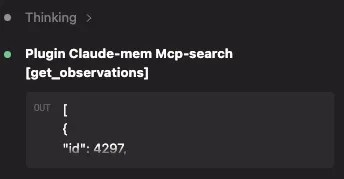
Claude with memory is a completely different tool. If you want to learn more about optimizing your workflow alongside memory, see the Claude Code Commands Cheatsheet for a full reference of available commands.
claude-mem: Good Points and Concerns
Good Points
- Instant session resume — just say “continue from last time”
- Accurate past reference — architecture decisions, bug fixes, and reasoning preserved
- Discovers forgotten context — surfaces relevant memories you didn’t even think to ask about
Concerns
- Requires an MCP server running in the background (stable, but one more process to manage)
- Storage grows over time — long-running projects may accumulate 50-200 MB of memory data
superpowers — The Plugin That Structures Your Development Workflow
The second essential plugin tackles a different problem: Claude’s tendency to jump straight into coding without thinking. Out of the box, Claude will happily start writing code the moment you describe a feature — skipping requirements analysis, design planning, and testing strategy. superpowers forces Claude to follow a structured Brainstorm → Plan → Execute → Verify workflow, and the quality improvement is dramatic.
Created by Jesse Vincent (@obra on GitHub), superpowers is a collection of specialized skills that inject proven software development methodologies directly into Claude’s reasoning process.
Key Features of superpowers
| Skill | What It Does | When It Activates |
|---|---|---|
| Brainstorm | Explores requirements and constraints before any implementation | New feature requests |
| Plan | Creates step-by-step implementation plan with checkpoints | After brainstorm phase |
| Execute | Implements code following the approved plan | After plan approval |
| TDD | Write tests first, then implement to pass them | Test-related tasks |
| Debug | Systematic root cause analysis before applying fixes | Bug reports and errors |
| Refactor | Safe refactoring with behavior preservation checks | Code improvement tasks |
Source: superpowers GitHub repository (April 2026)
How to Install superpowers
superpowers is a pure skill-based plugin — no external dependencies or servers required.
# Step 1: Register the plugin marketplace (skip if already done)
/plugin marketplace add https://github.com/anthropics/claude-code-plugins

# Step 2: Install superpowers
/plugin install superpowers
That’s it. The skills are immediately available and auto-activate based on your task context.
My Experience — Claude Now “Thinks Before It Codes”
The difference before and after superpowers is stark. Previously, when I’d ask Claude to add a new API endpoint, it would immediately start writing route handlers. No questions about authentication requirements, rate limiting, error handling, or data validation. The result? Multiple rounds of “actually, we also need…” revisions that wasted significant time.
What changed most after installing superpowers was the pre-implementation design phase. Claude now thoroughly details what needs to be done before executing — it asks clarifying questions, identifies edge cases I hadn’t considered, and proposes a structured plan before writing a single line of code. The accuracy of the first implementation attempt improved noticeably. The TDD skill is especially powerful — it writes comprehensive test cases first, then implements the code to pass them, catching bugs that would have survived manual testing.
In my experience, superpowers transforms Claude from a junior developer who jumps at every task to a senior developer who thinks critically first. For more tips on maximizing Claude’s output quality, see 15 Claude Code Efficiency Tips.
ui-ux-pro-max — The Plugin That Injects Design Intelligence
The third gap in vanilla Claude Code is UI generation quality. If you’ve ever asked Claude to build a frontend, you know the look: blue-purple gradients, rounded cards, the same Tailwind patterns every time. It’s recognizably “Claude-generated,” and that’s a problem for any production project. ui-ux-pro-max breaks free from this pattern by injecting a massive design knowledge base directly into Claude’s skill set.
Created by nextlevelbuilder on GitHub, this plugin provides 50+ distinct UI styles, 161 color palettes, 57 font pairings, and 99 UX best-practice guidelines. It’s like giving Claude a professional design education overnight.
Key Features of ui-ux-pro-max
1. 161 Product-Type Palettes
Automatically selects appropriate color schemes based on your product type — fintech, healthcare, SaaS, e-commerce, and 157 more.
2. Trend-Aware Style Selection
50+ UI styles including glassmorphism, neobrutalism, Swiss design, and current 2026 trends. No more generic card layouts.
3. Accessibility Built In
WCAG compliance checks, contrast ratio validation, and screen reader considerations are baked into every generated component.
4. 13 Framework Stacks
Supports React, Vue, Svelte, Next.js, and 9 other stacks. Generated UI code matches your project’s tech stack perfectly.
How to Install ui-ux-pro-max
You can install via the plugin marketplace or directly from npm.
# Option A: Via plugin marketplace
/plugin marketplace add https://github.com/anthropics/claude-code-plugins
/plugin install ui-ux-pro-max

# Option B: Via npm (alternative)
npm install -g ui-ux-pro-max-skill
ui-ux-pro-max init
After installation, the design skills activate automatically whenever Claude detects a UI-related task.
My Experience — Breaking Free from “Claude-Looking” UI
Before this plugin, Claude would generate pastel-colored designs with the same look every time. Every prototype had the same blue-purple gradient hero section, white card grid with rounded corners, and identical sans-serif typography. Clients could tell it was AI-generated within seconds.
After installing ui-ux-pro-max, the design quality noticeably improved. When I asked Claude to build a dashboard, it no longer defaulted to the same cookie-cutter layout. Instead, it selected contextually appropriate styles, palettes, and typography based on the product type. The before/after comparison below shows the difference clearly:
Before (No Plugin)

After (ui-ux-pro-max)

The design system persistence is another huge win. Once Claude establishes a visual language for your project, it maintains consistency across every new component. Professional-quality UI without a dedicated designer — that’s the promise, and it delivers. For security considerations when running plugins, review the Claude Code Security Settings Guide.
The Combined Power of These 3 Recommended Claude Plugins for Developers
Each plugin is valuable on its own, but the real magic happens when all three work together. I use all three in every project — from solo side projects to team-based production work. The baseline accuracy of work improves across the board.
Here’s how they complement each other: superpowers structures your workflow into brainstorm-plan-execute phases. claude-mem remembers every decision made during those phases across sessions. And ui-ux-pro-max ensures that when execution reaches the frontend, the output is production-quality from the first attempt.
Synergy Example — Full-Stack Feature Development
Day 1: You ask Claude to build a user dashboard. superpowers triggers a brainstorm phase, exploring requirements and edge cases. claude-mem records every decision.
Day 2: You resume work. claude-mem injects yesterday’s context automatically. superpowers moves to the plan phase, creating an implementation roadmap. You approve it.
Day 3: Execution begins. ui-ux-pro-max auto-selects a SaaS dashboard style with appropriate data visualization patterns. The result is a polished, well-architected feature — built with full context continuity.
Result: What would typically take 5+ sessions of re-explaining and reworking takes 3 focused sessions with consistent quality.
If you’re considering upgrading your Claude subscription to handle larger projects with these plugins, read my analysis on whether Claude Max Plan is worth it — the increased context window pairs exceptionally well with claude-mem’s memory injection.
Beyond plugins, Claude Hooks are another key way to extend Claude Code. They enable automatic processing on file changes and team workflow enforcement — a different approach from plugins.
Caution — Things to Keep in Mind
Things to watch out for
- claude-mem requires an MCP server running in the background. You need to start the server with
uv run claude-mem servebefore each session. This is a minor concern — operation is stable and I haven’t experienced crashes — but it’s one extra process to manage. - Memory storage grows over time. Long-running projects can accumulate 50-200 MB of memory data. Periodically review stored memories via the web viewer at
localhost:37777to clean up what you no longer need. - Plugin updates may occasionally require re-installation. Major version bumps can change skill file structure. Run
/plugin updateperiodically and check plugin changelogs for breaking changes. - Skills inject into the system prompt, consuming tokens. The overhead is minimal for superpowers and ui-ux-pro-max, and claude-mem’s 3-layer search actually saves tokens compared to manual context injection. Still, be aware of this on smaller plans.
Frequently Asked Questions (FAQ)
Conclusion — Transform Your Claude Code Experience Today
3 Plugins. 3 Problems Solved. Zero Risk.
claude-mem for memory, superpowers for methodology, ui-ux-pro-max for design — these recommended Claude plugins for developers cover every major gap in the vanilla Claude Code experience.
After months of daily use, my verdict is clear: these three plugins are non-negotiable for any developer serious about using Claude Code productively. They address the exact pain points that cause the most friction — forgetting context, unstructured development, and generic UI output.
The best part? Installation is completely reversible. You can try all three in under five minutes, and if they don’t improve your workflow, just uninstall them. But in my experience, once you’ve worked with a Claude that remembers, thinks before it codes, and generates professional UI — you won’t go back.
Start with claude-mem if you only have time for one. Add superpowers next. Then round it out with ui-ux-pro-max. Your future self will thank you.


![Harden Claude Code CLI: 9 Proven Steps for Business Use [2026]](https://i0.wp.com/devgent.org/wp-content/uploads/2026/03/claude-code-security-eyecatch.webp?fit=300%2C167&ssl=1)


Author
krona23
Over 20 years in the IT industry, serving as Division Head and CTO at multiple companies running large-scale web services in Japan. Experienced across Windows, iOS, Android, and web development. Currently focused on AI-native transformation. At DevGENT, sharing practical guides on AI code editors, automation tools, and LLMs in three languages.


🔥 Most Popular
- Obsidian Visualization Tools: Graph, Canvas, Excalidraw (2026)
- LM Studio Bionic Preview: Local Open-Model Agent for Docs and Code
- Claude Desktop Won't Install? Windows & Mac Fixes That Worked (2026)
- Claude Code CLI vs Web vs Desktop: A Daily User's Guide (2026)
- What Is VS Code? Features, Extensions & Copilot — Complete Guide (2026)



Leave a Reply