
Pricing rechecked: August 17, 2026
📑Table of Contents
- What Are AI Automation Tools?
- 5 Business Tasks You Can Automate with AI Today
- How to Choose the Right AI Automation Tool — 5 Essential Criteria
- AI Automation Tools Compared — 2026 Ultimate Overview
- n8n — The Developer’s Proven AI Workflow Engine
- Dify — Build AI Apps Without Writing Code
- Zapier — The Easiest Way to Start Automating
- Make — Best Value Visual Automation
- Best AI Automation Tool for Every Business Scenario
- Frequently Asked Questions (FAQ)
- Related articles
- Summary
Current reference prices are n8n Cloud Starter €20/month billed annually for 2,500 executions and Pro €50 for 10,000; Dify Cloud Sandbox is free with 200 message credits, Professional $59/month, and Team $159/month; Zapier Free includes 100 tasks/month and Professional starts at $19.99/month billed annually; Make offers Free with 1,000 credits/month, Core $12, Pro $21, and Teams $38 for 10,000 credits/month. Billing cadence, region, and AI consumption can change the total, so verify each official pricing page before subscribing.
📅 Last updated: August 17, 2026
“I’m still sorting emails manually every morning.” “Customer tickets are eating up half my day.” If these sound familiar, AI automation tools can solve these problems — and I’ve tested the major ones to find out which actually delivers.
I used to rely on Zapier and IFTTT for everything. But as my workflows grew more complex, Zapier’s per-task billing started adding up — roughly $65/month for what didn’t feel like heavy usage. The pricing tiers kept getting more confusing, too. That’s when I switched to n8n, which is now my primary automation platform.
That said, n8n demands a developer mindset. When I rolled it out to non-engineering teams, many members struggled to build workflows on their own and eventually asked to move to Dify. The right tool really depends on your team’s technical skill level.
In this guide, I compare four essential AI automation tools — n8n, Dify, Zapier, and Make — across pricing, features, and ideal user profiles. I’ve hands-on tested every tool covered here. Whether you’re a developer or a business user, you’ll find a clear recommendation for your use case.
For a broader overview of AI tools, check out “What Is an AI Agent? Essential Tools Guide.” If you’re a developer looking for AI code editors, see “AI Code Editor Comparison — Developer’s Complete Guide.”
What Are AI Automation Tools?
AI automation tools take traditional workflow automation — connecting apps, moving data, triggering actions — and add AI-powered intelligence (LLMs) for classification, generation, and decision-making. Unlike conventional RPA, these tools understand context and handle nuanced tasks.
Real-World AI Automation Examples
- Email triage → AI classifies content → Sends summary to Slack → Logs to spreadsheet
- Customer support → RAG searches internal knowledge base → AI generates draft response
- Social media → AI analyzes trends → Generates draft posts → Auto-publishes after approval
These can be built with no-code or low-code, so you don’t need to be an engineer to get started.
One key distinction: AI automation tools fall into two fundamentally different categories.
Workflow Automation
Automates data flow and task execution between apps. Think “email received → Slack notification → spreadsheet log” pipelines.
Tools: n8n, Zapier, Make
AI App Building
Builds AI-native applications like RAG chatbots and AI agents. The focus is on AI reasoning and retrieval rather than app-to-app integration.
Tool: Dify
This article covers both approaches. If your problem is “I need to connect my apps and automate hand-offs,” look at n8n, Zapier, or Make. If it’s “I need to build an AI chatbot using internal knowledge,” Dify is your starting point.
5 Business Tasks You Can Automate with AI Today
① Customer Support
Ticket received → AI classifies the issue → RAG searches internal FAQ → Generates draft reply → Logs to spreadsheet
② Marketing
Lead capture form → AI scoring → Personalized follow-up email → CRM update
③ Back Office
Invoice email received → AI extracts line items → Auto-populates expense system → Routes to approval workflow
④ Sales
Meeting ends → AI summarizes notes → CRM auto-updated → Team notified on Slack
⑤ Content Creation
Social trend analysis → AI generates draft content → Publishes after approval → Engagement tracking
How to Choose the Right AI Automation Tool — 5 Essential Criteria
With so many AI automation tools on the market, these five criteria will help you narrow down the right fit.
| Criterion | What to Check |
|---|---|
| ① Ease of Use | No-code? Code-extensible? Can your entire team use it? |
| ② Integration Breadth | Does it connect to your SaaS stack (Gmail, Slack, Notion, etc.)? |
| ③ AI Capabilities | LLM integration, RAG support, AI agent building — how deep does it go? |
| ④ Cost Structure | Billing unit? Free tier? Self-hostable to cut costs? |
| ⑤ Security | SOC 2 compliant? SSO / RBAC? Can you keep data on-premises? |
The biggest reasons I chose n8n were criteria ④ and ③. Self-hosting is free, which makes cost forecasting straightforward. And the native LangChain integration lets me build AI agents with real flexibility. On the flip side, criterion ① — ease of use — is honestly a weak point. It’s not a tool I’d hand to a non-technical team and expect them to be productive.
AI Automation Tools Compared — 2026 Ultimate Overview
| Feature | n8n | Dify | Zapier | Make |
|---|---|---|---|---|
| Best For | Developers who want code control | Building AI apps fast | Non-engineers who want the easiest start | Cost-conscious power users |
| Category | Workflow automation | AI app building | Workflow automation | Workflow automation |
| Integrations | 400+ nodes | API-centric (100+ LLMs) | 8,000+ apps | 3,000+ (growing fast) |
| Self-Hosting | Yes (free) | Yes (Apache 2.0) | No | No |
| AI Features | LangChain nodes, AI agents | RAG, agents, prompt IDE | Zapier Agents, AI Copilot | OpenAI / Anthropic modules |
| Ease of Use | Visual + code | Drag & drop | No-code (easiest) | Visual |
| Starting Price | €20/mo billed annually or free | $59/mo billed annually or free | $19.99/mo+ | $12/mo+ |
| Billing Unit | Workflow executions | Message credits | Tasks | Credits (formerly operations) |
| Security | SOC 2, RBAC, audit logs (Business) | SSO, VPC deploy (Enterprise) | SOC 2 Type II, SSO, SCIM | SOC 2, GDPR compliant |
Source: n8n, Dify, Zapier, Make official sites (as of June 2026)
Understanding the Billing Unit Differences
Example: Running a 5-step workflow once
- n8n: 1 execution (counts as 1 regardless of node count)
- Zapier: 5 tasks (each successful action counts separately)
- Make: 5 credits (each step counts separately; “operations” was renamed to “credits” in 2025)
- Dify: 1 message (counted per AI conversation turn) *Note: Dify is an AI app builder, not a workflow automation tool — this comparison is for reference only
This billing difference is one of the main reasons I switched from Zapier to n8n. The more complex my workflows got, the faster Zapier’s costs ballooned — I was paying around $65/month without particularly heavy usage. After moving to self-hosted n8n, my only cost is the server itself.
n8n — The Developer’s Proven AI Workflow Engine
🎯 Best for: Engineers who want code control & self-hosting to minimize costs

This is the AI automation tool I use every day. I originally relied on Zapier and IFTTT, but as Zapier’s pricing tiers multiplied and per-task billing accumulated to roughly $65/month, I went looking for something with more flexibility and better cost predictability. That search led me to n8n.
Key Features of n8n
🔧 Built for Developers — Code Control + AI Agents
- Open source (fair-code license), completely free when self-hosted
- 400+ nodes (integrations), visual editor + JavaScript / Python customization
- Native LangChain integration: Build AI agent nodes, memory management, and tool execution visually
- Supported LLMs: OpenAI, Anthropic, Gemini, Ollama (local models), and more
- RAG workflows: Vector store nodes for Pinecone, Qdrant, Supabase
- Webhook triggers, cron scheduling, error handling
- Business plan and above: SOC 2 compliant, SSO / LDAP, RBAC, audit logs
Workflows I’ve Actually Built with n8n
My first workflow was straightforward: pull Trello cards with approaching deadlines and post them to Slack. It fetches cards from Trello, filters for upcoming due dates, and sends notifications to a Slack channel. Simple, but it eliminated missed deadlines almost overnight.
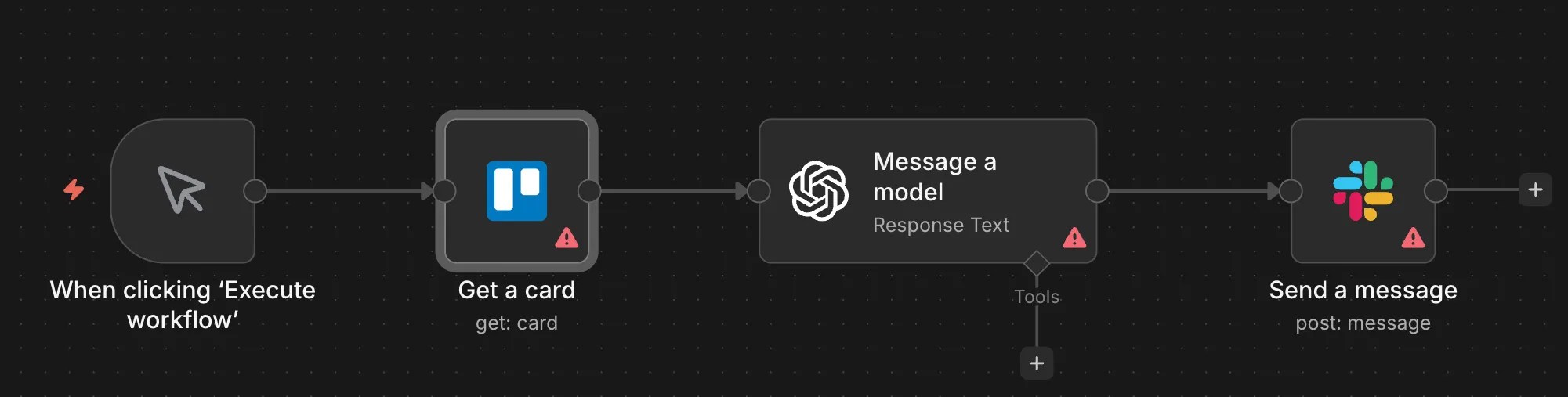
I later added an AI classification step in between. The workflow sends Trello card content to an LLM, which classifies priority level — only truly urgent items get pushed to Slack. The screenshot above shows exactly this pipeline: “Get a card → Message a model → Send a message.”
Another workflow I rely on daily is automated research aggregation. I needed to monitor a specific industry vertical, but manually checking sources every day wasn’t sustainable. I built an n8n workflow that collects information from multiple sources, has AI classify and summarize the findings, and delivers a daily digest to Slack.
The Honest Downsides of n8n
n8n is powerful, but it has real pain points in production.
Parallel workflow execution can be unreliable. Configuring parallel execution on self-hosted n8n isn’t particularly difficult, but the workflows don’t always behave as expected. I still haven’t fully resolved this issue in my own environment.
Debugging large-data workflows is painful. When I try to view execution history for workflows processing large datasets, the server sometimes becomes unresponsive under the load. If you’re running data-heavy workflows in production, you’ll need generous server specs or shorter log retention periods.
Non-engineers find it intimidating. When I introduced n8n to a non-engineering department, a significant number of team members struggled with it. They eventually requested a switch to Dify. n8n requires a programming mindset, so if your entire team needs to use it, Zapier or Make may be more realistic choices.
AI Nodes and Prompt Engineering — What I’ve Learned
When I first started using n8n’s LangChain-integrated AI nodes, LLM capabilities were still limited. I had to carefully engineer every prompt and iterate using each provider’s prompt testing tools to get acceptable accuracy.
Today’s models are much more forgiving — they handle rough prompts surprisingly well. That said, if you need precise, consistent outputs, prompt engineering still matters. The bar has just moved from “essential to function” to “essential to optimize.”
n8n — Pros and Cons
👍 Pros
- Self-hosted = free, minimal ongoing cost
- Per-execution billing keeps costs flat even for complex workflows
- LangChain integration enables flexible AI agent building
👎 Cons
- Steep learning curve for non-engineers
- Parallel execution doesn’t always work as expected
- Server slows down when debugging large-data workflows
n8n Pricing Plans
| Plan | Monthly Price | Executions/Month | Notes |
|---|---|---|---|
| Community (Self-hosted) | Free | Unlimited | Server costs separate (€5–20/mo) |
| Starter (Cloud) | €24/mo | 2,500 | 14-day free trial |
| Pro (Cloud) | €60/mo | 10,000 | |
| Business | €800/mo | 40,000 | SSO, LDAP, audit logs |
Source: n8n official site (as of June 2026)
Key point: 1 execution = 1 complete workflow run (regardless of how many nodes it contains). Unlike Zapier, complex workflows don’t inflate your bill. Annual billing saves 17%. There’s also a Startup Program offering 50% off the Business plan for companies with 20 or fewer employees.
Dify — Build AI Apps Without Writing Code
🎯 Best for: Anyone who wants to build AI chatbots and agents quickly
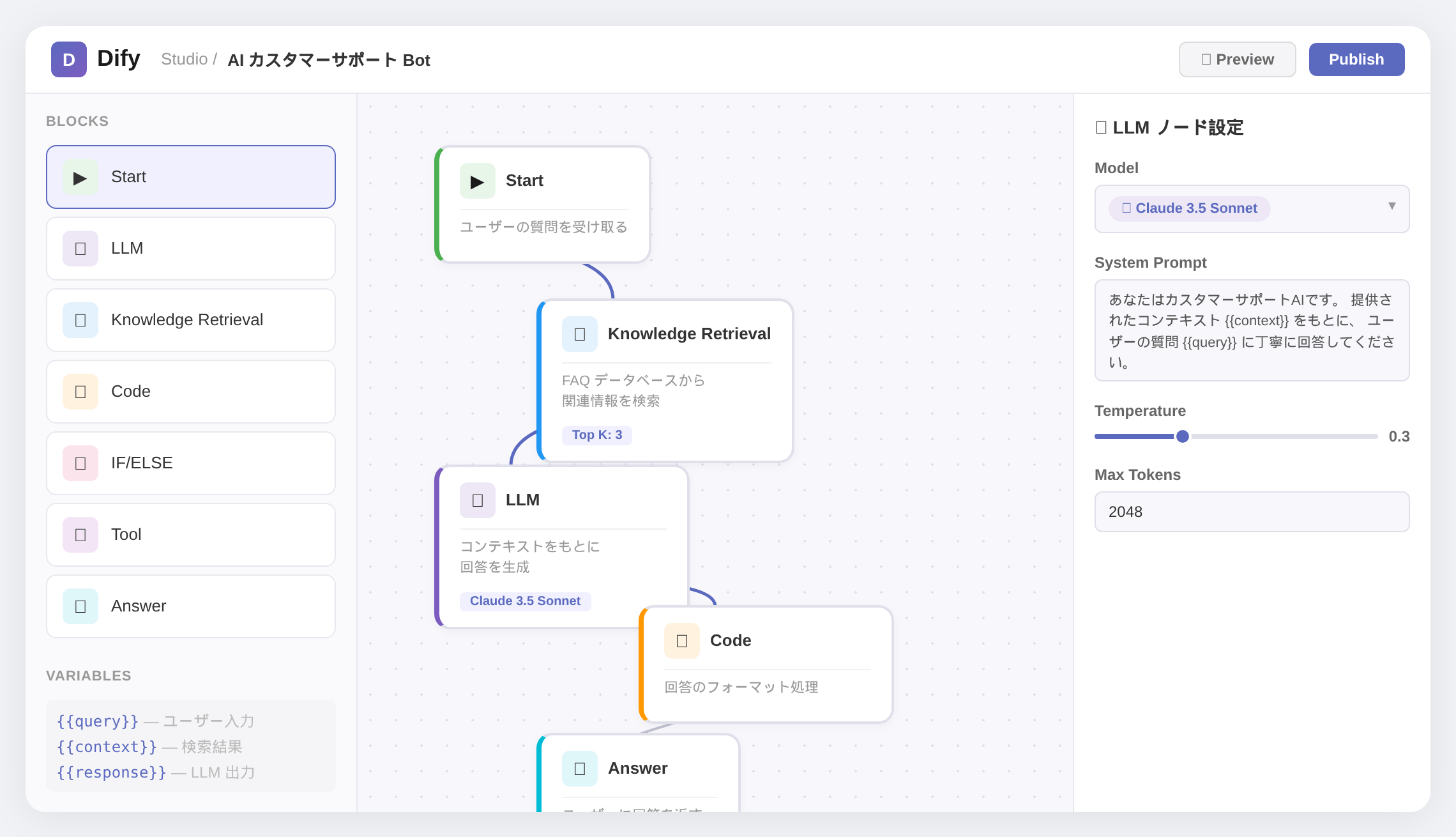
Dify is the only tool in this comparison that focuses on AI application development rather than workflow automation. It lets you build RAG chatbots and AI agents using a drag-and-drop interface.
I built a QA chatbot for internal use with Dify. The standard features weren’t quite enough — I ended up needing add-ons to get everything working — but it delivered what I needed. As I mentioned, when my non-engineering colleagues struggled with n8n, Dify’s intuitive interface was the main reason they wanted to switch.
Key Features of Dify
🤖 AI-First Platform — RAG & Agents, No Code Required
- AI application development platform (purpose-built for AI apps, not general workflow automation)
- Drag-and-drop builder for RAG pipelines, AI agents, and chatbots
- 100+ LLM providers supported (OpenAI, Anthropic, local models / Ollama / vLLM)
- Knowledge base management (upload docs → chunking → embedding → retrieval)
- Prompt IDE for testing and iterating
- API-first design: every app becomes an API endpoint
- Apache 2.0 license, self-hostable
👍 Pros
- RAG chatbots can be built in hours, not weeks
- Non-engineers can use the drag-and-drop interface
👎 Cons
- Standard features sometimes fall short — add-ons required
- Weak on external SaaS integrations (designed to pair with n8n or Zapier)
Dify Pricing Plans
| Plan | Monthly Price | Messages/Month | Notes |
|---|---|---|---|
| Sandbox (Cloud) | Free | 200 | Trial use, 1 member |
| Professional | $59/mo | 5,000 | 3 members, 50 apps |
| Team | $159/mo | 10,000 | 50 members, 200 apps, 20GB |
| Enterprise | Contact sales | Custom | SSO, VPC deploy |
| Self-hosted | Free | Unlimited | Deploy via Docker Compose |
Source: Dify official site (as of June 2026)
Annual billing saves 2 months. There’s also a free program for students and educators. Like n8n, self-hosting removes all usage limits.
Zapier — The Easiest Way to Start Automating
🎯 Best for: Non-engineers who want to automate right now, zero code required

Zapier was my go-to automation tool before I switched to n8n. The sheer ease of use and massive app library are unmatched — for non-technical users, it’s still the best choice, no question. But the per-task billing can sneak up on you. I wasn’t running particularly high-volume automations, yet I was paying around $65/month.
Zapier Features and Pricing
⚡ Simplest Setup — 8,000+ App Integrations
- 8,000+ app integrations (largest ecosystem in the industry)
- No-code and the easiest to use — non-engineers can start immediately
- Zapier Agents: AI agents that trigger Zaps and interact with connected apps
- AI Copilot: Build workflows using natural language
- Tables, Interfaces, Canvas, and other platform features
- Filters, Formatters, and Paths (branching logic) don’t count as tasks
- SOC 2 Type II compliant, SSO / SCIM support (Enterprise)
👍 Pros
- 8,000+ integrations — virtually every app is supported
- No-code interface is genuinely effortless
- AI Copilot lets you create workflows from plain English
👎 Cons
- Per-task billing adds up faster than you’d expect
- No self-hosting option (data stays on Zapier’s cloud)
| Plan | Monthly Price | Tasks/Month | Notes |
|---|---|---|---|
| Free | $0 | 100 | Single-step only |
| Professional | $19.99/mo+ | 750 | Multi-step, unlimited Zaps |
| Team | $103.50/mo | 2,000 | Shared workspace |
| Enterprise | Contact sales | Custom | SSO, SCIM, dedicated rep |
Source: Zapier official site (as of June 2026)
⚠️ Watch Out for Task Billing
In Zapier, 1 task = 1 successful action (sending an email, adding a row, etc.). A 5-step workflow running once consumes 5 tasks. I wasn’t running particularly heavy automations, but my bill still hit around $65/month.
Make — Best Value Visual Automation
🎯 Best for: Users who want Zapier-level automation at a fraction of the cost
I’ll be upfront: I haven’t used Make extensively in production. I tested it for this comparison. That said, it delivers roughly the same capabilities as Zapier at about one-third the price, which is hard to ignore. If you’re frustrated with Zapier’s costs but don’t need n8n’s code-level control, Make is worth a serious look.
- Formerly Integromat, 3,000+ app integrations (growing rapidly)
- More visual than Zapier, better for complex branching, loops, and data transformations
- Core plan starts at $12/mo+ for 10,000 credits ($9/mo with annual billing)
- In 2025, the billing unit was renamed from “operations” to “credits” (most actions still cost 1 credit)
- AI modules (OpenAI, Anthropic integration), built-in data store
- SOC 2 compliant, GDPR ready. No self-hosting option
| Plan | Monthly | Credits/mo | Notes |
|---|---|---|---|
| Free | $0 | 1,000 | For testing |
| Core | $12/mo+ | 10,000 | Annual: $9/mo |
| Pro | $18.82/mo | 10,000 | Custom vars, priority |
| Teams | $34.12/mo | 10,000 | Team management |
Source: Make official site (as of June 2026)
One thing to watch: polling intervals (every 15 minutes by default) multiplied by step count can burn through credits faster than expected. That said, Make offers similar automation capabilities to Zapier at roughly one-third the price — if Zapier’s costs are frustrating you, Make is the most straightforward alternative.
Best AI Automation Tool for Every Business Scenario
Customer Support Automation
→ Dify + n8n
Build a RAG chatbot with Dify, then connect ticket management and notifications through n8n. Automates everything from FAQ retrieval to response generation and logging.
Sales & Marketing Automation
→ Zapier / Make
Lead management, follow-up emails, CRM updates — these SaaS-heavy workflows are where Zapier and Make excel. Non-engineers can start immediately. Choose Make if cost is a priority.
Back Office Automation (Finance, HR)
→ n8n / Make
Invoice processing, timesheet aggregation, and other repetitive tasks at great cost efficiency. n8n adds free self-hosting plus AI-powered classification.
Internal Knowledge Base & AI Search
→ Dify
Upload your documents and you have a RAG-powered search chatbot. No programming required — turn your company’s knowledge into an AI-accessible resource.
Enterprise-Wide Automation (IT / DX Teams)
→ n8n
Free self-hosting, AI agents, and 400+ integrations make n8n an ideal foundation for company-wide automation infrastructure. Full code control for any customization.
Frequently Asked Questions (FAQ)
Do I need programming skills to use AI automation tools?
Zapier, Make, and Dify are no-code platforms — you can get started without any programming knowledge. n8n also has a visual editor for basic workflows, but its real power comes from JavaScript and Python customization, making it better suited for intermediate to advanced users. When I rolled out n8n to a non-engineering department, many team members found it difficult to use on their own.
Which tool is best for complete beginners?
Zapier is the easiest to start with. Its 8,000+ app integrations and no-code interface mean non-engineers can build automations immediately. Just be aware that costs can climb as your task count grows — once you’re comfortable, consider migrating to Make for better pricing.
Which tools support self-hosting?
n8n (fair-code license) and Dify (Apache 2.0) can both be self-hosted. You only pay for your own server costs and get unlimited usage with full data control. Zapier and Make are cloud-only and don’t offer self-hosting.
What’s the biggest difference between n8n and Zapier?
The billing model. n8n counts by “workflow executions” — one run of a workflow is one count, regardless of complexity. Zapier counts each “action” separately, so a 5-step workflow costs 5 tasks per run. I was paying around $65/month on Zapier; after switching to self-hosted n8n, my only cost is the server itself.
How is Dify different from the other three?
Dify is an “AI application building platform” focused specifically on RAG chatbots and AI agents. n8n, Zapier, and Make are workflow automation tools designed to connect apps and automate tasks. If you want to build AI apps, choose Dify. If you want to automate business processes across multiple SaaS tools, look at the other three.
Can I get by with just the free plans?
n8n’s self-hosted version is free with unlimited usage (server costs run about €5–20/month). Zapier’s free plan is limited to 100 tasks/month with single-step workflows only — not practical for real work. Make offers 1,000 credits/month, workable for small-scale use. Dify’s 200 messages/month is trial-level only.
Why do you primarily use n8n?
Three reasons: self-hosting is free, per-execution billing makes costs predictable even for complex workflows, and the native LangChain integration lets me build AI agents with real flexibility. I switched from Zapier and IFTTT, and the cost savings alone justified it — but being able to embed AI processing naturally into my workflows was the real game-changer. That said, for non-technical teams, Zapier or Make will be much easier to adopt.
Are free open-source tools enough for production use?
n8n and Dify are free to self-host, but you’re responsible for server setup, maintenance, and security. If your team includes IT staff, this works well. For non-technical teams, the managed cloud versions (paid) are the safer choice. Zapier and Make are cloud-only, which means zero setup overhead.
What security features are needed for enterprise deployment?
When handling business data, verify SOC 2 compliance, SSO / SAML, RBAC (role-based access control), and audit logging. Zapier holds SOC 2 Type II certification with SSO / SCIM on Enterprise plans. n8n offers SOC 2, LDAP, and RBAC on Business plans and above. Make is SOC 2 and GDPR compliant. Dify’s Enterprise plan includes SSO and VPC deployment. If you self-host (n8n or Dify), infrastructure security is your responsibility.
What’s the difference between RPA (like UiPath) and AI automation tools?
RPA (Robotic Process Automation) replicates human actions — screen clicks, keystrokes, form fills — and excels at automating legacy or GUI-based applications that lack APIs. AI automation tools like n8n, Zapier, and Make connect apps via APIs and embed AI models for judgment, content generation, and classification. Use AI automation for SaaS integrations and data-driven workflows; use RPA for desktop and legacy apps without modern APIs. Many teams combine both approaches for full coverage.


Author
krona23
Over 20 years in the IT industry, serving as Division Head and CTO at multiple companies running large-scale web services in Japan. Experienced across Windows, iOS, Android, and web development. Currently focused on AI-native transformation. At DevGENT, sharing practical guides on AI code editors, automation tools, and LLMs in three languages.
Summary
The key to success is matching the tool to your team’s skills and business needs
n8n — Developer-first, strongest AI agent capabilities, free self-hosting
Dify — AI app building specialist, no-code RAG and agents
Zapier — Most integrations, easiest to use, but higher cost
Make — Zapier alternative with better pricing, visual and flexible
After testing Zapier, IFTTT, and others, I now run my automation workflows on n8n. But if you’re not a developer, I’d recommend starting with Dify, Zapier, or Make — no-code tools that let you automate immediately. Try each tool’s free tier first to see which fits your workflow.
👉 AI Code Editor Comparison — Developer’s Complete Guide
👉 What Is an AI Agent? Essential Tools for Professionals
👉 AI Model Comparison — GPT-5.4 vs Claude Opus 4.6 vs Gemini 3.1
👉 MCP vs CLI — AI Agent External Tool Integration Compared
📚 Related Reading


![Devin Desktop (formerly Windsurf) vs Zed: AI Features, Performance & Pricing [2026]](https://i0.wp.com/devgent.org/wp-content/uploads/2026/03/windsurf-vs-zed-eyecatch.webp?fit=300%2C167&ssl=1)
🔥 Most Popular
- Claude Desktop Won't Install? Windows & Mac Fixes That Worked (2026)
- Obsidian Visualization Tools: Graph, Canvas, Excalidraw (2026)
- What Is VS Code? Features, Extensions & Copilot — Complete Guide (2026)
- LM Studio Bionic Preview: Local Open-Model Agent for Docs and Code
- Claude Code CLI vs Web vs Desktop: A Daily User's Guide (2026)



Leave a Reply