
📅 Last updated: June 2026
📑Table of Contents
- What Is an AI Browser? — How It Differs from Traditional Browsers in This AI Browser Comparison (2026)
- My AI Browser Journey — From Chrome to Atlas Over 2 Years
- ChatGPT Atlas — The Essential AI Browser for Agent Power Users in This AI Browser Comparison
- Perplexity Comet — The Ultimate Search-First AI Browser for Deep Research
- Dia — The Workflow Automation AI Browser for Privacy-Conscious Power Users
- Complete AI Browser Comparison — Features, Pricing & Platform Support (2026)
- AI Browser Security and Privacy — Essential Risks You Should Know
- Which AI Browser Is Right for You? — A Practical AI Browser Comparison Guide (2026)
- Frequently Asked Questions (FAQ)
- Conclusion
Over the past two years, I’ve migrated through Chrome, Arc, Dia, Comet, and finally ChatGPT Atlas — testing four AI browsers back-to-back. After all that, my AI browser comparison comes down to one conclusion: the best approach is using different browsers for different tasks.
Right now, I use Atlas as my primary browser and Comet as a dedicated research sub-browser. Both run on ChatGPT Plus and Perplexity Pro ($20/month each), and I’ve never hit a usage cap on either plan. Since I use the underlying AI models for work beyond just browsing, the subscriptions pay for themselves many times over.
Let’s start with a quick overview of all three products.
| Category | ChatGPT Atlas | Perplexity Comet | Dia |
|---|---|---|---|
| Developer | OpenAI | Perplexity AI | The Browser Company (Atlassian) |
| Pricing | Free / Plus $20/mo | Free / Pro $20/mo | Free / Pro $20/mo |
| Key Strength | Agent autonomous operation | Search & research | Workflow automation & privacy |
| macOS | ✅ GA | ✅ GA | ✅ GA |
| Windows | Coming soon | ✅ GA | In development |
| Mobile | Not available | ✅ iOS/Android | In development |
| Vertical Tabs | ✅ Supported | ❌ Not supported | △ Limited |
| Privacy | Low (cloud processing) | Medium (data collection) | High (local-first) |
| Other Options Worth Considering | |||
| Microsoft Edge Copilot | A strong contender for Windows users. Copilot integration is steadily improving, and its AI features exceed Chrome’s. Generous free tier | ||
| Brave Leo | Ideal for privacy-first users who want AI browsing. Local processing, no sign-up required. Solid free features | ||
Source: ChatGPT Atlas official, Perplexity AI official, The Browser Company official (as of June 2026)
What Is an AI Browser? — How It Differs from Traditional Browsers in This AI Browser Comparison (2026)
An AI browser is a web browser that integrates generative AI as a core feature rather than an add-on. While Chrome and Firefox are essentially tools for opening URLs and rendering pages, AI browsers are designed to understand, interact with, and anticipate what you need from the web.
The difference goes well beyond “ChatGPT in a sidebar.” AI browsers can scroll pages, fill out forms, and cross-reference multiple tabs autonomously on your behalf. That ability to delegate actual browser actions to AI is what convinced me to leave Chrome behind for good.
AI Browser vs. Google Search — How Do You Use Both?
A common question: “If I switch to an AI browser, do I still need Google Search?” After using AI browsers daily for over a year, my answer is “use both.” Each has distinct strengths.
| Use Case | Best Tool | Why |
|---|---|---|
| Quick factual questions | Atlas (ChatGPT) | Type your question in the address bar and get an instant answer |
| In-depth research with citations | Comet (Perplexity) | Synthesizes multiple sources with inline citations |
| Verifying primary sources | Google Search | Direct access to official pages and original sources is more reliable |
| Navigating to login pages / specific sites | Google Search | Navigational queries are still more accurate on Google |
| Summarizing or analyzing long articles | Atlas / Comet | Only AI browsers can “read” the page and respond contextually |
In my experience, switching to AI browsers never made me want to “go back” to Google. It’s not an either-or choice — the two coexist naturally, and I use each for what it’s best at without even thinking about it.
The 2026 AI Browser Landscape
Starting in late 2025, multiple AI browsers moved to general availability (GA), and 2026 has become the year of mainstream adoption. OpenAI’s Atlas, Perplexity’s Comet, and The Browser Company’s Dia have emerged as the three major contenders.
All three are Chromium-based, which means Chrome extensions work out of the box — mostly. In practice, I’ve hit extension compatibility issues on more than one occasion (more on that later). The real differentiators are how each browser leverages AI and how it handles your privacy.
If you’re also evaluating AI coding tools, my AI editor comparison (2026) covers Cursor, Windsurf, and Zed with the same hands-on approach.
My AI Browser Journey — From Chrome to Atlas Over 2 Years
Before diving into individual reviews, here’s the timeline of how I ended up testing four browsers in succession. Understanding why I switched each time should give you a realistic sense of what to expect from each product.
📍 My Browser Migration Timeline
- Chrome (until 2024) — Tried Arc after seeing it recommended everywhere online. Its tab management was genuinely superior, so I switched
- Arc (1 year+) — The Browser Company announced it would stop developing new features for Arc and pivot to Dia, an AI-native successor. So I followed them
- Dia (about 1 month) — Very little of what made Arc great carried over. Extensions didn’t work initially. Perplexity launched the Comet closed beta right around this time, so I jumped ship
- Comet (3 months+) — Excellent search quality, but the lack of vertical tabs was a dealbreaker for my tab-heavy workflow. When Atlas launched with Arc-style tab management and doubled as a ChatGPT desktop app, I made the switch
- Atlas (6 months+ and counting) — Settled in as my primary browser. I still use Comet as a dedicated research sub-browser
The biggest lesson from this journey: choosing an AI browser isn’t just about AI features. Tab management, extension compatibility, and everyday usability as a browser — these fundamentals determine whether you’ll actually stick with it long-term.
ChatGPT Atlas — The Essential AI Browser for Agent Power Users in This AI Browser Comparison
Atlas’s standout strength is its autonomous agent capability built on ChatGPT. It doesn’t just summarize pages — it can follow instructions like “fill out this form” or “open multiple tabs and compare this information” and actually execute them.
I made ChatGPT Atlas my primary browser for two reasons. First, it has vertical tabs similar to Arc’s layout, so the transition from Arc felt seamless. Second, it effectively replaces the ChatGPT desktop app. Being able to switch between Google Search and ChatGPT queries within the same browser is a major convenience for anyone who uses ChatGPT daily.
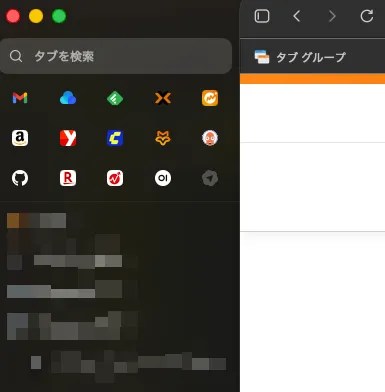
Here are Atlas’s key features:
- Agent Mode: Autonomously handles page interactions, form filling, and information gathering (the browser UI glows blue when active)
- Sidebar Assistant: Instantly summarize or ask questions about the page you’re viewing
- Browser Memory: Retains your browsing context for 30 days to improve response accuracy over time
- Cursor Chat: Select text on any page and ask questions about it on the spot
- Vertical Tabs: Manage large numbers of tabs in a sidebar (familiar for Arc users)
- Multi-Profile: Separate work and personal environments into distinct profiles
The feature I use most is the sidebar assistant for page summaries. I’ll open a long English technical article or documentation page and just say “summarize this.” It pulls out the key points instantly. I’ve also used Agent Mode frequently — for example, when I couldn’t figure out how to configure a service, I told the agent to “look up how to set this up” and it searched, navigated, and walked me through the steps autonomously.
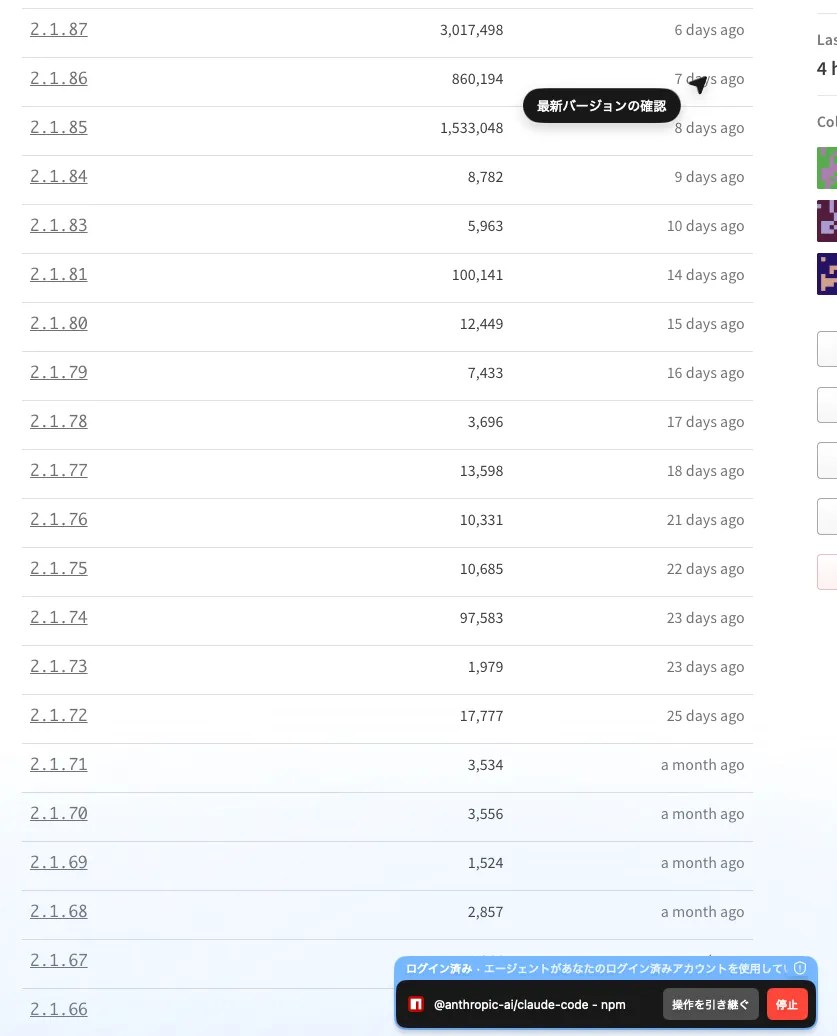
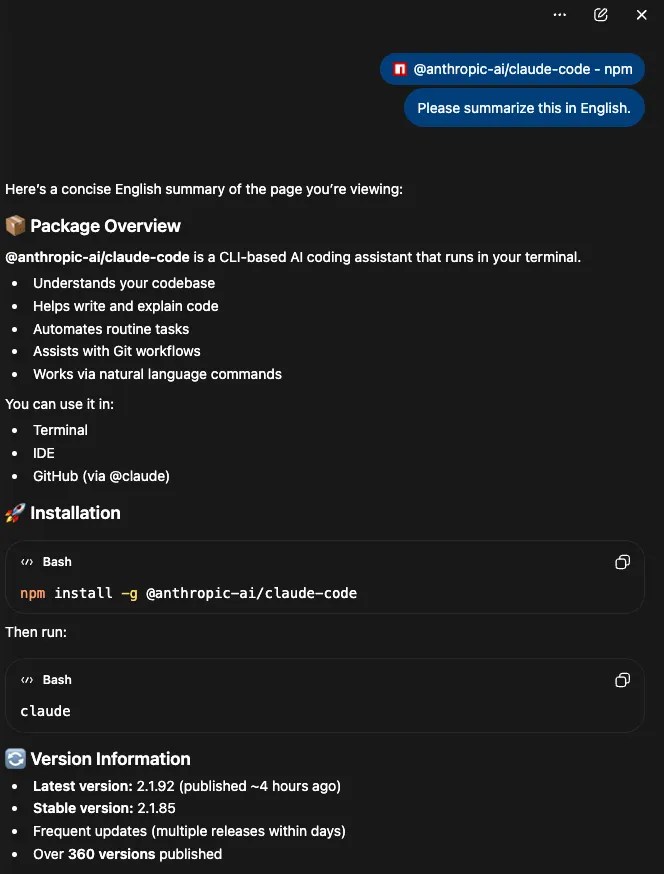
This kind of autonomous task execution is powered by what’s known as an “AI agent.” If you’re new to the concept, my guide to AI agents and essential tools explains how these systems work and where they’re headed.
Atlas Pros and Cons
👍 Strengths
- Seamless ChatGPT integration — search and AI queries all within the browser
- Agent Mode autonomous operations are impressively accurate
- Polished UI with vertical tabs, themes, and profile separation
👎 Drawbacks
- OAuth login frequently fails on apps that require authentication
- Some Chrome extensions that work fine in Chrome simply don’t load
- Various minor bugs — not yet at Chrome or Edge stability levels
- macOS only (Windows coming soon), no mobile app
- Browsing data is processed in the cloud
After using Atlas for over six months, my honest assessment is that the AI features are excellent but the browser’s core maturity still has room to grow. The OAuth authentication issues in particular come up regularly — I sometimes have to fall back to Chrome for services that require login. Even so, Atlas has held its position as my default browser. The ChatGPT integration advantage is simply that significant.
Perplexity Comet — The Ultimate Search-First AI Browser for Deep Research
Comet’s core advantage is its browser-level integration of the Perplexity AI search engine, delivering unmatched research efficiency. Standard queries are handled by Perplexity’s answer engine, while Deep Research mode automatically synthesizes information across multiple web sources into cited reports.
I’ve used Comet for over 3 months as a primary browser and still use it daily as my research sub-browser. Perplexity’s search quality is a clear step above the other AI browsers. The reason it didn’t stay as my main browser? No vertical tabs. That was the dealbreaker for my tab-heavy workflow.
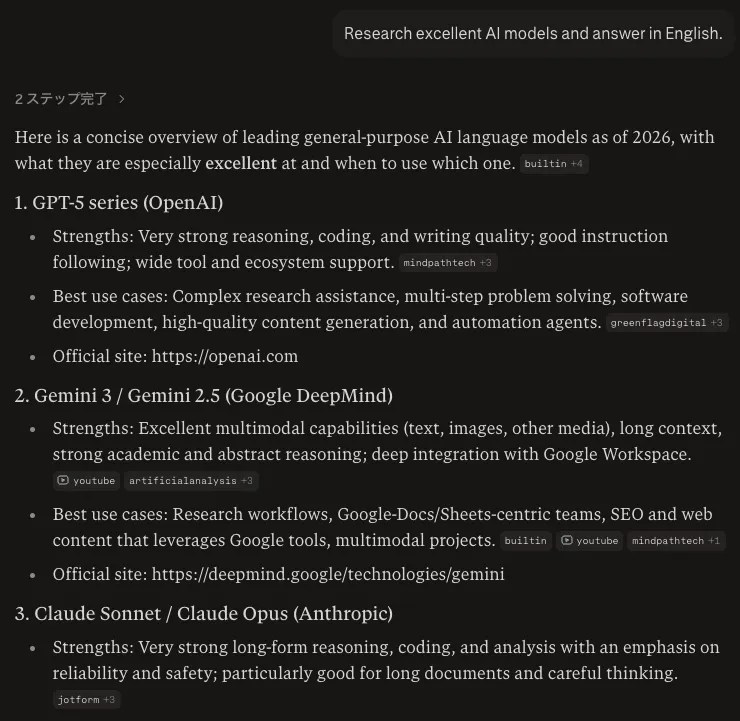
Comet’s key features include:
- Perplexity Agent: Autonomous agent for page interactions, information gathering, and task execution
- Comet Assistant: Sidebar access for instant page summarization, translation, and analysis
- Deep Research: Automatically generates detailed research reports by synthesizing multiple sources
- Perplexity Health: A dedicated mode optimized for medical and health information searches
- Cross-Device Sync: Available on iOS/Android with history and settings synced across devices
In my workflow, Comet excels at keeping research materials organized and accessible. When I’m investigating a topic in depth, the conversation naturally escalates into Deep Research mode, generating comprehensive reports without any extra prompting. The key to getting the most from Comet is giving it a clearly distinct role from Atlas — I use it exclusively for research, never for general browsing.
Comet Pros and Cons
👍 Strengths
- Best-in-class search quality among AI browsers (Deep Research is outstanding)
- Full multi-platform support (macOS, Windows, iOS, Android)
- Agent features available even on the free plan
👎 Drawbacks
- No vertical tabs — frustrating for users who keep 20+ tabs open
- Agent mode requests Gmail and Calendar access (privacy concern)
- Security vulnerabilities have been reported (details below)
Dia — The Workflow Automation AI Browser for Privacy-Conscious Power Users
Dia is the AI-native successor to Arc Browser, built by The Browser Company. Its differentiators are the Skills framework for workflow automation and a local-first approach to privacy.
I migrated to Dia when Arc development stopped, but honestly, I moved on to Comet after about a month. The things that made Arc special — its refined tab management, extensive customization — barely carried over. Extensions didn’t work at launch, and the UI felt stripped down. Whether you’ll like the minimal aesthetic is a matter of taste.
That said, the accuracy of Dia’s AI page interactions was the highest among all three browsers I’ve tested. When I tried Skills for tasks like weather checks and page summaries, the underlying LLMs weren’t powerful enough at the time for the feature to truly shine. Today, though, similar command systems are thriving in tools like Claude Code, and with LLM capabilities advancing rapidly, Dia’s Skills framework has likely become far more capable. I’d like to revisit it when I get the chance.
Dia’s main features include the Skills Framework (automate tasks via slash commands), MCP support (choose from Claude, Gemini, or GPT-4o as the AI model), Cross-tab @mentions (reference and compare information across multiple tabs), and Background Agent (run tasks in parallel in the background). For more on MCP and how it’s used in development tools, see my Claude Code vs Codex CLI comparison.
⚠️ Dia: Know Before You Switch
- The free plan has very limited AI usage — serious use requires Pro at $20/month
- macOS first, Windows still in development (waitlist). No mobile support yet
- Minimalist UI may feel too stripped-down for Arc users expecting full customization
- Agent features are still in beta
Complete AI Browser Comparison — Features, Pricing & Platform Support (2026)
Comparing all three side by side makes the strengths and trade-offs crystal clear. I’ve organized this AI browser comparison across three axes — AI features, pricing, and platform support — based on my hands-on testing.
AI Feature Comparison
| Feature | ChatGPT Atlas | Perplexity Comet | Dia |
|---|---|---|---|
| Page Summarization | ✅ Sidebar | ✅ Comet Assistant | ✅ Skills |
| Agent Mode | ✅ Agent Mode (paid) | ✅ Basic free | ✅ Skills + Background Agent (paid) |
| Search AI | ChatGPT-based | Perplexity AI-based (highest accuracy) | Selectable via MCP |
| Deep Research | ❌ | ✅ Multi-source synthesis | ❌ |
| Cross-tab Reference | ❌ | ❌ | ✅ @mentions |
| Memory | ✅ 30-day retention | ❌ | ✅ 7 days |
| Workflow Automation | △ Agent Mode | △ Agent features | ✅ Skills Framework |
Source: Atlas official, Perplexity official, Dia official (as of June 2026)
Pricing Comparison — Is $20/Month Worth It?
| Plan | ChatGPT Atlas | Perplexity Comet | Dia |
|---|---|---|---|
| Free Plan | Basic AI features available | Fully free (search, summarization, agent, Deep Research) | Heavily limited AI features |
| Paid Plan | ChatGPT Plus $20/mo | Perplexity Pro $20/mo | Pro $20/mo |
| Key Paid Features | Full Agent Mode, priority processing | Unlimited Deep Research, Pro Search | Unlimited Skills, Background Agent |
| Higher Tier | Pro $200/mo | Max $200/mo | Enterprise (in development) |
Source: Atlas official, Perplexity official, Dia official (as of June 2026)
One major pricing shift: in March 2026, Perplexity dropped the Comet paywall and made the browser free across macOS, Windows, iOS, and Android. Headline features like agentic search, page summarization, and Deep Research are now available on the free plan. Pro ($20/month) mainly adds unlimited Pro Search and higher Deep Research limits, and a new “Comet Plus” add-on ($5/month) pulls premium publisher content into your AI answers.
I subscribe to both ChatGPT Plus and Perplexity Pro. The important thing to understand is that these aren’t “browser-only” subscriptions. ChatGPT Plus gives you access to GPT-5.5 and other models for any task, not just Atlas browsing. Perplexity Pro works across all your devices, not just Comet. If you factor in the full AI model usage beyond the browser, both plans deliver solid value.
I don’t subscribe to Dia Pro — the paid plan didn’t exist when I first tried it, and since I moved on to other browsers as my primary tools, I never signed up. Paying for all three is possible but not practical for most people. I’d recommend limiting yourself to two paid plans at most.
Platform Support Comparison
| Platform | ChatGPT Atlas | Perplexity Comet | Dia |
|---|---|---|---|
| macOS | ✅ GA | ✅ GA | ✅ GA |
| Windows | ⚠️ Coming soon | ✅ GA | ⚠️ In development |
| iOS | ❌ Not available | ✅ Available | ❌ In development |
| Android | ❌ Not available | ✅ Available | ❌ In development |
| Chrome Extensions | ✅ (some incompatibilities) | ✅ (desktop only) | ✅ |
Author’s research (as of June 2026)
AI Browser Security and Privacy — Essential Risks You Should Know
AI browsers send page content to AI systems for processing, which introduces security risks that traditional browsers don’t have. If you’re considering using an AI browser for work, understanding these risks upfront is critical.
Privacy Architecture of Each Browser
| Category | ChatGPT Atlas | Perplexity Comet | Dia |
|---|---|---|---|
| Data Processing | Cloud (OpenAI servers) | Cloud (Perplexity servers) | Local-first |
| Memory Retention | 30 days (opt-out available) | — | 7 days (stored locally) |
| Training Data Usage | Can be turned off in settings | Can be turned off in settings | Off by default |
| External Access Requests | None | Gmail, Calendar, Notion, etc. | None |
Author’s research from official documentation and hands-on testing (as of June 2026)
Comet Security Vulnerability — What Is CometJacking?
In early 2026, security researchers discovered a vulnerability in Perplexity Comet dubbed “CometJacking.” This is a prompt injection attack where malicious websites embed hidden instructions that hijack the AI assistant’s behavior when a user asks it a question.
Additionally, in March 2026, Amazon filed a lawsuit against Comet’s automated purchasing behavior via its agent feature, and a federal district court issued a preliminary injunction blocking Comet’s access to Amazon accounts. Perplexity appealed, and the case was heard before the Ninth Circuit Court of Appeals on June 11, 2026. It’s being closely watched as the first substantial legal ruling on whether AI agent automation violates platform terms of service and the CFAA (Computer Fraud and Abuse Act).
My Personal Privacy Practices
I’ve turned off data learning in both Atlas and Comet. I also avoid using agent mode on any service that handles personal information — banking, insurance, government services, and the like.
For enterprise use, I’d advise caution at this stage. The tooling for organizations to manage AI browser data handling — policy controls, audit logs, compliance frameworks — is still immature. For personal use, AI browsers are perfectly fine. For corporate deployment, I’d wait for the ecosystem to mature further.
Which AI Browser Is Right for You? — A Practical AI Browser Comparison Guide (2026)
My bottom line: there is no “best” AI browser for everyone. The right choice depends on your use case and priorities. Start with this quick-reference table to narrow down your options.
| What You Want to Do | Best Choice | Why |
|---|---|---|
| Automate web interactions | ChatGPT Atlas | Agent Mode handles form filling and data collection autonomously |
| Deep research and investigation | Perplexity Comet | Deep Research synthesizes multi-source reports automatically |
| Maximum privacy | Dia | Local-first processing minimizes external data exposure |
| Windows or mobile use | Perplexity Comet | The only AI browser with full cross-platform GA support |
| Casual search and quick questions | Google Search (traditional browser) | Navigational search and source verification are still Google’s territory |
| Workflow automation for developers | Dia | Skills + MCP + Atlassian integrations fit naturally into dev workflows |
For a broader perspective on the AI models powering these browsers, check out my AI model comparison (2026).
Who Should Choose Atlas
🏆 Agent-First Users — “I Want My Browser to Do Things for Me”
Atlas is the best fit if you already use ChatGPT, want to delegate tasks to an AI agent, or prefer vertical tabs. If you’re an Arc refugee like me, Atlas is the most natural landing spot. Just note that it’s currently macOS + Apple Silicon only (Windows coming soon, no mobile app yet).
Who Should Choose Comet
🔍 Research-First Users — “I Need to Find Answers Fast”
Deep Research’s automated report generation is something no other AI browser offers. It’s also the only choice if you need Windows or iOS/Android support right now. I’ve kept Comet as my dedicated research browser and continue using it daily alongside Atlas.
Who Should Choose Dia
🔒 Privacy & Automation Users — “I Want Control and Security”
Dia is ideal for users who prioritize privacy, developers who use Atlassian tools (Jira, Confluence, Slack) daily, and power users who want to choose their own AI model. Keep in mind that serious use requires the Pro plan, and Windows/iOS support is not yet available.
A Note for Windows Users — Edge Copilot as an Alternative
I’ve also spent time with Edge Copilot, and its AI integration has been improving steadily. It offers more AI-connected features than Chrome, and for Windows-primary users, Edge is a legitimate option. It doesn’t match Atlas or Comet in dedicated AI capabilities, but its stability and polish as a browser are in a different league entirely.
If you want to extend your AI automation beyond the browser, my comparison of AI automation tools (n8n, Dify, Zapier, Make) covers how dedicated workflow tools can complement browser AI. For a broader look at AI service pricing, see my Claude pricing comparison.
Frequently Asked Questions (FAQ)
Q1. Can AI browsers use Chrome extensions?
Atlas, Comet (desktop), and Dia are all Chromium-based, so Chrome extensions work in most cases. However, “most” doesn’t mean “all.” In my experience with Atlas, some extensions simply refuse to load, and OAuth-based services frequently fail to authenticate. I’d recommend testing your must-have extensions before fully committing to the switch.
Q2. Are AI browsers usable on the free plan?
Atlas and Comet both have functional free tiers that are sufficient for trying them out. Dia’s free plan, however, has very strict AI usage limits — serious use essentially requires Pro ($20/month). I pay for both Atlas and Comet, but since the subscriptions cover AI model access beyond just the browser, the value is there.
Q3. How safe is my browsing data with AI browsers?
Dia offers the strongest privacy protection with local-first processing. Atlas processes data through OpenAI’s cloud, so exercise caution with pages containing sensitive information. Comet may request access to Gmail and Google Calendar. Personally, I’ve disabled data learning on both Atlas and Comet, and I never use agent mode on services that handle personal information like banking or insurance.
Q4. What’s the best AI browser for Windows users in 2026?
As of June 2026, Perplexity Comet is the only AI browser in this comparison with full GA support on Windows. Atlas’s Windows build is “coming soon” and Dia’s is still in development (waitlist) — neither has shipped to the public yet. Edge Copilot is also worth considering for Windows users — its AI integration has been steadily improving.
Q5. Can I import my Chrome bookmarks and history into AI browsers?
Yes. All three browsers support Chrome data import — bookmarks, passwords, and history. When I migrated from Arc to Atlas (via Chrome export), the entire process took less than 10 minutes.
Q6. Is it useful to run multiple AI browsers at the same time?
Absolutely. I run Atlas as my primary browser for daily browsing and Comet as a dedicated research tool. Atlas handles quick questions via ChatGPT and agent tasks, while Comet handles deep investigation via Perplexity’s Deep Research. This division of labor settled in naturally and has become a permanent part of my workflow.
Q7. Which AI browser has mobile support?
Only Perplexity Comet offers iOS and Android apps as of June 2026. Atlas and Dia are both in mobile development. If smartphone browsing is essential for you, Comet is your only option right now.
Q8. Are AI browsers safe? What are the security risks?
AI browsers face a unique threat called “prompt injection attacks,” where malicious websites embed hidden instructions that manipulate the AI assistant. Perplexity Comet was specifically affected by a vulnerability dubbed “CometJacking.” To protect yourself, avoid using agent mode on websites with sensitive information, and always review what the agent intends to do before allowing execution.
Q9. Can AI browsers be used for work? What about enterprise deployment?
For personal use, AI browsers work well. For enterprise deployment, proceed with caution. The tools for managing AI browser data handling at an organizational level — policy controls, audit logs, compliance frameworks — are still maturing. Especially for work involving confidential data, evaluate against your organization’s security policies before rolling out.
Q10. What exactly is an “agent feature” in AI browsers?
Agent features allow AI to autonomously execute web operations based on your instructions. For example, if you ask “compare the lowest price for this product across three sites,” the AI opens pages, checks prices, and compiles the results on its own. Atlas’s Agent Mode, Comet’s Perplexity Agent, and Dia’s Skills + Background Agent are each browser’s implementation of this concept.
Q11. Is a free AI browser good enough, or do I need a paid plan?
Free plans cover basic AI summarization and search. Atlas’s Agent Mode (autonomous operation) and Dia’s Background Agent (parallel background processing) require paid plans. Comet is the exception: after its March 2026 paywall removal, even agentic search and Deep Research are available on the free plan, with Pro ($20/month) raising the limits. I use the paid AI features daily and have no intention of going back to free tiers.
Conclusion
AI Browser Comparison verdict: the right browser depends on your workflow and environment
Agent-first workflows → Atlas / Research-heavy workflows → Comet / Privacy & automation → Dia. Not sure? Try Atlas and Comet on their free plans and see which fits.
Having migrated through Chrome, Arc, Dia, Comet, and finally Atlas over the past two years, I can say confidently that switching to AI browsers has meaningfully improved my productivity. The shift from “using a browser” to “having a browser work for you” through autonomous agent operation is a genuine paradigm change.
Here’s a final summary of how to choose:
- ChatGPT Atlas: Best for macOS users who want agent automation, vertical tabs, and deep ChatGPT integration
- Perplexity Comet: Best for users who prioritize search quality, research depth, and Windows/mobile support
- Dia: Best for developers who value privacy, MCP integration, and programmable workflow automation
My current setup is “Atlas as primary + Comet as secondary,” and it works remarkably well. Instead of searching for one perfect browser, I’ve found that using the right tool for each task is the approach that actually maximizes productivity. The AI browser market is evolving rapidly through 2026. Start by trying all three on their free plans and discover which combination works best for you.


Author
krona23
Over 20 years in the IT industry, serving as Division Head and CTO at multiple companies running large-scale web services in Japan. Experienced across Windows, iOS, Android, and web development. Currently focused on AI-native transformation. At DevGENT, sharing practical guides on AI code editors, automation tools, and LLMs in three languages.


🔥 Most Popular
- Claude Desktop Won't Install? Windows & Mac Fixes That Worked (2026)
- Obsidian Visualization Tools: Graph, Canvas, Excalidraw (2026)
- What Is VS Code? Features, Extensions & Copilot — Complete Guide (2026)
- LM Studio Bionic Preview: Local Open-Model Agent for Docs and Code
- Claude Code CLI vs Web vs Desktop: A Daily User's Guide (2026)



Leave a Reply