
Official prices on November 1, 2026
📑Table of Contents
- Claude Pricing Plans at a Glance [2026]
- What Each Claude Pricing Plan Actually Feels Like
- Real Usage Numbers: Claude Pro Max Comparison
- API Pay-as-You-Go vs Claude Pricing Plans
- Feature Differences by Claude Pricing Plan
- Which Claude Pricing Plan Should You Choose?
- Team & Enterprise Plans
- Claude vs ChatGPT vs Gemini: Pricing Comparison [2026]
- Frequently Asked Questions
- The Bottom Line
- Related articles
Claude’s pricing page now lists Max at $100 and Ultra at $200 for individual plans above Pro. Max is 5x Pro usage every 5 hours and every week. Ultra has no 5-hour limit for verified accounts and 10x Pro usage every week. Max includes $100 a month in API credits, and Ultra includes $200. The August 17 table’s Max 20x at $200 is named Ultra on the current page. This update does not state a new Pro monthly price, because the page display changes with the billing cycle. The table and upgrade story below are the August 17, 2026 record. Check claude.com/pricing before you subscribe. On the ChatGPT side, Plus is $20 a month and Pro is $100, $200, or $500. Free and Go may show ads.
📅 Last updated: November 1, 2026
If you’re wondering which Claude pricing plan to pick, here’s the short answer: most people should get Pro ($20/month). That’s it. Max is only worth paying for if you use Claude Code or Cowork heavily every single day.
I’ve personally upgraded from Pro to Max 5x to Max 20x over the past year — testing every tier with real development workloads. I run 3+ Claude Code sessions daily, each pushing well past 1 million tokens, and log over 5 hours of active AI-assisted development every day. In this complete Claude Pro Max comparison for 2026, I’ll break down every plan with concrete numbers, real usage data, and honest recommendations so you can pick the right one without second-guessing.
Updated for August 17, 2026, this guide also covers Fable 5, Sonnet 5, weekly limits, and usage credits. Let’s start with the full pricing overview.
Claude Pricing Plans at a Glance [2026]
Before diving into details, here’s the complete Claude pricing breakdown. This table gives you the full picture in seconds.
| Plan | Monthly Price | Usage (vs Pro) | Claude Code | Cowork | Best For |
|---|---|---|---|---|---|
| Free | $0 | Minimal | ❌ | ❌ | Trying Claude out |
| Pro | $20/mo ($200/yr) | 1x (baseline) | ✅ | ✅ (heavy quota use) | Most users |
| Max 5x | $100 | 5x | ✅ | ✅ Practical | Daily developers |
| Max 20x | $200 | 20x | ✅ | ✅ Parallel OK | Power users who want zero limits |
💡 Save ~17% with annual billing on Pro: $200/year ($16.67/month) instead of $20/month.
Source: Anthropic Claude Pricing (as of August 17, 2026)
All plans have rolling five-hour limits, and paid plans also have weekly limits. Usage across Claude on the web, desktop, mobile, and Claude Code draws from the same pool. Paid users can enable usage credits to continue at standard API rates after the included quota is exhausted.
What Each Claude Pricing Plan Actually Feels Like
I’ve used every Claude plan in real work. Here’s an honest breakdown of what you can expect from each tier — no marketing fluff, just practical experience.
Free — Good for Testing, Not for Work
Free — $0/month
The Free plan gives you basic access to Claude for casual conversations. You can ask questions, get writing help, and explore what the model can do. However, the usage cap is extremely low — expect to hit the limit after just a handful of messages. Claude Code and Cowork are not available.
Verdict: Perfect for evaluating whether Claude fits your workflow. Not viable for any kind of regular use.
Pro ($20/month) — The Sweet Spot for Most People
🏆 Best Value — Pro $20/month
Pro unlocks everything that matters: Claude Code, extended thinking, Cowork, Google Workspace integration, remote MCP, and file creation. You get roughly 40–80 messages per 5-hour window, which is plenty for writing, research, translation, and light coding tasks.
From my experience, if you’re using Claude for everyday questions, document drafting, or occasional code reviews, Pro is more than enough. I ran on Pro for months before needing more — and the only reason I upgraded was heavy Claude Code development sessions.
It’s also worth noting that Pro is not just for developers. I use it for WordPress content management, SEO analysis, and business document drafting — tasks where the quota rarely becomes an issue. If you’re a marketer, writer, or project manager, Pro gives you access to Claude’s full intelligence without the developer-tier pricing.
Verdict: The right choice for 80%+ of Claude users. Start here.
Max 5x ($100/month) — The Developer Standard
⚡ Developer Pick — Max 5x $100/month
Five times the Pro usage quota. This is where Claude Code becomes genuinely productive for full-day development work — roughly 5 hours of continuous coding tasks per day. Cowork background tasks become practical instead of a quota drain. Max also unlocks the full suite of autonomous agent features — Dispatch, Computer Use, Loop, and Channels — covered in detail in Claude’s autonomous agent feature guide.
When I started using Claude Code daily for real projects, Pro’s quota ran out within 1–2 hours. Upgrading to Max 5x was the turning point — I could finally work through the afternoon without hitting limits. If you want to learn how to get the most out of it, check out these 15 Claude Code efficiency tips that transform your daily workflow.
Verdict: The go-to plan for developers who use Claude Code every day.
Max 20x ($200/month) — Zero Limits, Maximum Comfort
👑 Unlimited Feel — Max 20x $200/month
Twenty times the Pro usage. Run 3–4 Claude Code sessions in parallel without worry and use Cowork while coding in another terminal. Max also adds higher task output limits, priority access during peak traffic, and early access to advanced features.
I upgraded from 5x after starting to hit limits during heavy parallel workloads. With my usage pattern — 3+ sessions per day, each consuming over 1 million tokens, and 5+ hours of active coding — even Max 5x ran dry by midweek. On Max 20x, I typically reach the weekly limit by Thursday or Friday during intense sprints, but day-to-day I essentially never see a rate limit. It’s the “don’t think about it” tier.
One thing that helps extend the quota: I use a GSD (Get Stuff Done) plugin that helps structure complex tasks into smaller, focused prompts. This reduces wasted tokens on unfocused conversations and lets me squeeze more productive work out of the same quota.
Verdict: For power users who refuse to let usage caps interrupt their flow.
Real Usage Numbers: Claude Pro Max Comparison
The most common question about Claude pricing is: “How much can I actually use it?” Here are concrete numbers based on my real-world testing.
| Plan | claude.ai Chat | Claude Code Development | Cowork |
|---|---|---|---|
| Pro | ~40–80 msgs / 5 hrs | Runs out in 1–2 hrs of serious work | Launching a task drains quota fast |
| Max 5x | Comfortable all day | ~5 hrs/day single-task | Background tasks are practical |
| Max 20x | Effectively unlimited | 3–4 parallel sessions, no issues | Cowork + Claude Code simultaneously |
Source: Author’s measurements (as of August 17, 2026)
The key insight: Claude Code and extended thinking consume quota dramatically faster than regular chat. A simple conversation might use 1 unit, but a Claude Code task with extended thinking can burn through 10–20x that amount. This is why developers almost universally end up on Max.
How Much Does Claude Code Actually Cost?
Based on my real-world usage, Claude Code on Max 20x costs a fraction of what you’d pay through the API. This is the number most developers want to know before committing to a plan.
A typical development day for me involves approximately 3.2 million input tokens (code context, project files, prompts) and 800K output tokens (generated code, explanations, refactoring). At API rates for Opus 4.8 ($5/$25 per million tokens for input/output), that translates to roughly $36 per day. Over a 20-working-day month, that’s approximately $720 — more than three times the cost of Max 20x.
| Metric | Daily Estimate |
|---|---|
| Input tokens (code context + prompts) | ~3.2M |
| Output tokens (generated code + explanations) | ~800K |
| API cost (Opus 4.8 rates) | ~$36/day |
| Monthly API cost (20 working days) | ~$720/month |
| Max 20x cost | $200/month (flat) |
| Savings vs API | ~72% |
Source: Author’s token measurements (July 2026, Opus 4.8 model)
For anyone using Claude Code more than a few hours per week, Max plans pay for themselves almost immediately. The flat-rate pricing removes the anxiety of watching token costs climb during an intensive debugging session.
Claude API Pricing Breakdown
To understand why Max plans are such good value, it helps to see the actual API rates. Here’s the full token pricing for each Claude model as of August 17, 2026.
| Model | Input / MTok | Output / MTok | Cache Write / MTok | Cache Read / MTok |
|---|---|---|---|---|
| Fable 5 | $10 | $50 | $12.50 | $1 |
| Opus 4.8 | $5 | $25 | $6.25 | $0.50 |
| Sonnet 5 (through Aug. 31) | $2 | $10 | $2.50 | $0.20 |
| Sonnet 4.6 | $3 | $15 | $3.75 | $0.30 |
| Haiku 4.5 | $1 | $5 | $1.25 | $0.10 |
Source: Anthropic API Pricing (as of August 17, 2026)
Sonnet 5’s introductory $2/$10 rate ends August 31, 2026; standard pricing becomes $3/$15 per MTok on September 1. Fable 5, Anthropic’s highest-capability generally available model, costs $10 input and $50 output per MTok.
💡 Extended Thinking Costs Extra on API
When using the API, extended thinking tokens are billed at output rates — $25/MTok for Opus 4.8 and $15/MTok for Sonnet 4.6. A single complex reasoning task can generate tens of thousands of thinking tokens on top of the visible output. On Max plans, extended thinking is included in your flat-rate quota with no extra charge.
💰 Prompt Caching — Up to 90% Savings on API
If you do use the API, prompt caching can dramatically reduce costs. When Claude Code sends your project’s codebase as context, most of that context stays the same between requests. With prompt caching enabled, repeated context is read from cache at just $0.50/MTok for Opus 4.8 — a 90% reduction compared to the standard $5/MTok input rate.
The initial cache write costs 25% more than standard input, but subsequent reads within the 5-minute TTL window are 90% cheaper. For iterative development workflows where you’re making frequent requests against the same codebase, this can cut your effective API costs by 50–80%.
If You Use Cowork, Max ($100/month+) Is Essential
⚠️ Cowork on Pro Burns Through Quota Instantly
- Cowork continuously consumes quota while a task runs in the background
- On Pro, launching a single Cowork task can eat your entire 5-hour window quota
- For practical Cowork usage, Max 5x is the minimum. Max 20x lets you run Cowork and Claude Code simultaneously
I tried using Cowork for a file classification project — sorting hundreds of documents into categories based on content. The results were genuinely impressive when it worked: Cowork autonomously read each file, identified patterns, and organized them correctly. But the context window exhaustion was disappointing. On complex tasks, Cowork burns through its context limit faster than you’d expect, and when it does, the task simply stops mid-way. I had to restart the same job multiple times, manually feeding it smaller batches.
Want to see what Cowork can do? Read our guide on how to automate business tasks with Claude Cowork — but make sure you’re on Max before you try it seriously.
API Pay-as-You-Go vs Claude Pricing Plans
For power users, the Max plan is significantly cheaper than API pay-as-you-go pricing. Here’s why.
API pricing charges per token — input and output — every time you make a request. If you’re using Claude Code or Cowork daily, those tokens add up fast. In my experience, heavy Claude Code usage through the API can easily cost $200–$2,000+ per month, sometimes more during intense development sprints.
| Pricing Model | Monthly Cost | Best For | Risk |
|---|---|---|---|
| API Pay-as-You-Go | $10–$2,000+ (varies) | Light or sporadic usage | Costs can spike unpredictably |
| Max 5x | $100 flat | Daily Claude Code users | Fixed cost, predictable |
| Max 20x | $200 flat | Heavy parallel workloads | Fixed cost, predictable |
Source: Anthropic API Pricing & Claude Plans (as of August 17, 2026)
The Breakeven Point: When to Switch from API to Max
The breakeven calculation is straightforward, and it’s the key to choosing between API and Max plans.
- Max 5x breakeven: If your monthly API bill exceeds ~$100, Max 5x saves money.
- Max 20x breakeven: If your monthly API bill exceeds ~$200, Max 20x saves money.
- Rule of thumb: If you use Claude Code for 2+ hours/day or run Cowork regularly, you’re almost certainly past the breakeven point.
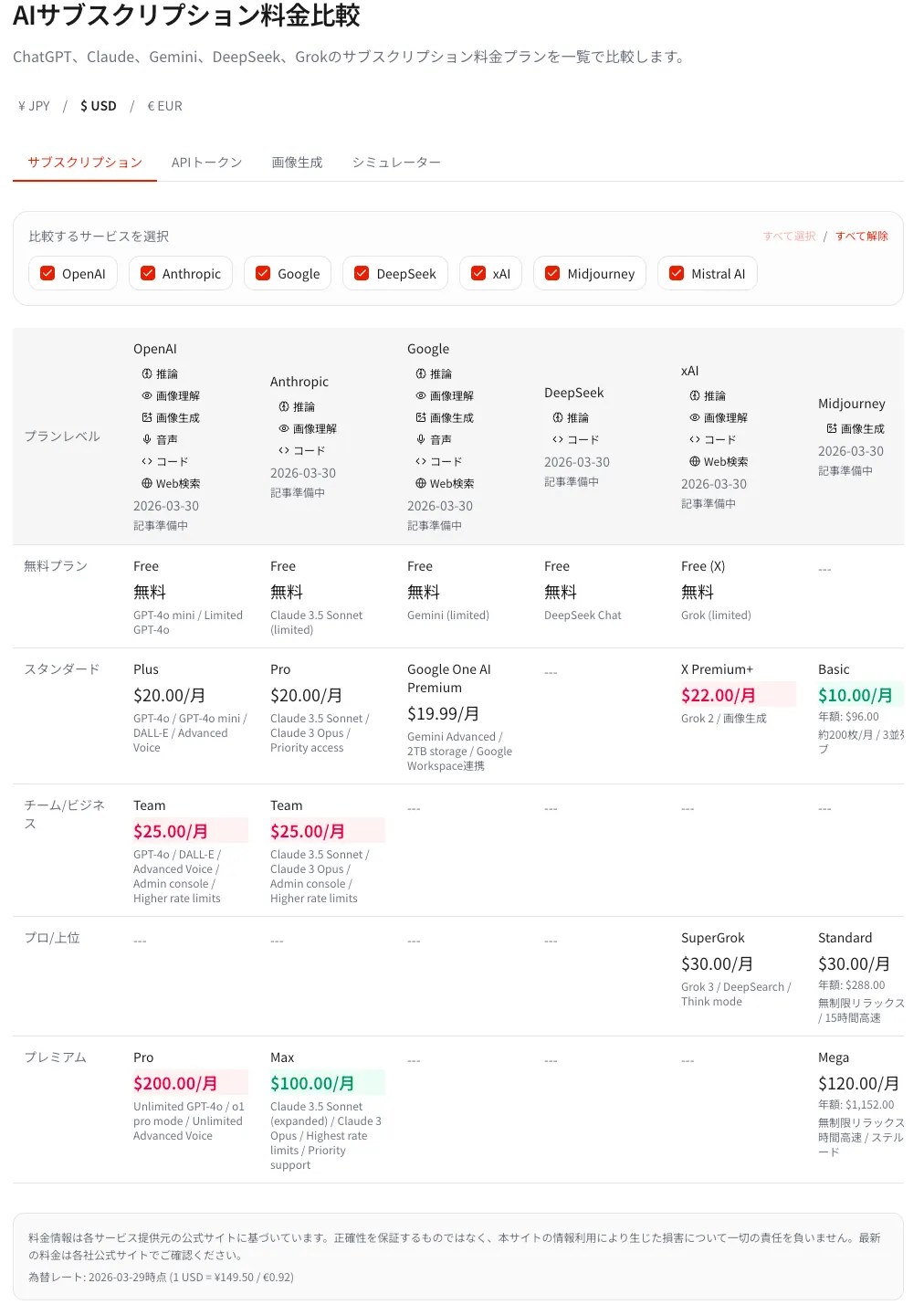
🔍 Want to run the numbers for your own usage?
Our AI cost simulator compares pricing across 9 major providers — including Claude, ChatGPT, Gemini, and more. Enter your usage pattern and instantly find the cheapest plan.
💡 Don’t Forget the Extras
Max plans also include the Claude app experience, Cowork, higher task output limits, and early feature access. Those workflow benefits are separate from raw API token pricing.
The bottom line: if you spend less than ~$20/month on API calls, stick with pay-as-you-go. But if you’re regularly hitting $50+ in API costs, Max 5x at $100/month gives you far more headroom at a predictable price. For a deeper analysis of whether Max is worth it for your use case, see Is Claude Max Worth It? A Real User’s Honest Review.
Cost Per Usage Unit — Why Max 20x Is the Best Value
Higher monthly price doesn’t mean worse value. When you compare cost per 1x usage unit, Max 20x is actually the cheapest plan per unit of usage.
- Pro ($20/mo): 1x usage → $20 per 1x unit
- Max 5x ($100/mo): 5x usage → $20 per 1x unit (same unit cost as Pro)
- Max 20x ($200/mo): 20x usage → $10 per 1x unit (half the cost of Pro)
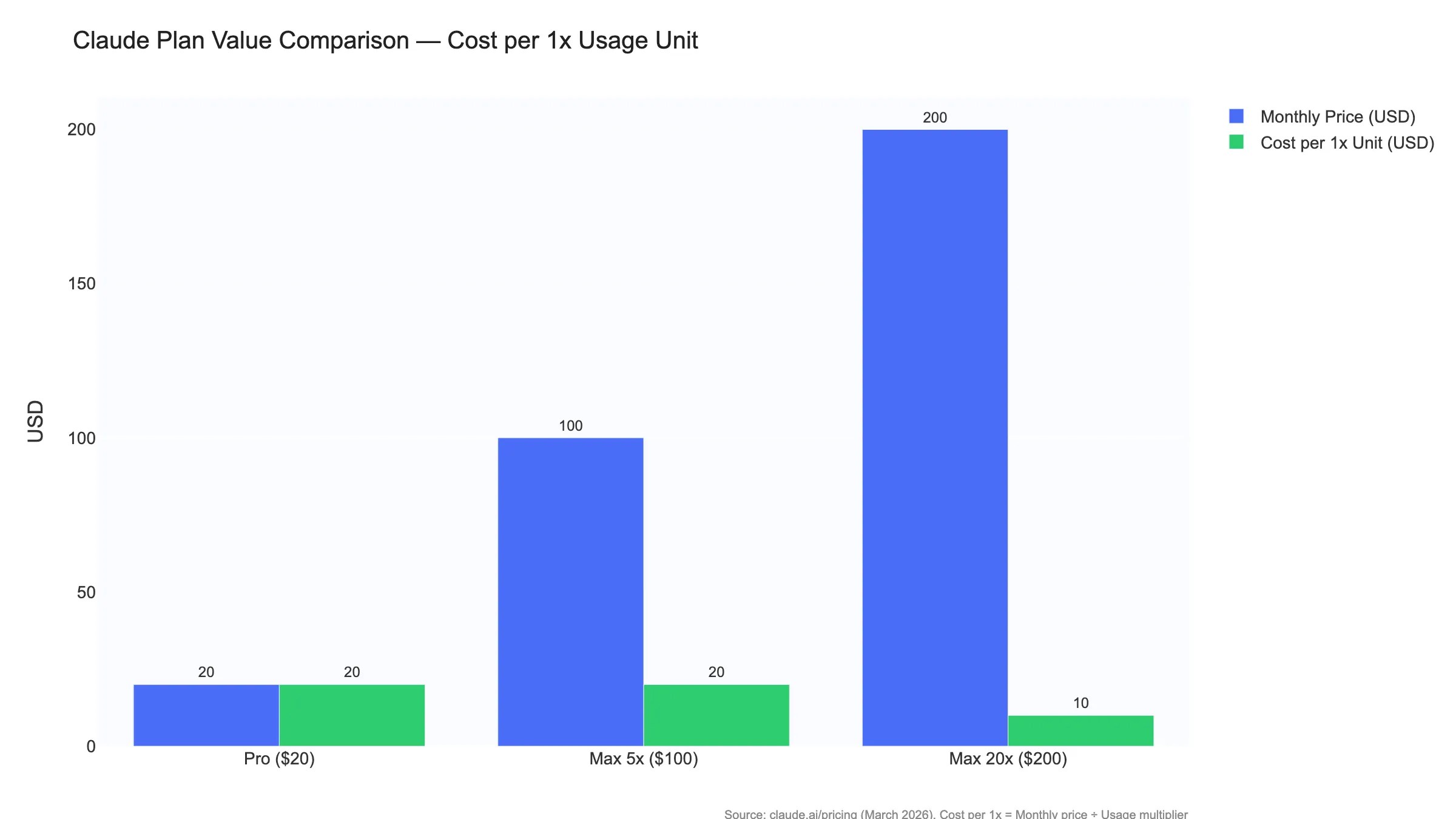
In other words, Max 5x just gives you more volume at the same per-unit rate, but Max 20x gives you both more volume and a lower per-unit cost. If you’re using Claude Code daily, Max 20x at $200/month delivers the best value of any plan — and that’s the main reason I settled on it.
Feature Differences by Claude Pricing Plan
Beyond usage quotas, each Claude pricing tier unlocks different capabilities. Here’s the complete feature matrix.
| Feature | Free | Pro | Max 5x | Max 20x |
|---|---|---|---|---|
| Claude Code | ❌ | ✅ | ✅ | ✅ |
| Cowork | ❌ | ✅ | ✅ | ✅ |
| Extended Thinking | ❌ | ✅ | ✅ | ✅ |
| Google Workspace Integration | ❌ | ✅ | ✅ | ✅ |
| Remote MCP | ❌ | ✅ | ✅ | ✅ |
| File Creation & Code Execution | ❌ | ✅ | ✅ | ✅ |
| Higher Task Output Limits | ❌ | ❌ | ✅ | ✅ |
| Persistent Memory | ❌ | ❌ | ✅ | ✅ |
| Early Access to New Features | ❌ | ❌ | ✅ | ✅ |
| Priority Access During Peak | ❌ | ❌ | ❌ | ✅ |
Source: Anthropic Claude Pricing (as of August 17, 2026)
The critical takeaway: Pro and Max share most features. The main differences are usage volume, higher output limits, priority access, and early feature access. If you don’t need the extra quota, Pro gives you access to nearly everything. For a detailed look at how Claude Code works across different interfaces, see Claude Code: CLI vs Web vs Desktop — Which Should You Use? You might also want to compare Claude Code with its closest competitor — read our Claude Code vs Codex Comparison to see how they differ in architecture and real-world performance.
Which Claude Pricing Plan Should You Choose?
After using every tier myself, here’s my honest recommendation based on how you actually use Claude.
Pro ($20/mo) — Start Here
You use Claude a few times a day for questions, writing, translation, or research. Claude Code for quick code reviews or light fixes. You rarely hit usage limits.
Max 5x ($100/mo) — Developer Essential
You use Claude Code or Cowork daily. Pro’s limits interrupt your work regularly. You want stable, uninterrupted development sessions.
Max 20x ($200/mo) — Zero Friction
You run multiple Claude Code terminals in parallel. You use Cowork while coding. You never want to think about usage limits again.
Free ($0) — Just Exploring
You want to try Claude before committing. You have occasional questions. You don’t need Claude Code, Cowork, or extended thinking.
⚠️ Common Upgrade Path Mistakes
- Upgrading to Max 20x too early: Many people jump straight to Max 20x “just in case.” Start with Pro or Max 5x — you can upgrade instantly if you need more, and there’s no penalty.
- Staying on Pro too long with Claude Code: If you’re hitting rate limits every day and waiting for the 5-hour window to reset, you’re losing more in productivity than the $80 difference between Pro and Max 5x.
- Forgetting the weekly limit: Even on Max 20x, there’s a weekly cap. If you’re burning through quota heavily Monday–Wednesday, you might hit limits by Thursday. Spread intensive work across the week when possible.
- Using API when Max is cheaper: If you’re paying for Claude Code through the API to “save money” but spending over $200/month in tokens, you’re overpaying. Switch to Max.
My personal advice: start with Pro and upgrade only when you feel the limits. You can change plans at any time — there’s no penalty for upgrading or downgrading mid-month. I went Pro, then 5x, then 20x over the course of several months, and that gradual path let me clearly see the value at each step.
If you’re evaluating Claude alongside other AI development tools, our AI Code Editor Comparison covers how Claude Code stacks up against Cursor, Windsurf, and other editors in 2026.
Team & Enterprise Plans
If you’re evaluating Claude pricing for an organization rather than personal use, Anthropic offers Team and Enterprise tiers with administration features.
| Plan | Monthly Billing | Annual Billing | Usage (vs Pro) | Claude Code | Key Features |
|---|---|---|---|---|---|
| Team Standard | $25/user/mo | $20/user/mo | More than Pro | ✅ | Team management, SSO, shared workspace |
| Team Premium | $125/user/mo | $100/user/mo | 5x Standard | ✅ | High usage quota for power users |
| Enterprise | $20/seat + usage | Annual contract | Metered by model/task | ✅ | SCIM, audit logs, retention and IP controls |
Source: Claude Team Plan (as of August 17, 2026)
Team supports 2–150 seats and lets organizations mix Standard and Premium seats. Both include Claude Code and Cowork; Premium provides 5x the usage of Standard. This replaces the older five-seat minimum and 1.25x/6.25x comparison.
Claude vs ChatGPT vs Gemini: Pricing Comparison [2026]
At the same $20 price point, Claude Pro offers the strongest developer toolkit — Claude Code and Cowork give you terminal-level AI coding and background task automation that ChatGPT Plus and Gemini AI Pro don’t match.
ChatGPT Plus provides code execution within the chat interface but lacks a terminal-based coding tool equivalent to Claude Code. Gemini AI Pro offers coding assistance through Gemini Code Assist, but it’s not a standalone CLI tool you can run in your terminal. For developers, this distinction matters enormously.
| Service | Monthly Price | AI Models | Coding Assistant | Background Agent |
|---|---|---|---|---|
| Claude Pro | $20 | Fable 5 / Sonnet 5 / Opus 4.8 | Claude Code ✅ | Cowork ✅ (heavy quota use) |
| Claude Max 5x | $100 | Fable 5 / Sonnet 5 / Opus 4.8 | Claude Code ✅ | Cowork ✅ |
| ChatGPT Plus | $20 | GPT-4o / o3 | Code execution ✅ | Operator ✅ |
| ChatGPT Pro | $200 | o3 pro / GPT-4o | Code execution ✅ | Operator ✅ |
| Gemini AI Pro | $20 | Gemini 3.1 Pro | Gemini Code Assist ❌ | ❌ |
Source: Official pricing pages for Claude, ChatGPT, and Gemini (as of August 17, 2026)
It’s worth noting that ChatGPT Pro at $200/month is comparable to Claude Max 20x in price, but the capability profiles differ significantly. ChatGPT Pro emphasizes reasoning with o3 pro, while Claude Max 20x gives you massive quota for Claude Code and Cowork — tools purpose-built for software development.
For developers, Claude is the clear winner at every price point. For general conversation and image generation, ChatGPT remains competitive. I’ve tested all three extensively and chose Claude for my development workflow — the combination of Claude Code’s terminal integration and Cowork’s background automation is unmatched at any price tier.
Frequently Asked Questions
Is the only difference between Pro and Max the usage quota?
No. Beyond the higher usage quota, Max includes higher task output limits, priority access during peak traffic, and early access to advanced features. Core capabilities such as Claude Code and Cowork are also available on Pro.
What happens when I hit the usage limit?
Claude has both a 5-hour rolling window limit and a weekly limit. When you hit either cap, you’ll need to wait for the window to reset. No additional charges are incurred. If you can’t wait, you can upgrade to a higher plan instantly or opt to continue at API rates for the remainder of the window.
Can I use Claude Code on the Pro plan?
Yes, Claude Code is available starting from Pro ($20/month). For quick questions, code reviews, and small fixes, it works well. However, for sustained development work — building features, large refactors, multi-file changes — you’ll burn through Pro’s quota in 1–2 hours. If Claude Code is central to your daily workflow, Max 5x ($100/month) is the practical minimum.
Can I change plans mid-month?
Yes. You can upgrade or downgrade at any time. When you upgrade, the higher usage quota takes effect immediately. This is exactly what I did — started on Pro, moved to Max 5x when I needed more, and eventually went to Max 20x. No lock-in, no penalties.
Are there student discounts or team pricing options?
Anthropic does not list a universal individual student discount on the consumer pricing page, but it offers an Education plan through participating universities. Pro costs $200/year. Team supports 2–150 seats: Standard is $25 monthly or $20 with annual billing; Premium is $125 monthly or $100 with annual billing and provides 5x Standard usage.
Is Max or API pay-as-you-go cheaper?
It depends on your volume. If you spend under ~$20/month in API tokens, pay-as-you-go is cheaper. But heavy Claude Code and Cowork users can easily rack up $200–$2,000+ in API costs per month. In that scenario, Max 20x at a flat $200/month is dramatically cheaper — and you get the convenience of the claude.ai interface, Cowork, and priority access on top.
What’s the minimum plan for Claude Code?
Pro ($20/month) is the minimum. Free users cannot access Claude Code at all. While Pro technically supports Claude Code, its limited quota makes serious development work impractical. For professional use, I recommend Max 5x ($100/month) as the real starting point for Claude Code.
How much does Claude Code actually cost per day?
Based on my measurements, a heavy day of Claude Code development consumes 3.2M+ input and 800K+ output tokens. At API rates (Opus 4.8), that’s roughly $36 per day. On Max 20x ($200/month flat), that works out to about $10 per working day — a ~72% saving compared to API pay-as-you-go pricing.
When does Max become cheaper than API pay-as-you-go?
The breakeven point is straightforward: if your monthly API bill exceeds $100, Max 5x saves money. If it exceeds $200, Max 20x saves money. Most developers who use Claude Code for 2+ hours daily are well past this threshold. Max also includes the Claude app experience, Cowork, higher output limits, and early feature access — benefits not available through the API alone.
Does Claude offer annual billing?
Yes, Pro offers annual billing at $200/year ($16.67/month), saving approximately 17% compared to monthly billing ($20/month). Max plans are currently monthly-only. Annual billing is available at checkout or in your account settings.
How can I check my Claude Code usage?
Check Settings → Usage in Claude for your plan usage. Inside a Claude Code session, run /usage. API customers can use the Claude Console dashboard to monitor token usage and spend.
Do I need a Max plan to use Claude Code?
No. Claude Code works on any paid plan, including Pro ($20/month). Max is not required — it simply gives you more usage quota. If you’re using Claude Code for occasional code reviews, quick questions, or small fixes, Pro’s quota is sufficient. Max becomes necessary only when you’re doing sustained, multi-hour development sessions or running parallel tasks.
The Bottom Line
Most people should get Pro ($20/month). Upgrade only when you feel the limits.
Claude Code developers who work daily: Max 5x ($100/month) is the sweet spot.
Want zero interruptions and parallel workflows: Max 20x ($200/month) eliminates all friction.
API pay-as-you-go makes sense only for light or sporadic usage.
I upgraded from Pro to Max 5x to Max 20x over time — and recommend the same gradual approach. Start with Pro, and let your actual usage tell you when it’s time to move up.
👉 View current Claude pricing plans


Author
krona23
Over 20 years in the IT industry, serving as Division Head and CTO at multiple companies running large-scale web services in Japan. Experienced across Windows, iOS, Android, and web development. Currently focused on AI-native transformation. At DevGENT, sharing practical guides on AI code editors, automation tools, and LLMs in three languages.


🔥 Most Popular
- Claude Desktop Won't Install? Windows & Mac Fixes That Worked (2026)
- Zed Language Support & IME Issues: CJK Input, i18n Status — Complete Guide (2026)
- Claude Code Skill: Hands-On SKILL.md, Auto-Invoke & Teams (2026)
- Install OpenClaw: Node 24 or 26 (November 2026)
- MCP vs CLI: I Migrated From MCP and CLI Is 10-32x Cheaper (2026 Benchmarks)




Leave a Reply