![Claude Code vs Codex CLI: Complete Comparison Guide [2026]](https://devgent.org/wp-content/uploads/2026/03/wp-upload-claude-code-vs-codex.webp)
Updated August 20, 2026
📑Table of Contents
- Claude Code vs Codex CLI — Spec Comparison (2026)
- Benchmarks, Token Efficiency, and Context in 2026
- Pricing — My Actual $220/Month Stack in 2026
- Code Quality Head-to-Head — Real Same-Prompt Tests
- MCP and Extensibility in 2026
- Where I Got Burned — Real Failures with Both Tools
- Security and Permissions
- My Daily Workflow — How I Actually Use Both
- Frequently Asked Questions
- Bottom Line — Claude Code Is My Pick If I Can Only Keep One
- Related articles
Model comparisons are time-sensitive: OpenAI’s current model guide lists GPT-5.6 Sol/Terra/Luna, while Claude continues to evolve through Opus 4.8 and newer releases. Treat benchmarks as point-in-time evidence and verify the OpenAI and Anthropic docs before adopting a workflow.
📅 Last updated: June 2026
“Should I use Claude Code or Codex?” — that’s the question I hear most from developers in 2026. I started using Claude Code seriously in winter 2025 and adopted Codex CLI around the same time specifically because I wanted cross-model code reviews. After months of running both every day, my answer is simple: Claude Code vs Codex CLI isn’t a rivalry — it’s a partnership, and running both is the most cost-effective choice I’ve found.
Benchmarks tell a mixed story. Codex has a clear edge on Terminal-Bench, especially after the April 2026 GPT-5.5 release, which made the agent significantly more reliable on long-running runs. On the Claude side, Opus 4.8 (the current flagship, released May 28, 2026) pushed SWE-bench Verified to 88.6%. The cost picture has shifted too: I’m getting noticeably more work out of Codex per dollar than I used to, and the era of “Claude Code clearly ahead” is over — the two are now in a real fight. This article walks through both — public benchmark scores and what actually happens when you hand the same prompt to each tool — so you can decide what belongs in your own stack.
📌 What you’ll learn
- Claude Code vs Codex CLI spec comparison (context window, config standard, execution model)
- Published benchmark scores: SWE-bench Verified / Pro, Terminal-Bench 2.0, OSWorld, plus token efficiency
- Same-prompt UI generation head-to-head with real screenshots
- My actual $220/month stack (Claude Max 20x + ChatGPT Plus) and where it still falls short
- Which plan tier fits solo devs, commercial work, and enterprise use
Claude Code vs Codex CLI — Spec Comparison (2026)
Let’s start with the specs that matter in day-to-day use. Most competing articles skip three things I care about most: the config file standard, the context window, and the task execution model. Those three are where the real architectural differences live.
| Spec | Claude Code | Codex CLI |
|---|---|---|
| Vendor | Anthropic | OpenAI |
| Models | Claude Opus 4.8 / Sonnet 4.6 | GPT-5.5 / GPT-5.6-Codex |
| Context window | 1M (Opus 4.8 standard) / 200K (Sonnet 4.6) | 400K (GPT-5.5 generation) |
| Config file standard | CLAUDE.md (proprietary) | AGENTS.md (open standard, multi-tool) |
| Task execution model | Local interactive (in-terminal) | Local interactive + cloud async delegation (via ChatGPT) |
| Agent autonomy | Very high (files, git, tests, commits) | High (sandboxed; cloud version auto-creates PRs) |
| MCP support | Native, mature ecosystem | Supported (configured in ~/.codex/config.toml) |
| IDE integration | VS Code / Zed / JetBrains | VS Code / JetBrains (official extensions) |
| Pricing | Claude Pro / Max subscription + API | ChatGPT Plus / Pro / Business / Enterprise + API |
| Open source | Yes (Apache 2.0) | Yes (Apache 2.0) |
| My primary use | Design, UI generation, large refactors, MCP automation | Code review, solid logic, cross-model verification |
Sources: Anthropic Claude Code docs, OpenAI Codex (as of June 2026)
The CLAUDE.md vs AGENTS.md split deserves a closer look. CLAUDE.md is Anthropic’s proprietary format, designed to pair tightly with Claude Code’s Skills and Hooks system — you can build elaborate, project-specific behaviours on top of it. AGENTS.md, by contrast, is an open standard that multiple agent tools can read. I actually keep both in my projects and let them complement each other.
The other under-reported difference is execution model. Claude Code is fundamentally synchronous: you stay in the terminal, watch what it’s doing, and intervene when needed. Codex adds an asynchronous cloud path — you hand it a task, walk away, and come back 15–30 minutes later to a pull request. Same tool, completely different workflow shape. I’ll come back to this.
🧮Which AI actually costs less? Run the numbers across 9 providers.Open the cost simulator →
Benchmarks, Token Efficiency, and Context in 2026
Most comparison articles stop at feature lists. Developers actually want numbers — and a reality check from someone who uses both daily. This section covers public benchmark scores, token consumption, and context window size, plus where my lived experience agrees with the data and where it doesn’t.
Public Benchmark Scores
| Benchmark | Claude Code (Opus 4.8) | Codex CLI (GPT-5.5 / 5.3-Codex) | What it measures |
|---|---|---|---|
| SWE-bench Verified | ~88.6% (Opus 4.8) | ~75% (GPT-5.5 generation) | Bug fixes on real repos (87.6%→88.6% with Opus 4.8) |
| SWE-bench Pro | ~57% | ~59% | Harder Pro split (near-tie) |
| Terminal-Bench | ~74.6% (Opus 4.8 / TB 2.1) | ~82.7% (GPT-5.5 / TB 2.0) | Long-running terminal tasks (versions differ, but Codex leads) |
| OSWorld-Verified | High | High | GUI/OS operations |
Sources: Anthropic Research, OpenAI Codex announcement, SWE-bench leaderboard (June 2026; figures rounded)
The short version: SWE-bench Verified and Pro are effectively a tie, but Terminal-Bench 2.0 goes clearly to Codex. That matches my gut — when I need an agent to sit in a terminal and grind through a long-running task without supervision, Codex fails less often. But in work that requires human-style judgment (UI generation, multi-file refactors), Claude Code tends to win in ways benchmarks can’t easily measure.
Token Efficiency — Claude Code Uses ~4× the Tokens of Codex
This one is under-reported but important. Multiple third-party analyses (DataCamp and Morphllm among them) find that Claude Code consumes roughly 4× the tokens of Codex for the same task. The reason is architectural: Claude Code is designed to do more reasoning, verification, and re-exploration steps in the same task.
That doesn’t automatically make Codex cheaper in practice, though. Claude Code is usually run on a Max subscription with a flat monthly cost, so token consumption doesn’t move the bill. Codex on API-metered billing gets more expensive the more you run it. Claude Code rewards running it hard under a flat subscription; Codex rewards frugal, well-scoped API calls. That shapes the plan decisions in the next section.
Context Window — 400K vs 1M (June 2026)
The April 2026 GPT-5.5 release pushed Codex CLI’s context window to 400K tokens (up from 272K, per OpenAI’s announcement) — note that GPT-5.5 is 1M via the raw API but capped to 400K on the Codex surface. Claude Opus 4.8 (the current flagship, released May 28, 2026) ships 1M-token input / 128K-token output as the standard spec, no longer a beta. When I need an agent to see an entire project and make coherent, cross-file changes, Claude Code’s 1M context still wins by a clear margin — but Codex at 400K now comfortably handles mid-sized repositories in one shot, which it didn’t before.
Execution Paradigm — Local Interactive vs Cloud Delegation
Codex’s biggest structural advantage is that you can hand work to a cloud agent through ChatGPT instead of (or alongside) running it locally. The cloud version runs in a sandbox, spends 15–30 minutes on the task, and opens a pull request when it’s done. Fire-and-forget async.
Claude Code is built around a synchronous, local conversation loop. You get fine control and instant redirection, at the cost of having to sit there. The simple rule I use: if you can afford to wait, delegate to Codex cloud; if you need to steer, stay in Claude Code. Which one wins for you depends on the shape of your workflow more than on raw model quality.
Pricing — My Actual $220/Month Stack in 2026
I currently run Claude Max 20x ($200/mo) + ChatGPT Plus ($20/mo) = $220/mo. An earlier version of this article suggested Max 5x; I upgraded after repeatedly hitting Claude Code’s 5-hour rolling window while running parallel tasks. Here’s what I actually see in practice.
| Tier | Claude Code | Codex CLI |
|---|---|---|
| Free | None (Pro $20/mo is the floor) | ChatGPT Free (rate-limited) |
| Entry | Claude Pro $20/mo | ChatGPT Plus $20/mo |
| Serious solo use | Max 5x $100/mo | ChatGPT Plus + metered API |
| Heavy use | Max 20x $200/mo | ChatGPT Pro 5x $100/mo / Pro 20x $200/mo |
| Teams | Claude Team (enterprise tiers) | ChatGPT Business / Team (from $25/seat/mo) |
| API metering | Opus 4.8: $5/$25 per 1M tokens | GPT-5.5 standard: $5/$30; codex-mini: $2.50/$10 per 1M tokens |
| Usage limit | 5-hour rolling window | Monthly cap or uncapped metered |
Sources: Anthropic pricing, OpenAI API pricing (June 2026; prices subject to change)
💰 My setup — $220/mo and the honest reality
Today I run Claude Max 20x ($200) + ChatGPT Plus ($20) = $220/mo. I started on Max 5x, but the moment I pushed Claude Code to run parallel tasks I started bouncing off that 5-hour rolling window constantly. Even on 20x, there are days when serious commercial work leaves me wanting more capacity, and I believe anyone running a real commercial project will end up supplementing with API-metered billing on top of the subscription.
For work environments, ChatGPT Business / Team at $25–$100/seat often isn’t enough either — the moment you need audit logs or strict data-handling guarantees, the practical path is Enterprise, which in effect means paying API-metered rates. Knowing that tier progression in advance saves a lot of plan-swapping regret.
Recommended Stack by Project Scale
① Solo dev / learning
Claude Pro ($20) + ChatGPT Plus ($20) = $40/mo. Enough to get a feel for both. Don’t jump to Max until you’re hitting limits every day.
② Side projects / small commercial
Claude Max 5x ($100) + ChatGPT Plus ($20) = $120/mo. Real working volume. Upgrade to 20x when the 5-hour window starts biting.
③ Full-stack commercial work
Claude Max 20x ($200) + ChatGPT Plus ($20) = $220/mo. My setup. If you run parallel tasks daily, this is the realistic floor.
④ Enterprise / regulated work
ChatGPT Business/Team ($25–$100/seat) as the entry; the moment you need audit logs or data controls, expect to end up on Enterprise / metered API pricing.
For a deeper look at Claude’s subscription tiers and how the usage windows actually feel, see Claude pricing plans explained.
Code Quality Head-to-Head — Real Same-Prompt Tests
This is where I think most Claude Code vs Codex CLI comparisons fall short. They describe concepts instead of running the same prompt through both tools and showing you the output. Here are two tests I’ve done recently.
Test 1: Build a Dashboard from a Vague Prompt
I deliberately used a loose prompt — “Create a simple dashboard design” — and gave both tools no further constraints. The point was to see what design decisions each one reaches for when you don’t spell everything out. Both finished in about 3 minutes. The outputs:
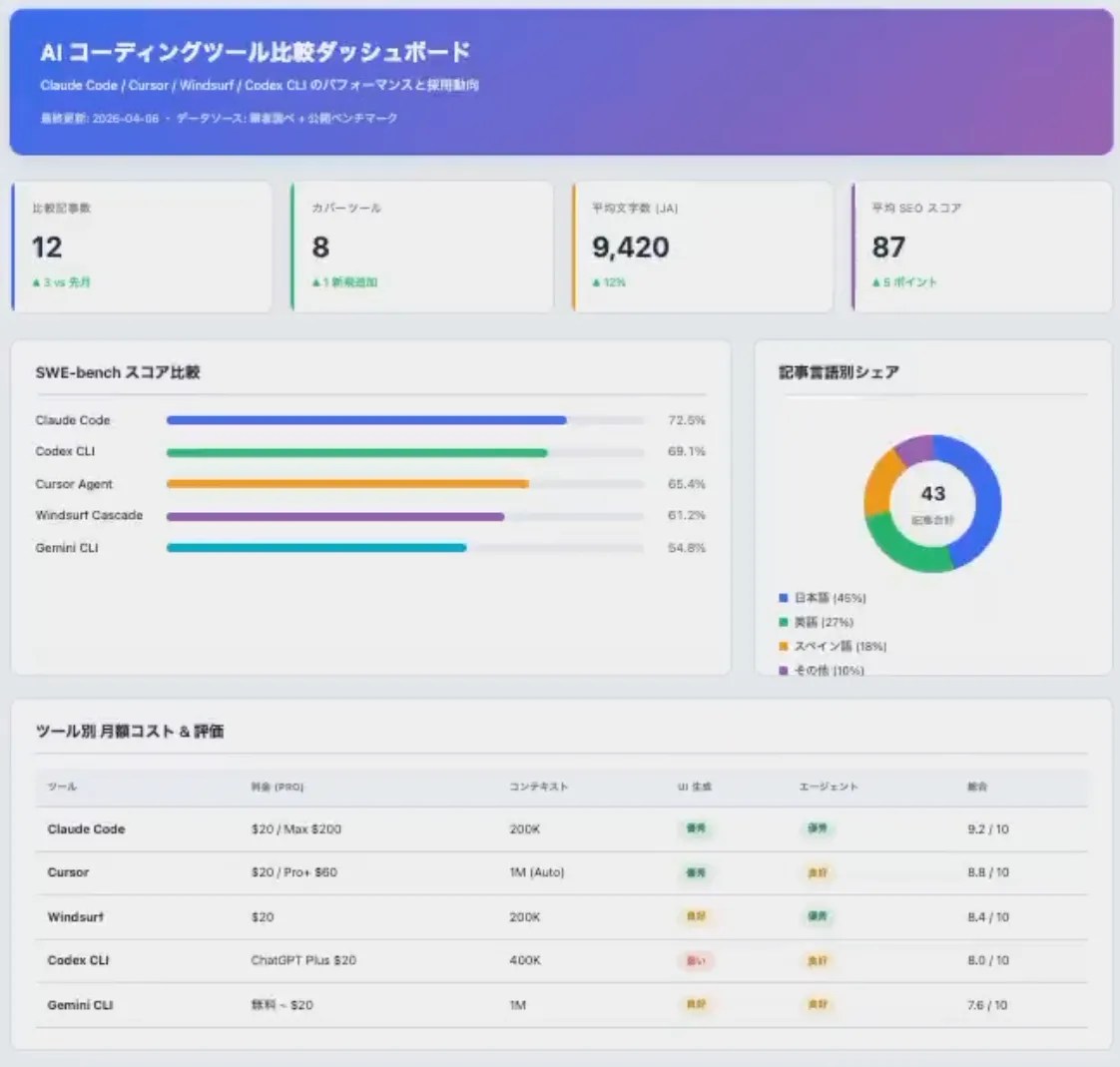
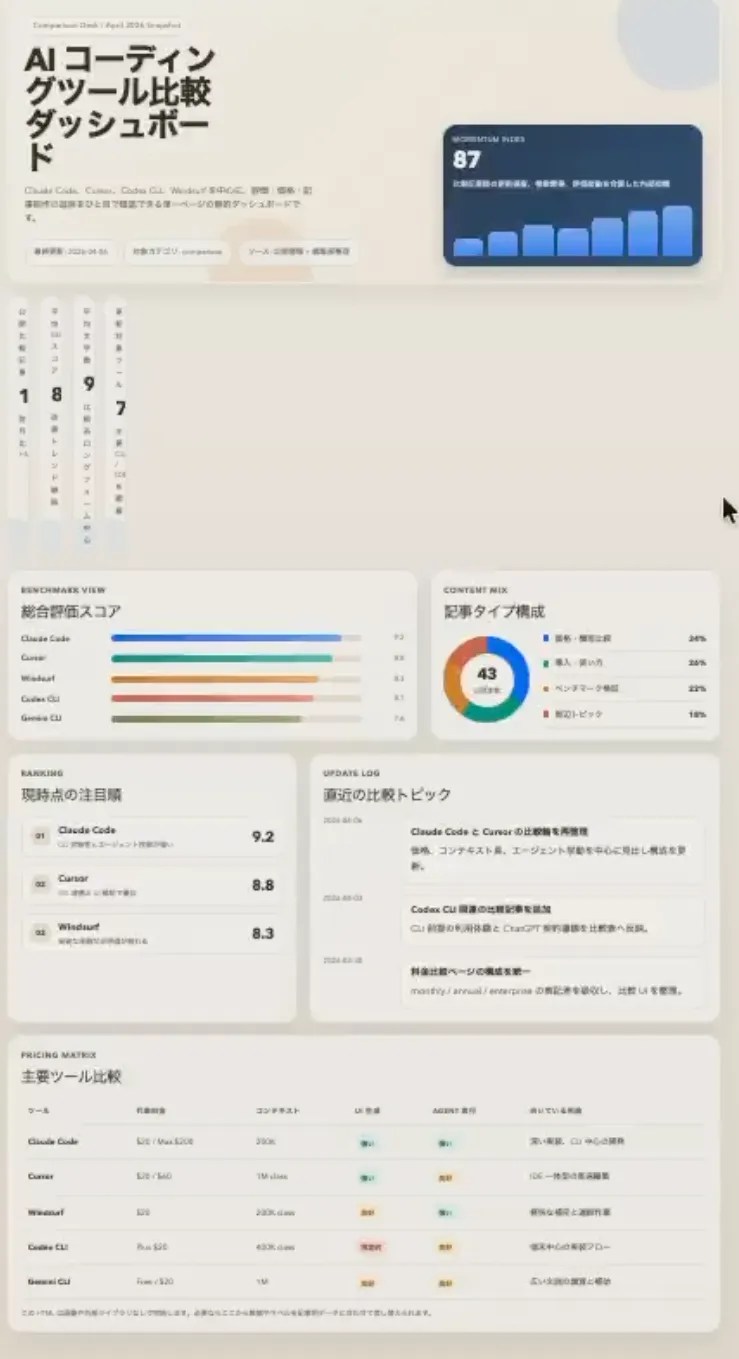
Claude Code produced a pastel, colourful dashboard that looked decorative and ready-to-show. Codex CLI produced something denser and more information-rich, with a calmer palette — but on closer inspection there were layout glitches that would need fixing. The glitches aren’t serious (I could fix them in a minute), but for “I need one screen I can drop into a demo right now”, Claude Code gets me there faster. I used Claude Code’s output as-is.
🎨 My take — UI generation goes to Claude Code
When you hand a loose brief to each tool, Claude Code returns something more polished. Codex wins on raw information density, but the layout detail work it leaves behind costs you the speed win. Benchmarks don’t capture this because they test different things — but this is the kind of difference that shows up every day in real work.
Test 2: Cross-Model Code Review
The single biggest reason I kept Codex in my stack is cross-model code review. Having the same model review its own code misses a lot — there’s a class of bugs that a model simply can’t see in its own output. When I pass Claude Code’s output to Codex, it repeatedly catches redundant code and subtle logic bugs that wouldn’t surface within Anthropic’s own family of models.
The reverse also works, but in a different way. When I hand Codex’s output to Claude Code for review, Claude Code tends to give minimal, targeted feedback rather than rewriting the whole thing. The diff is easier to act on. Neither tool is “better” at review — they simply look at code from different angles — and that’s exactly why running both and having them review each other is the best setup I’ve found.
For pure logic implementation differences between the underlying models, I go deeper in AI Model Comparison — GPT-5.5 vs Claude Opus 4.8 vs Gemini 3.1, which walks through GPT-vs-Claude logic outputs with concrete examples.
Task-by-Task Matrix
| Task type | Claude Code | Codex CLI | Comment |
|---|---|---|---|
| UI component generation | ★★★ | ★ | Claude Code for polish and palette |
| Solid logic implementation | ★★ | ★★★ | Codex handles edge cases more carefully |
| Cross-model code review | ★★ | ★★★ | “Different angle” is the whole point |
| Large-scale refactoring | ★★★ | ★★ | 1M context pays off |
| Long-running terminal tasks | ★★ | ★★★ | Matches Terminal-Bench 2.0 results |
| MCP-powered workflows | ★★★ | ★★ | Both support MCP; Claude Code’s ecosystem is more mature |
Source: author’s daily experience (as of June 2026)
MCP and Extensibility in 2026
Any serious discussion of agent extensibility has to start with MCP (Model Context Protocol). MCP is an open protocol for connecting AI agents to external tools and data sources, and both Claude Code and Codex CLI support it. Codex reads MCP server configuration from ~/.codex/config.toml — this is documented in the official openai/codex repo at docs/config.md. What differs is ecosystem maturity and default experience, which is the real reason I still lean on Claude Code as my primary tool.
| Extensibility | Claude Code | Codex CLI |
|---|---|---|
| MCP server connections | Native, mature ecosystem | Supported via ~/.codex/config.toml |
| Custom instructions | CLAUDE.md + Skills (SKILL.md) | AGENTS.md (open standard) |
| Hooks | Pre / Post hooks | None |
| Official IDE extensions | VS Code / Zed / JetBrains | VS Code / JetBrains (2026 official) |
| Ecosystem | MCP servers + Skills + plugins | MCP + ChatGPT-bundled + plugin system |
Sources: Anthropic Claude Code docs, openai/codex (docs/config.md) (June 2026)
In my setup, Claude Code is wired to MCP servers for GitHub, Notion, and PostgreSQL. Codex can connect to the same kinds of servers via config.toml, but in my experience the number of published MCP servers, the operational know-how around combining MCP with Skills and Hooks, and the community activity all lean Claude Code’s way. Codex’s MCP ecosystem is catching up fast through 2026, and the gap may shrink meaningfully over the next six months. For building project-specific custom commands on Claude Code’s side, see Claude Code Skills — building and shipping custom commands.
Where I Got Burned — Real Failures with Both Tools
Every comparison article I found in English is a success-story parade. None of them mention what actually breaks. This section covers my migration history, failure cases, and the operating rules I’ve landed on.
How I Ended Up Running Both
I started using Claude Code seriously in winter 2025. Codex CLI came in almost immediately afterwards, not as a primary tool but because I wanted cross-model code review from a genuinely different family of models. Codex had a reputation for solid, reliable code generation, and the barrier to adding it alongside was low.
Over time my Codex usage has grown — it carries more of my day than I initially expected. But if I could only keep one, I’d still choose Claude Code. The reason is strategic: Anthropic is clearly concentrating its development effort on the developer experience, and the pace of Claude Code feature additions reflects that. OpenAI has a much broader product surface and visibly tilts toward business use cases; it’s not that Codex is bad — it’s that the centre of gravity is different, and I want my primary tool from the vendor whose roadmap is pointed straight at me.
Failures — Complex Tasks Live and Die by Spec Precision
⚠️ Claude Code failure — ML training code
When I asked Claude Code to write machine-learning model training code, I repeatedly got implementations where the logic itself was wrong. Data preprocessing in the wrong order, loss functions that didn’t match the problem, subtle mishandling of batch sizes. The code ran, but it wasn’t doing what I’d asked. The lesson wasn’t “don’t use Claude Code for ML” — it was “don’t trust vague prompts on complex tasks”. I moved to much more granular, step-by-step specs and the failure rate dropped.
⚠️ Codex CLI failure — design used to be too bare
Historically, when I asked Codex for UI design work I’d get something uncomfortably plain — fine for a prototype, not fine for a demo. That has shifted in 2026: the JetBrains official extension, ChatGPT bundling, and the broader plugin ecosystem have clearly raised OpenAI’s investment in Codex as a design-capable tool. It’s still not where I go first for UI, but the gap is narrowing quickly.
The shared lesson from both failures is the same: precision of specification beats prompt-engineering tricks. As models have gotten better, the old “magic phrases that unlock quality” mindset matters less. What matters more is how clearly you describe what you’re trying to build and, equally, what you’re not trying to build.
Operating Rules — Plugins, Skills, CLAUDE.md
👍 What’s working in my Claude Code setup
- Aggressive use of community plugins to shave time off daily work
- Per-project Skills for repetitive tasks — turning drudgework into one-line commands
- A CLAUDE.md tuned per project with tone, forbidden operations, and priority rules
👎 What still hurts on Codex CLI
- The plugin culture isn’t as mature — most of what I’d want, I end up building myself
- AGENTS.md is useful but doesn’t give me the command-level granularity of Skills
My overall operating rule: invest in the base layer, not in prompt tricks. Time spent on a good CLAUDE.md, a handful of Skills, and the right plugins pays back every single day, whereas the “say this magic phrase” kind of advice ages poorly as models improve. For more on the Claude Code side of that, see Claude Code productivity tips.
Security and Permissions
If you’re using these tools for real work, security matters. Claude Code and Codex start from opposite philosophies: Claude Code gives you freedom and expects you to configure guardrails; Codex is locked down by default and you have to open things up.
| Security aspect | Claude Code | Codex CLI |
|---|---|---|
| Execution environment | Direct on local machine (with /sandbox) | Sandbox by default |
| Network access | User-managed (allowlists possible) | Blocked even in Full Auto |
| Permission model | Allowlist + CLAUDE.md + /permissions | Safe Read / Suggest / Full Auto |
| Enterprise assurance | Enterprise tier adds audit logs | Enterprise (metered) adds audit + data controls |
Sources: Claude Code docs, OpenAI Codex (June 2026)
If you or your team are nervous about giving an agent free rein on a local machine, Codex’s sandbox-first design is genuinely reassuring — it costs you flexibility but the worst-case blast radius is much smaller. Claude Code can match that safety profile if you configure it, but you have to do the configuring. I use permissive settings on trusted projects and strict allowlists on anything touching production. More on that in Claude Code security settings guide.
My Daily Workflow — How I Actually Use Both
Here’s the rhythm of a typical day and where each tool sits in it. Think of this as the lived version of the $220/month stack.
① Morning — planning (Claude Code)
Open Plan mode, let CLAUDE.md’s rules shape the approach, often resuming yesterday’s session with /resume.
② Late morning — UI + implementation (Claude Code)
Frontend work and large refactors. Claude Code’s autonomous loop is fastest here — and this is when I burn through the 5-hour window.
③ Midday — code review (Codex CLI)
Pass the morning’s output through Codex. It catches things Claude Code won’t see in its own work.
④ Afternoon — solid logic (Codex CLI)
Auth, payments, validation — anything where “mostly correct” isn’t good enough. Codex’s edge-case handling earns its keep.
⑤ Late afternoon — MCP workflows (Claude Code)
GitHub issue triage, PR creation, Notion sync. MCP is irreplaceable here, and running parallel tasks is what usually trips the 5-hour window.
⑥ End of day — wrap-up (Claude Code)
Diff review, commit messages, /compact to prep for tomorrow. Mostly driven by Skills at this point.
My command cheatsheet for Claude Code lives in Claude Code commands — full reference, and for the broader AI-editor landscape I’ve written AI editor comparison — six editors I’ve switched between.
Frequently Asked Questions
Bottom Line — Claude Code Is My Pick If I Can Only Keep One
Claude Code vs Codex CLI isn’t a rivalry — it’s a partnership.
I pay $220/month (Claude Max 20x + ChatGPT Plus) to keep both, and it’s the most productive setup I’ve found.
Choose Claude Code for: project-level design, large refactors, MCP integrations, UI generation, interactive agent work where you need to steer as it runs.
Choose Codex CLI for: cross-model code review, solid logic-heavy implementation, long-running terminal tasks, and parallel PR delegation through cloud async.
If I could only keep one, it would still be Claude Code — Anthropic is concentrated on the developer experience and ships more developer-facing features per quarter, while OpenAI’s broader product push has me a little worried that Codex isn’t getting the same focus. That said, the April 2026 GPT-5.5 release closed a lot of the gap: same monthly spend now buys more agent work on Codex than before, and the two are in a real fight. Codex remains genuinely indispensable for cross-model review and cloud delegation, and running both is the right call whenever the budget allows. Both vendors ship fast — re-evaluate the balance every few months, and you’ll keep getting the best of what’s available.


![Harden Claude Code CLI: 9 Proven Steps for Business Use [2026]](https://i0.wp.com/devgent.org/wp-content/uploads/2026/03/claude-code-security-eyecatch.webp?fit=300%2C167&ssl=1)

Author
krona23
Over 20 years in the IT industry, serving as Division Head and CTO at multiple companies running large-scale web services in Japan. Experienced across Windows, iOS, Android, and web development. Currently focused on AI-native transformation. At DevGENT, sharing practical guides on AI code editors, automation tools, and LLMs in three languages.


🔥 Most Popular




Leave a Reply