MCP vs CLI — when your AI agent needs to interact with external tools, which integration method should you choose? I used to rely heavily on MCP (Model Context Protocol), but I have since switched to a CLI-first approach, reserving MCP only for situations where no CLI alternative exists.
📑Table of Contents
- MCP vs CLI Explained — How Each Approach Works in 2026
- MCP vs CLI Cost Comparison — The Shocking Token Gap
- MCP vs CLI Reliability and Performance Comparison (2026)
- MCP vs CLI Security Comparison
- MCP vs CLI by Service — GitHub, Docker, Slack, and More
- My MCP-to-CLI Migration Experience — A Practical Report
- MCP vs CLI Decision Framework — When to Choose Each
- MCP vs CLI Industry Trends — Latest Developments in 2026
- Frequently Asked Questions — MCP vs CLI
- Conclusion — MCP vs CLI Means “CLI First, MCP as Complement”
The turning point was a benchmark published by Scalekit: CLI is 10-32x cheaper than MCP, with 100% reliability versus 72%. I previously had Docker MCP Toolkit, PostgreSQL, K8s, Google services, Obsidian, Playwright, and more all connected simultaneously. Of my $100/month API budget, roughly $10 — and depending on which MCPs you connect, potentially $30–$50 — was being consumed by MCP schema injection alone. After switching to CLI, that dropped below $1. The context compression interruptions that plagued my long sessions virtually disappeared. In this essential guide, I break down the MCP vs CLI trade-offs from both my firsthand migration experience and objective benchmark data.
| Metric | CLI | MCP |
|---|---|---|
| Token Cost | 1x (baseline) | 10-32x |
| Reliability | 100% | 72% |
| Setup | Easy (most tools pre-installed) | Server deployment required |
| Security | Manual management | OAuth 2.1 standard |
| Context Window Usage | ~5% | 40-50% |
| Best For | Developer workflows | Enterprise / multi-tenant |
Source: Scalekit Official Blog (2026, Claude Sonnet 4, 75 runs)
MCP vs CLI Explained — How Each Approach Works in 2026
MCP (Model Context Protocol) Overview
MCP (Model Context Protocol) is an open protocol announced by Anthropic in November 2024. It defines a standardized interface for AI models to communicate with external tools and data sources. Often described as “the USB-C of AI,” MCP eliminates the need for custom integrations per tool, allowing a single protocol to connect to any compatible service.
The architecture follows a client-server model: an AI application (MCP client) accesses external services through an MCP server. Each tool’s capabilities are defined using JSON Schema, and the model reads these schemas to determine which tool to invoke and what parameters are required.
In December 2025, MCP was donated to the Agentic AI Foundation (AAIF) under the Linux Foundation, co-founded by Anthropic, Block, and OpenAI. Google, Microsoft, AWS, and Cloudflare also joined as supporters, transforming MCP from a single-company project into an industry standard. As of 2026, virtually all major tools — Claude Code, Cursor, Windsurf, Zed, VS Code Copilot, Codex CLI, and OpenClaw — support MCP.
| Date | Milestone |
|---|---|
| Nov 2024 | Anthropic releases MCP as an open-source protocol |
| Early 2025 | OpenAI, Google, and Microsoft announce MCP support |
| Late 2025 | Donated to Linux Foundation AAIF; governance established |
| Early 2026 | Docker MCP Catalog launches; major SaaS platforms adopt MCP |
Source: MCP Official Site, Anthropic
The CLI Approach Overview
The CLI approach means the AI agent directly executes existing command-line tools via the shell. Think git, gh (GitHub CLI), docker, kubectl, and curl — tools developers already use every day. Instead of routing through a dedicated protocol, the OS shell itself acts as the integration layer.
# CLI approach: check a repo's language breakdown in one commandgh api repos/owner/repo/languages# With MCP, the same info requires a server round-trip# → plus tool schemas injected into context every timeWhy AI Models Excel at CLI
Having used both sides of the MCP vs CLI equation extensively, one thing stands out: AI models are dramatically better at handling CLI commands. When I ask Claude Code to run a CLI command, it generates the correct syntax almost every time. MCP, by contrast, occasionally trips over schema parsing errors and parameter type mismatches.
1. Massive Training Data
Billions of lines of command examples from GitHub, Stack Overflow, and technical blogs are embedded in the model’s weights. The model simply knows how to use git and gh.
2. No Schema Injection Needed
MCP requires injecting tool definitions into the context window every time. With CLI, the model doesn’t even need --help — it generates commands from pre-existing knowledge.
3. Pipeline Composition
The Unix philosophy of “small tools piped together” works perfectly. gh pr list | jq '.[] | .title' accomplishes in one line what MCP would need multiple tool calls for.
4. Easy Debugging
CLI output is human-readable. You can copy-paste the exact command the agent ran into your terminal to reproduce results. MCP debugging requires tracing JSON-RPC calls.
Pipeline composability is even more powerful in practice than it sounds on paper. In my experience, AI expertly handles complex pipe commands that would take a human considerable time to compose — something like gh pr list --json number,title,author | jq '.[] | select(.author.login=="myuser")' | head -5 gets generated in one shot. When a CLI command fails, the AI checks --help or searches the web to self-correct, so CLI errors rarely become blockers. The real risk isn’t CLI failures — it’s the AI misunderstanding your intent and executing the wrong operation entirely. That risk, however, is shared equally between CLI and MCP approaches. It’s not a CLI-specific weakness.
MCP vs CLI Cost Comparison — The Shocking Token Gap
The most impactful dimension of the MCP vs CLI comparison is token cost. This was the primary reason I migrated to CLI.
Scalekit Benchmark Results
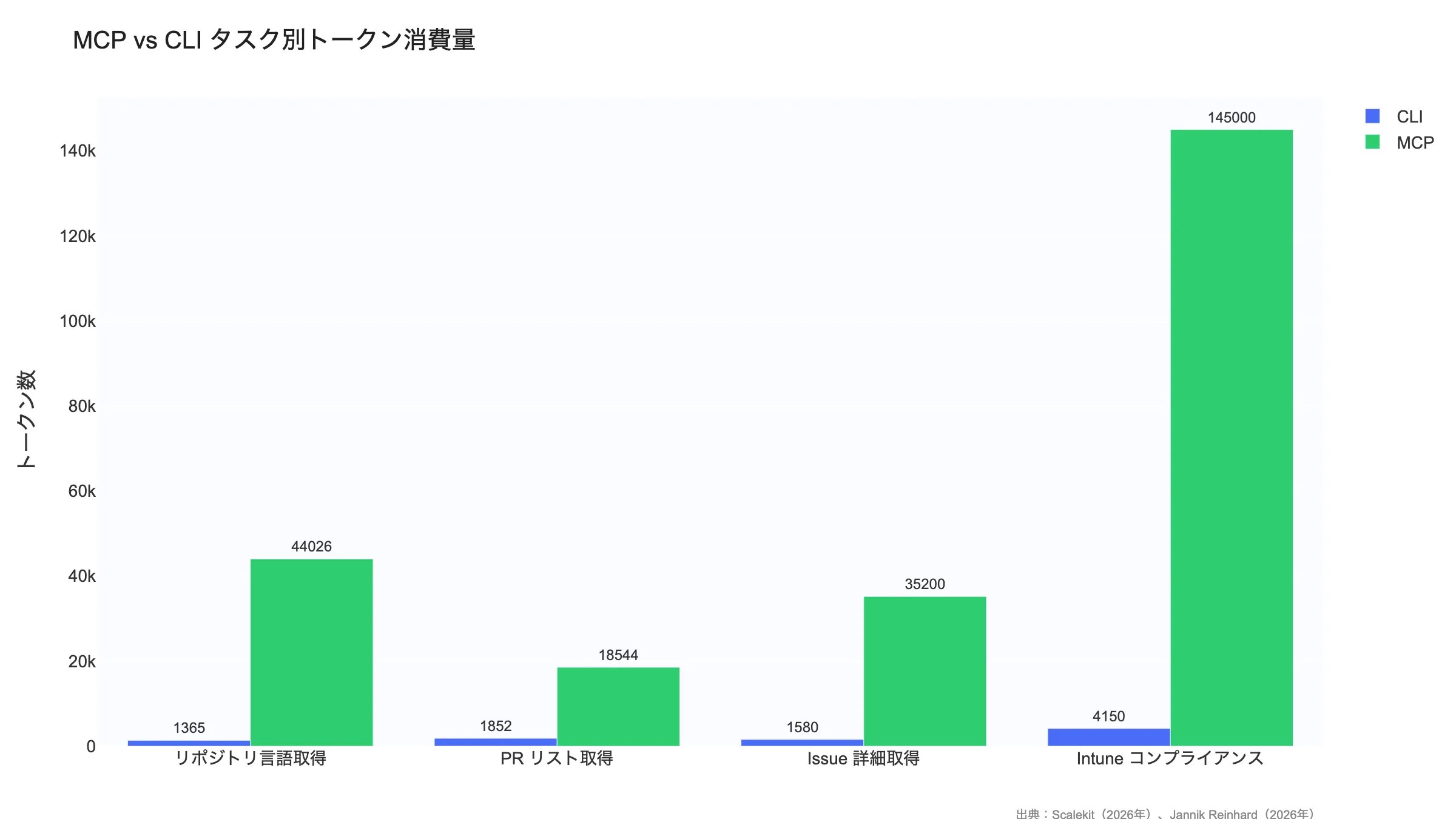
Scalekit ran the same tasks using both CLI and MCP with Claude Sonnet 4 across 75 executions. The results highlighted a dramatic gap between the two approaches.
| Task | CLI Tokens | MCP Tokens | Multiplier |
|---|---|---|---|
| “What languages is this repo written in?” | 1,365 | 44,026 | 32x |
| “List the latest pull requests” | 1,852 | 18,544 | 10x |
| “Get details of Issue #42” | 1,580 | 35,200 | 22x |
Source: Scalekit “MCP vs CLI: The Hidden Cost of AI Tool Integration” (2026)
Key Data — A 32x Cost Difference
The widest gap appeared in the “repo language breakdown” task: CLI completed it in just 1,365 tokens, while MCP consumed 44,026 tokens. Using Claude Sonnet 4 pricing ($3/M input tokens, $15/M output tokens), that translates to roughly $0.004 per task with CLI vs $0.13 with MCP. At 20 tasks/day over 20 working days, that’s ~$1.6/month for CLI vs ~$52/month for MCP — a 30x+ cost gap.
This lines up with my own experience. When I had a large number of MCP servers connected, roughly $10 — and depending on which MCPs you use, up to $30–$50 — of my $100/month API budget was going to schema injection alone. After migrating to CLI, that overhead dropped below $1. The more sessions you run throughout the day, the more this compounds — developers who use AI agents heavily will feel the cost difference most acutely.
Additional Benchmark — 35x Gap in Intune Management Tasks
Beyond Scalekit, Jannik Reinhard independently benchmarked MCP vs CLI on a Microsoft Intune compliance check (50 devices). MCP consumed approximately 145,000 tokens while CLI required just 4,150 tokens — a 35x difference. In browser automation tasks, CLI scored 28% higher on task completion and demonstrated 33% better token efficiency (202 vs 152 score).
Multiple independent benchmarks now point in the same direction, confirming that CLI’s cost advantage is not limited to specific conditions or a single test setup.
Source: Jannik Reinhard “Why CLI Tools Are Beating MCP for AI Agents” (2026)
Why MCP Consumes So Many Tokens
The root cause of MCP’s heavy token consumption is simple: tool definition schemas are injected into the context window on every request.
| Item | Detail |
|---|---|
| Schema size per tool | 550-1,400 tokens |
| GitHub MCP server tool count | 93 tools |
| Total GitHub MCP schema | ~55,000 tokens |
| Context window usage | 40-50% of the window |
Source: GitHub MCP Server (author’s analysis)
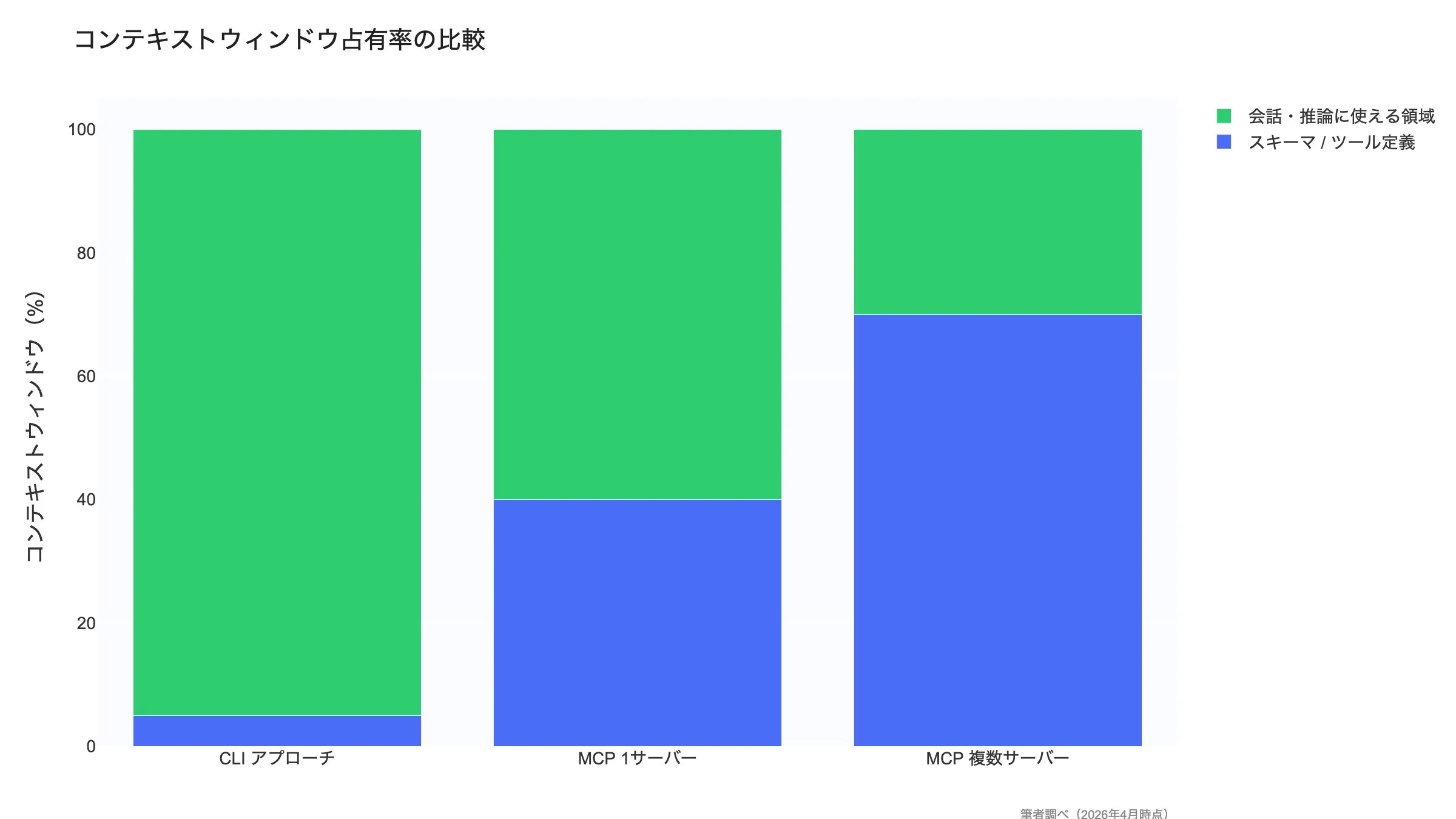
When you connect the GitHub MCP server, all 93 tool definitions — roughly 55,000 tokens — are injected into the context window. That eats up 40-50% of the model’s context capacity, drastically reducing the space available for actual task processing. Even a simple task like “check the repo’s languages” triggers the injection of all 93 tool schemas.
CLI, by contrast, needs just a single-line command like gh api repos/{owner}/{repo}/languages. No schema injection required — the model’s pre-existing knowledge serves as the schema.
Token Reduction Efforts (2026)
Several approaches have emerged to tackle MCP’s token overhead problem.
Anthropic Code Execution Pattern
Replaces MCP tool calls with server-side code execution, achieving a 98.7% reduction in schema injection (150,000 to 2,000 tokens). However, this falls outside the MCP standard specification.
Speakeasy Dynamic Toolsets
Dynamically selects only task-relevant tools for schema injection. Narrows GitHub’s 93 tools down to the 3-5 needed, achieving a 96% reduction.
Lazy Loading
Initially injects only tool names and summaries; full schemas are loaded on demand when the model selects a tool. Claude Code’s ToolSearch uses this pattern.
Schema Compression
Shortening descriptions and omitting optional properties to physically reduce schema size. Limited impact alone, but compounds well with other techniques.
These efforts are promising, but they remain implementation-level workarounds rather than protocol-level fixes. Since MCP is fundamentally designed around “inject all schemas” semantics, a true solution requires a specification revision.
As I discuss in my Claude Code vs Codex CLI comparison, CLI-based tools sidestep this cost problem entirely by design.
How My MCP-to-CLI Migration Affected Costs
I previously had Docker MCP Toolkit, PostgreSQL, K8s, Google services, Obsidian, Playwright, and more all connected simultaneously. The MCP vs CLI cost gap became painfully real once I started using Claude Max ($100/month) for extended coding sessions.
The most memorable period was when context windows topped out at 20k tokens. With multiple MCP servers connected, schema injection alone consumed the majority of that budget — I would hit the context limit in just a few turns of conversation. Switching to CLI immediately freed up enough space for several additional turns. While today’s models support 100k+ contexts, the cumulative schema cost from multiple simultaneous MCP connections is still far from negligible.
Testing with Obsidian MCP confirmed something important: schema tokens are consumed simply by having an MCP server connected, even when you’re not actively using it. This “standby cost” compounds with every additional MCP server. In total, $10 to $50/month of my $100 API budget was going to MCP schemas alone, depending on which servers were connected. After the CLI migration, that dropped below $1.
MCP vs CLI Reliability and Performance Comparison (2026)
Beyond token cost, reliability and performance also show a significant gap. In Scalekit’s 25-run test, CLI achieved a 100% success rate while MCP failed 7 out of 25 times due to ConnectTimeout, landing at just 72% reliability. It is worth noting upfront that this 72% figure primarily reflects remote MCP server connection timeouts — local MCP servers using stdio transport are not affected by this failure mode and perform far more reliably (see the detailed breakdown below).
| Metric | CLI | MCP |
|---|---|---|
| Task Success Rate | 100% (25/25) | 72% (18/25) |
| Average Response Time | 2-5 seconds | 5-15 seconds |
| Primary Failure Cause | Nearly none | ConnectTimeout (7/25 runs) |
| Dependencies | OS shell + CLI tools | MCP server + JSON-RPC + external API |
| Retry Complexity | Low (re-run the command) | High (may require server reconnection) |
Source: Scalekit Official Blog (2026)
Important context on the 72% figure: Scalekit’s MCP failures were primarily caused by ConnectTimeout errors on remote MCP server connections. Local MCP servers using stdio transport do not suffer from this issue and show significantly better reliability. In fact, an independent benchmark by Zechner (an independent security researcher) found that both MCP and CLI achieved a 100% success rate in local environments. The 72% figure is real but reflects a worst-case scenario with remote servers — if you run MCP locally via stdio, reliability is on par with CLI.
Additional Benchmark — Smithery.ai (756 Runs)
Smithery.ai tested native MCP servers against auto-generated CLI wrappers across 756 runs using Claude Haiku 4.5 and Codex GPT-5.4. The results paint a more nuanced picture of MCP vs CLI performance:
- Native MCP: 91.7% task success rate
- Auto-generated CLI wrappers: 83.3% task success rate
- Token usage: CLI wrappers consumed 2.9x more tokens than native MCP
- Latency: CLI wrappers had 2.4x higher latency than native MCP
These results appear to contradict the Scalekit findings, but the key difference lies in what “CLI” means. Smithery tested auto-generated CLI wrappers — thin command-line interfaces mechanically generated from API specs — not battle-tested, human-designed tools like gh, aws, or kubectl. Mature CLIs have concise output formats, rich training data in LLM weights, and years of optimization that auto-generated wrappers lack.
Disclosure: Smithery operates an MCP hosting platform and has a commercial interest in MCP adoption, which should be considered when interpreting these results.
Source: Smithery.ai Blog (2026, Claude Haiku 4.5 + Codex GPT-5.4, 756 runs)
The reason CLI delivers higher reliability is straightforward: fewer moving parts. CLI operates through the OS shell and locally installed tools. MCP, on the other hand, involves a multi-layer stack — MCP server process, JSON-RPC communication, and external API calls — where any layer can fail.
In my own experience, I lost time debugging MCP server startup failures and version mismatches. With CLI, a simple which command confirms availability. This ease of troubleshooting has a real impact on day-to-day development productivity.
MCP Reliability Concerns
- When an MCP server crashes, it disrupts the agent’s entire session
- Streamable HTTP transport adds network latency
- Running multiple MCP servers simultaneously increases memory consumption
- As of 2026, MCP server quality varies significantly across vendors
MCP vs CLI Security Comparison
Security is the one area in the MCP vs CLI debate where MCP holds a clear advantage. MCP was built with enterprise-grade security baked in from the design stage.
MCP Security Strengths
OAuth 2.1 Standard Authentication
MCP offers first-class OAuth 2.1 support (PKCE required, spec finalized March 2025). Token issuance, refresh, and revocation are standardized — no need to implement auth per service.
Scoped Permissions
Access permissions can be set at fine granularity per tool. “Read issues only” or “allow PR creation but block merging” — that level of control is possible.
Audit Logging
Every tool invocation is logged — which agent, when, which tool, with what parameters. This provides the traceability required for compliance.
Token Rotation
Automatic access token rotation minimizes risk from token leaks. No need to hold long-lived API keys.
Deep Dive — How OAuth 2.1/PKCE Changes Agent Authentication
MCP’s support for OAuth 2.1 with PKCE (Proof Key for Code Exchange) introduces a critical security advantage: credential delegation. The AI agent never directly handles API keys or long-lived secrets. Instead, the MCP server manages the OAuth flow, issuing short-lived access tokens with scoped permissions. If a token is compromised, it expires quickly and can be revoked without rotating the underlying credentials.
CLI tools, by contrast, typically authenticate through environment variables or config files (e.g., ~/.config/gh/hosts.yml, ~/.aws/credentials). This is simpler to set up, but riskier when AI agents have file-system access — an agent could inadvertently read, log, or expose these credentials. For individual developers on trusted machines, this risk is manageable with proper operational hygiene. For multi-agent or multi-tenant environments, MCP’s delegated authentication model is significantly safer.
Source: MCP Authorization Specification (2025)
CLI Security Risks and Mitigations
Key CLI Security Risks
- Plaintext API keys: Keys stored in
.envfiles or environment variables are always at risk of leakage. Mitigation: use a secrets manager - Ambient authentication: Tokens from
gh auth loginare shared machine-wide. Mitigation: Claude Code permission controls and sandboxing - Git commit exposure: Risk of accidentally committing
.envfiles. Mitigation: .gitignore, git-secrets - Coarse permissions: CLI tools tend to be “all access or no access.” Mitigation: issue least-privilege tokens
- Shell injection: Agent-generated commands could contain malicious prompt injections. Mitigation: sandboxed execution (e.g., Codex CLI sandbox)
The Security Verdict
If you need enterprise-level governance, MCP is the clear choice. OAuth 2.1, scoped permissions, and audit logs are designed to meet organizational security requirements. For individual developers or trusted teams, CLI security risks can be adequately managed with proper operational practices.
In my workflow, CLI plus environment variables is more than sufficient for personal projects. For team-based or client-facing products, I appreciate MCP’s permission management.
MCP vs CLI by Service — GitHub, Docker, Slack, and More
GitHub CLI vs GitHub MCP
The official GitHub MCP server exposes 93 tools covering issues, PRs, repository settings, Actions, Packages, and more. While comprehensive, that comprehensiveness is precisely the cost problem.
# CLI approach: done in one command (1,365 tokens)$ gh api repos/owner/repo/languages{ "Python": 45230, "JavaScript": 12500, "TypeScript": 8900}# MCP approach: 93 tool schemas injected first (44,026 tokens)# → 32x cost differenceMy verdict: for individual development, gh CLI is the only choice I’d make. GitHub MCP is unnecessary. That said, GitHub MCP does offer features like webhook management and repository settings automation that the CLI doesn’t cover.
These MCP and CLI integrations play a key role in AI editors too. Our Cursor vs Windsurf Comparison examines how each editor handles MCP support and external tool connectivity.
MCP vs CLI Quick Reference by Service
| Service | CLI Tool | MCP Server | My Recommendation |
|---|---|---|---|
| GitHub | gh (mature) | 93 tools | CLI preferred |
| Docker | docker (mature) | Docker MCP | CLI preferred |
| Kubernetes | kubectl (mature) | K8s MCP | CLI preferred |
| AWS | aws cli (mature) | AWS MCP | CLI preferred |
| Slack | No CLI | Slack MCP | MCP required |
| Notion | No CLI | Notion MCP | MCP required |
| Browser | No CLI | Playwright MCP | MCP required |
| Database | psql / mysql (mature) | DB MCP | CLI preferred |
Author’s analysis (as of March 2026)
The pattern is clear: use CLI when a mature CLI exists, and use MCP when no CLI alternative is available (Slack, Notion, browser automation, etc.). My own setup follows this pattern exactly. For everyday database operations I use psql via CLI, and only connect MCP temporarily for complex schema exploration.
The MCP vs CLI choice also affects which editor fits your workflow best. For a comparison between a performance-first editor and an AI-powered one, see our Windsurf vs Zed Comparison.
My MCP-to-CLI Migration Experience — A Practical Report
Beyond the theoretical MCP vs CLI comparison, here is my real-world experience migrating from an MCP-centric setup to a CLI-first approach.
Before: MCP-Centric Setup
My previous setup was an “install everything available” approach. I had Docker MCP Toolkit, PostgreSQL MCP, K8s MCP, Google services MCP, Obsidian MCP, and Playwright MCP all connected simultaneously. The unified interface for everything was genuinely appealing, but the costs were real:
- Schemas consumed the majority of the context window (each server burning thousands to tens of thousands of tokens)
- In the 20k context era, I would hit the limit in just a few turns of conversation
- Context compression occurred frequently during long sessions, causing the AI to forget recent work
- MCP server startup failures and version mismatches interrupted my workflow
After: CLI-First Setup
I’ve now removed essentially all MCP servers. I run gh, psql, docker, and kubectl directly via the shell. For services that lack a CLI but have an API, I’ve documented the API usage patterns in Claude Code Skills instead — effectively replacing MCP’s “unified interface” with Skills + CLI + API. The migration was gradual, switching one service at a time as CLI alternatives proved sufficient. I have zero regrets. The cleanliness of not having unnecessary context consumption is the single biggest win. For the editor side, I’ve also adopted a lightweight setup pairing Zed with CLI agents, as I discuss in my Windsurf vs Zed Comparison.
What Changed After Migration
| Metric | MCP-Centric (Before) | CLI-First (After) |
|---|---|---|
| Token Cost | $10–$50/month on schemas alone | Dropped below $1/month |
| Work Speed | Delayed by schema loading | Instant command execution |
| Error Rate | Timeouts and type errors | Nearly zero |
| Long Sessions | In the 20k era, hit context limits in a few turns | Gained several extra turns of usable context |
| Config | Docker/K8s/Google/Obsidian/Playwright etc. | All MCPs removed; replaced by CLI + API + Skills |
Author’s analysis (as of March 2026, using Claude Max plan)
The biggest takeaway from migration was simple: default to CLI unless there’s a specific reason not to. That said, MCP doesn’t become completely irrelevant — you still need it for services without CLIs, and you need the CLI tools accessible to your AI agent. Understanding both approaches and choosing the best one per integration is the realistic conclusion.
If you’re going CLI-first, it’s also worth understanding how different Claude Code interfaces handle CLI workflows differently. Our comparison of Claude Code: CLI vs Web vs Desktop explains which interface suits each use case.
MCP vs CLI Decision Framework — When to Choose Each
A useful framework for choosing between MCP and CLI is the distinction between the “Inner Loop” and “Outer Loop” of development. The Inner Loop is where you write code and get immediate feedback — coding, debugging, running tests. The Outer Loop is where your code interacts with external systems — CI/CD, deployment, team collaboration, SaaS integrations.
Inner Loop — CLI Wins
Speed and token efficiency are the top priorities. git, gh, docker, and pytest are tools the model knows inside-out, executing instantly with zero schema overhead.
Outer Loop — MCP Has Advantages
External SaaS connections, multi-tenant authentication, cross-team collaboration. When you need OAuth 2.1 delegated auth, structured audit logs, and unified JSON responses, MCP is the better fit.
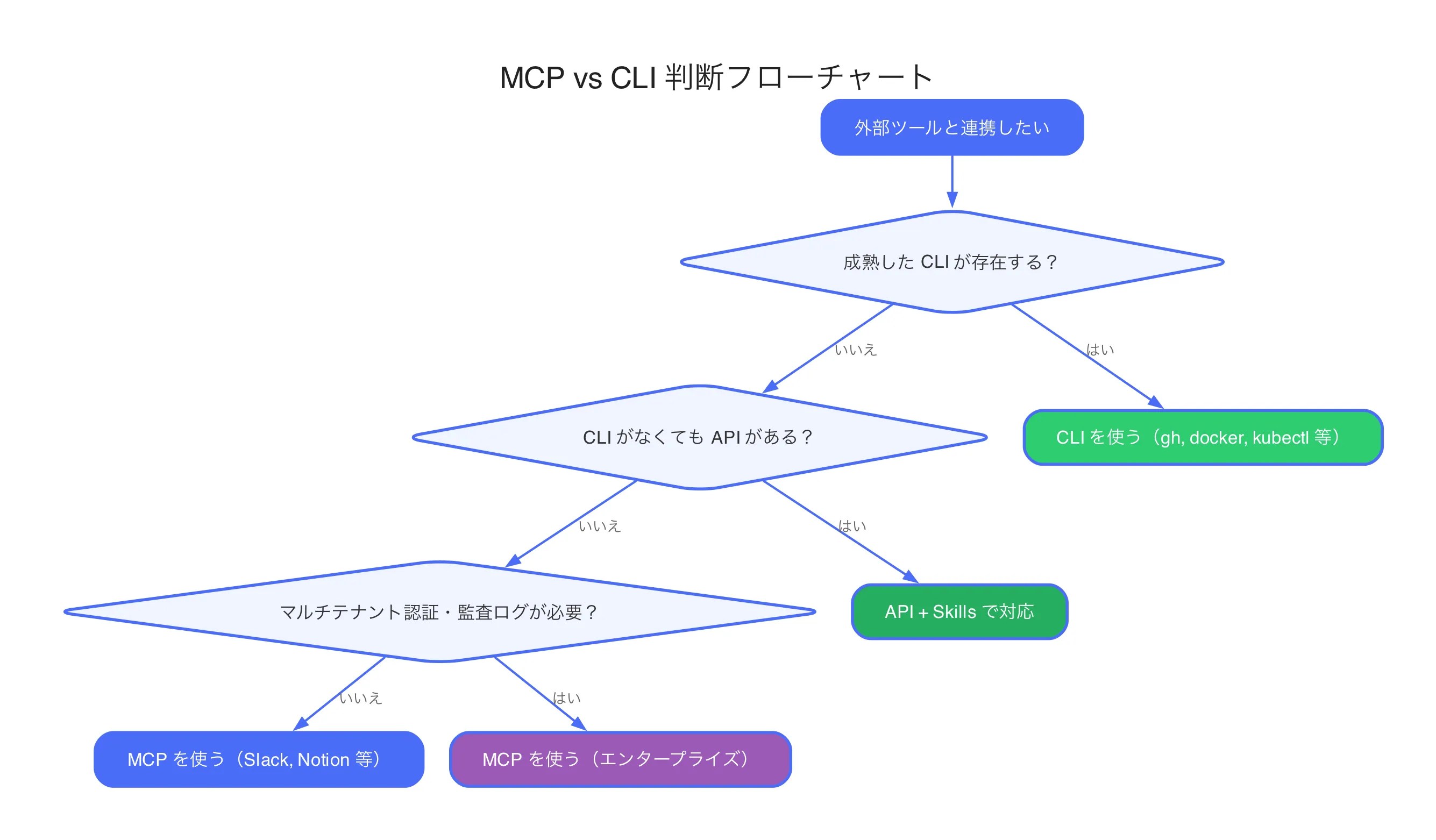
That said, in my own practice, even most Outer Loop tasks can be handled with CLI + API + Skills. Unless MCP is genuinely the only option, I default to CLI. A simple rule of thumb: if it can’t be done without MCP, use MCP; otherwise, use CLI.
When to Choose CLI
A Mature CLI Exists
Tools like gh, docker, kubectl, git, aws cli, and gcloud have years of track record and are richly represented in model training data.
Token Efficiency Matters
When minimizing API costs or maximizing context window for reasoning, CLI’s 10-32x cost advantage is decisive.
Individual or Team Development
In trusted local environments, MCP’s enterprise security features are overkill. CLI’s simplicity wins.
Reliability Is Non-Negotiable
For CI/CD pipelines and automation workflows requiring 100% success rates, CLI eliminates MCP’s ConnectTimeout risk.
When to Choose MCP
No CLI Available
Services like Slack, Notion, Figma, and Salesforce have no developer-friendly CLI. MCP (or direct API calls) is the only option.
Multi-Tenant Authentication
When multiple customers connect with their own credentials on a SaaS platform, MCP’s OAuth 2.1 flow is the right fit.
Enterprise Governance
When audit logs, permission controls, and compliance requirements are in play, MCP’s traceability of “who did what and when” gives it the edge.
Non-Technical End Users
When end users don’t use terminals, MCP’s unified UI integration — invoking tools from a chat interface — is the better experience.
The Hybrid Approach Is the Answer (My Conclusion)
In practice, a “hybrid approach” that uses CLI and MCP situationally is the best practice for 2026.
Hybrid Pattern — Claude Code Implementation Example
Claude Code is a prime example of the hybrid approach. Core development tasks (git, file operations, test execution) use CLI directly, while services without CLIs like Notion and Slack connect through MCP servers. Additionally, MCP’s Lazy Loading (ToolSearch) minimizes schema injection costs.
This pattern is already adopted by many AI coding tools, delivering a pragmatic solution that balances cost efficiency with feature coverage. I cover more tips on this hybrid workflow in my Claude Code Efficiency Tips guide.
| Scenario | Recommended | Reason |
|---|---|---|
| Development workflows | CLI | git / gh / docker are overwhelmingly more efficient via CLI |
| Customer-facing products | MCP | OAuth authentication, permission controls, and audit logs required |
| Slack / Notion integration | MCP | No CLI exists; MCP is the only option |
| CI/CD pipelines | CLI | 100% reliability needed; MCP connection instability unacceptable |
Author’s analysis (as of March 2026)
MCP vs CLI Industry Trends — Latest Developments in 2026
The MCP Momentum
The MCP ecosystem has been accelerating throughout 2026.
- Linux Foundation AAIF: Co-founded by Anthropic, OpenAI, Block, Google, and Microsoft to drive MCP standardization and governance
- Docker MCP Catalog: One-click MCP server deployment (similar to Docker Hub), dramatically lowering the setup barrier
- Major SaaS adoption: GitHub, GitLab, Jira, Confluence, Salesforce, HubSpot, and virtually all enterprise SaaS platforms now offer official MCP servers
- Streamable HTTP transport: A standardized HTTP-based transport alongside stdio, making remote MCP server operation far easier
The CLI Comeback
Notable — Perplexity Drops MCP
In March 2026, Perplexity announced it was scaling back MCP support in favor of CLI-based agent execution, citing “token cost inefficiency” and “connection instability.” As cost competition intensifies in the AI agent market, MCP’s overhead has become harder to justify.
- Anthropic code execution pattern: Anthropic itself is researching code-execution-based tool invocation as an MCP alternative, achieving 98.7% reduction in schema injection
- Terminal-first tools on the rise: Claude Code, Warp Terminal, and Ghostty are designing the terminal/CLI as the first-class AI interface
- “CLI is all you need” movement: The developer community is increasingly vocal that “MCP is over-engineered — CLI is enough,” particularly among solo developers and startups
What Lies Ahead
MCP and CLI are moving toward coexistence: MCP for enterprise, multi-tenant, and no-code domains; CLI for developer workflows and cost optimization. Three trends to watch:
MCP Specification Revision
The AAIF is discussing schema injection optimization (standardizing lazy loading, dynamic tool selection) in the next spec revision. If token consumption improves at the protocol level, CLI’s cost advantage will shrink.
Expanding Context Windows
As model context windows continue to grow, MCP’s schema injection cost becomes relatively less impactful. However, token unit price remains an important variable.
Agent-to-Agent Communication
In A2A (Agent-to-Agent) scenarios where AI agents collaborate, MCP’s structured protocol has the advantage. CLI was designed for human interfaces and is less suited for inter-agent communication.
Frequently Asked Questions — MCP vs CLI
Conclusion — MCP vs CLI Means “CLI First, MCP as Complement”
The MCP vs CLI verdict: CLI first, use MCP where no CLI exists and where governance demands it.
The hybrid approach is the 2026 best practice.
As the Scalekit benchmark demonstrated, CLI is 10-32x cheaper than MCP with 100% reliability. After personally migrating from MCP-centric to CLI-first, my monthly schema overhead dropped from $10–$50 to under $1, and long session stability improved dramatically. For services with mature CLIs (GitHub, Docker, Kubernetes, AWS), default to CLI. Reserve MCP for services without CLI alternatives and for enterprise governance needs — that is the optimal strategy in 2026.
Ultimately, what matters is not “which technology is superior” but “which fits the task.” Using MCP where CLI suffices wastes costs; insisting on CLI where only MCP can reach loses capability. Analyze your use cases objectively and choose the right tool for each integration.


![Harden Claude Code CLI: 9 Proven Steps for Business Use [2026]](https://i0.wp.com/devgent.org/wp-content/uploads/2026/03/claude-code-security-eyecatch.webp?fit=300%2C167&ssl=1)
![Cursor vs Windsurf: Complete Comparison Guide [2026 Edition]](https://i0.wp.com/devgent.org/wp-content/uploads/2026/03/wp-upload-cursor-vs-windsurf-eyecatch.webp?fit=300%2C167&ssl=1)
![Windsurf vs Zed: Complete Comparison of AI Features, Performance & Pricing [2026]](https://i0.wp.com/devgent.org/wp-content/uploads/2026/03/windsurf-vs-zed-eyecatch.webp?fit=300%2C167&ssl=1)


Author
krona23
Over 20 years in the IT industry, serving as Division Head and CTO at multiple companies running large-scale web services in Japan. Experienced across Windows, iOS, Android, and web development. Currently focused on AI-native transformation. At DevGENT, sharing practical guides on AI code editors, automation tools, and LLMs in three languages.
Related Articles



Leave a Reply