
Updated August 20, 2026
📑Table of Contents
Windsurf was renamed Devin Desktop on June 2, 2026. The IDE, extensions, settings, and pricing largely carried over, while Devin Local is now the current local-agent path. Cascade references remain for legacy sessions and documentation. See the official announcement.
📅 Last updated: June 2026
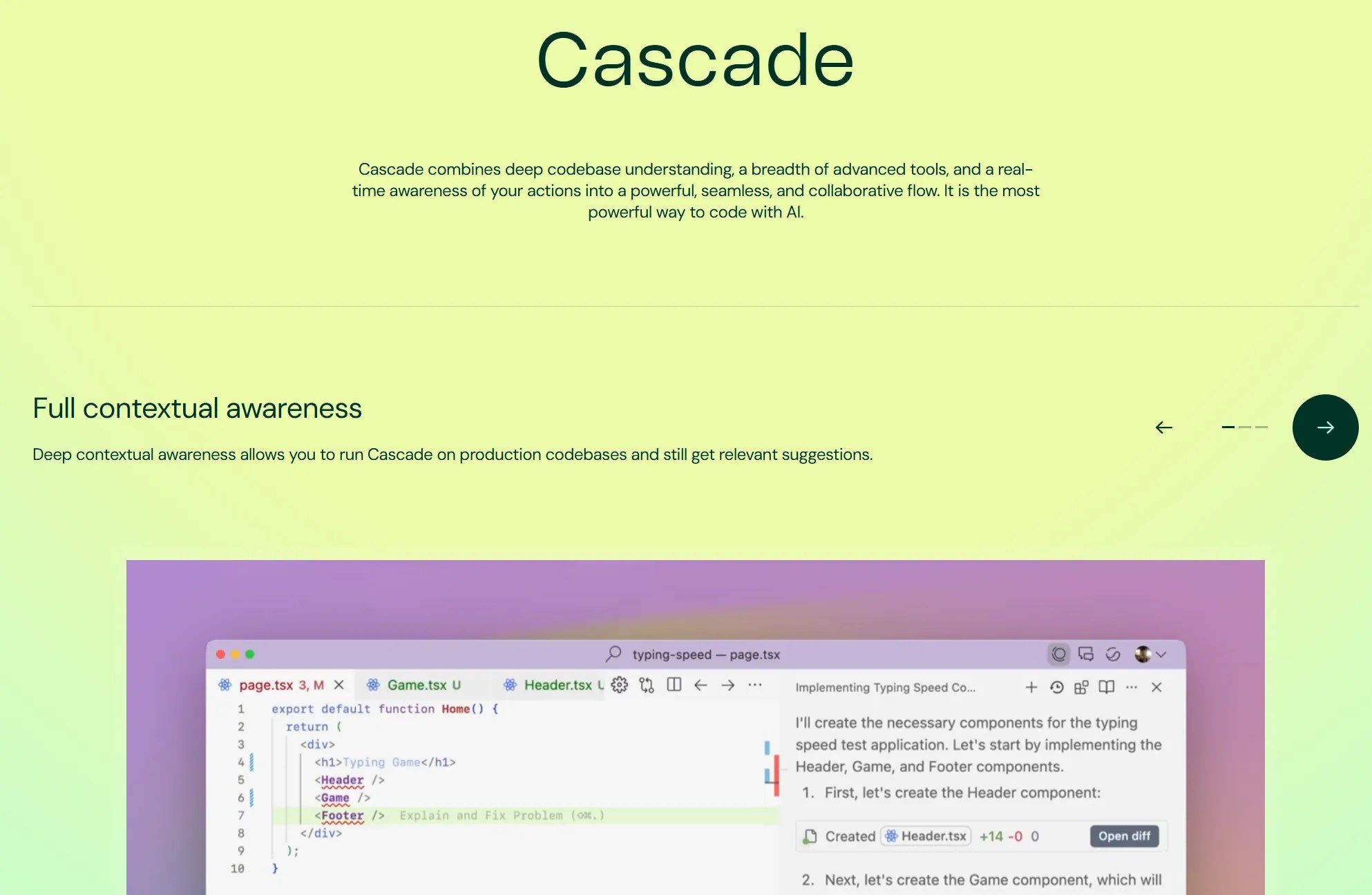
In 2026, AI code editors are everywhere — Cursor, GitHub Copilot, Claude Code, Kiro, and more are all competing for your workflow. So which one actually deserves your attention? If you care about cost without sacrificing capability, Devin Desktop (formerly Windsurf) deserves a serious look. On June 2, 2026, Cognition renamed Windsurf to Devin Desktop via an OTA update and put the Agent Command Center — a single Kanban view for managing every local and cloud agent — at the center of the product. The local Cascade agent was rebuilt from scratch in Rust as Devin Local (up to 30% more token-efficient, with subagent support); legacy Cascade reaches end-of-life on July 1, 2026, so any CI jobs or scripts that call Cascade by name need to switch to Devin Local. Your plan, pricing, and extensions all carry over unchanged (the product’s earlier name was Codeium).
Born from Codeium and rebuilt around an AI agent called Cascade, Windsurf gives you a VS Code-based editor that deeply understands your entire codebase — and does it at $20/month, the same price as Cursor. Until recently I used Windsurf as my primary daily driver, and what kept me there was the flexibility: you can manage credits yourself, mix and match models for different tasks, and lean on SWE-1.5 (Windsurf’s own model) for free. The infamous Cascade Errors have also dropped dramatically compared to a year ago. Yes, not every new model they launch is a winner — but the promotional windows that unlock new models for free or at a discount are a genuinely nice perk.
In July 2025, Cognition AI — the team behind Devin, the autonomous AI software engineer — acquired Windsurf. That acquisition reshuffled leadership, and with the June 2026 rename it delivered on its promise: you now code alongside Devin Local while delegating full autonomous tasks to cloud Devin from within the same IDE. Devin Desktop also ships with Agent Client Protocol (ACP) support, so third-party agents like Codex, Claude Agent, and OpenCode run inside the same editor — one Devin across desktop, cloud (Devin Cloud), terminal (Devin CLI), and code review (Devin Review).
This guide covers everything: what Windsurf actually is, the full feature set, pricing as of March 2026, risks to be aware of, and how it stacks up against Cursor, Claude Code, and GitHub Copilot.
What Is Windsurf? — The AI Code Editor Born from Codeium
Windsurf is an AI-powered code editor built on VS Code, developed originally by Codeium. The VS Code foundation means you can bring over your existing extensions, themes, and keybindings with minimal friction. What sets Windsurf apart from a typical AI-assisted editor is its architecture: everything is built around Cascade, a full agentic system that understands your codebase as a whole rather than file by file.
Windsurf also developed its own frontier-class model, SWE-1.5, which runs at up to 950 tokens/second and is available at zero credit cost on paid plans. In February 2026, Windsurf claimed the #1 spot on LogRocket’s AI Dev Tool Power Rankings — a signal that the product has matured well past its Codeium roots.
Official site: https://windsurf.com/
The Windsurf Story — Acquisition Timeline
Windsurf’s history reads more like a startup thriller than a typical developer tool story:
- 2021 — Varun Mohan and Douglas Chen (MIT alumni) found Exafunction
- 2023 — Rebranded to Codeium; rapid growth as an AI code completion tool
- April 2024 — Rebranded again to Windsurf; pivoted from completion tool to full agentic AI editor
- April 2025 — OpenAI opens acquisition talks, reportedly valuing Windsurf at ~$3 billion
- July 11, 2025 — OpenAI talks collapse. Same day, Google executes an acquihire: CEO Varun Mohan, CTO Douglas Chen, and roughly 40 senior engineers join Google for a reported $2.4 billion package (licensing + talent acquisition)
- July 14, 2025 — Cognition AI acquires the remaining Windsurf entity — IP, product, trademarks, and ~210 employees — for approximately $250 million
- December 2025 — Acquisition finalized. Devin integration within the Windsurf IDE begins
- June 2, 2026 — Windsurf is renamed Devin Desktop via OTA update, introducing the Agent Command Center, ACP support, and Devin Local
- July 1, 2026 — Legacy Cascade reaches end-of-life; Devin Local becomes the sole local agent
What Is Devin?
Devin, built by Cognition AI, is widely recognized as the world’s first autonomous AI software engineer. Give it an issue or a feature spec and it handles design, implementation, testing, and deployment on its own — no hand-holding required.
With the June 2026 rename, the Windsurf + Devin hybrid workflow is now live: you stay in the IDE writing and reviewing complex code with Devin Local, while cloud Devin autonomously handles routine or parallelizable tasks in the background. The Agent Command Center’s Kanban view lets you orchestrate multiple Devins — and ACP-compatible third-party agents — side by side, turning a single AI assistant into a coordinated AI team run from one editor.
Reference: Cognition official blog
What Windsurf Can Do — Complete Feature Guide
Windsurf has grown far beyond a basic AI code editor. Here’s a breakdown of its eight core capabilities.
① Cascade (AI Agent)
Windsurf’s centerpiece. Cascade is a full agentic system with two modes — Code (generation and editing) and Chat (questions and research). It maintains a live planning agent that continuously updates its task plan. Actions it can take autonomously: create, edit, or delete files; run terminal commands; perform web searches; capture browser console errors; and deploy to Netlify. Checkpoints save a snapshot at each step so you can roll back any change. Turbo Mode skips terminal confirmation prompts for fully automated runs. Wave 13 added Cascade Hooks — custom commands that fire at any point in your workflow. Image input is also supported: paste a screenshot and Cascade generates the corresponding UI code.
② SWE-1.5 (Windsurf’s Own Model)
Windsurf’s in-house frontier coding model, trained on the Cascade agent harness using NVIDIA GB200 NVL72 chips with reinforcement learning. Inference speed reaches up to 950 tokens/second — roughly 6× Claude Haiku 4.5 and 13× Claude Sonnet 4.5. It achieves near-SOTA on SWE-Bench Pro (Scale AI) and supports multimodal input (images). Best part: it costs zero credits on Pro plans and above, making it the default choice for most tasks. No external API billing means no surprise charges.
③ Windsurf Tab (AI Completion)
Unified in Wave 14, Windsurf Tab combines Autocomplete, Supercomplete (multi-line predictions), and Tab to Jump (cursor position suggestions) into a single system. It pulls signals from recently viewed files, terminal output, your current Cascade conversation, and clipboard content to produce completions that actually fit what you’re doing right now — not just syntactic boilerplate. Available unlimited and free on all paid plans.
④ Previews (Live Browser Preview)
Introduced in Wave 4 (March 2025), Previews lets you view your local web app live inside the IDE or in an external browser (Chrome, Arc, or Chromium). The Element Selector lets you click any UI element and send it as context to Cascade. Console errors are captured automatically and forwarded to Cascade for diagnosis — no more copy-pasting stack traces into the chat.
⑤ Deploys (One-Click Publish)
Available since Wave 8 (April–May 2025). Deploy your project to Netlify directly from the IDE with a single click — no terminal, no dashboard switching. Ideal for sharing prototypes with clients or teammates. Free plan includes 1 deploy per day; Pro gets more. It’s a small feature, but the friction it removes is real.
⑥ Memories (Persistent Context)
Cascade automatically remembers important project context across sessions — conventions, architecture decisions, recurring patterns. You can manually add, edit, or remove memories at any time. The .windsurfrules file lets you define custom rules that govern Cascade’s behavior project-by-project (similar to Cursor’s .cursorrules). This is what makes working on the same codebase day after day feel coherent rather than like starting fresh every time.
⑦ Fast Context (High-Speed Code Search)
Launched in October 2025, Fast Context is a sub-agent built on SWE-grep that finds relevant code context 20× faster than the previous approach, with throughput exceeding 2,800 tokens/second. In practice, this means Cascade responds more accurately on large codebases because it can retrieve the right context before it hallucinates. It’s one of those behind-the-scenes improvements you don’t notice until you go back to an older version.
⑧ Other Notable Features
MCP (Model Context Protocol): OAuth, SSE, and Streamable HTTP supported, with an in-IDE management UI. Arena Mode (Wave 14, Jan 2026): run two models anonymously side by side, compare outputs, vote, and see personal/global leaderboards. Plan Mode (Wave 14): generate a detailed implementation plan before Cascade writes a single line. Git Worktrees (Wave 13): run multiple Cascade sessions on parallel branches without conflicts. Multi-Cascade Panes: view multiple agent sessions side by side. JetBrains support (since Wave 7): full Cascade access in IntelliJ, PyCharm, WebStorm, and others. Auto-generated commit messages round things out.
Three Key Strengths
🌊 Strength 1 — Deep Context Understanding
The thing that separates Cascade from most AI coding assistants is how it thinks about your project. Rather than reading files in isolation, it builds an understanding of the overall architecture, dependency graph, and coding conventions before it acts. Ask it to “add validation to this API endpoint” and it studies how existing validation is done elsewhere in the codebase — then produces consistent code rather than something that technically works but looks foreign. Cross-file refactoring is safe because Cascade performs accurate impact analysis before making changes. Checkpoints mean you can try sweeping changes with confidence: if something goes wrong, rolling back is one click. The combination of Fast Context and SWE-1.5 makes this fast enough to feel responsive even on large monorepos.
💰 Strength 2 — Best-in-Class Cost Performance
At $20/month, Windsurf Pro matches Cursor Pro on price — but Windsurf gives you SWE-1.5 and GPT-5.1-Codex at zero credit cost. That means you can do a substantial amount of real development without burning through credits at all. When you do need premium models (Claude Sonnet, o3, etc.), additional credits are $10 per 250 units with no expiration — they roll over indefinitely. Tab completion is unlimited on all paid plans. If you’re disciplined about model selection, $20–$40/month covers serious development work. For developers who want genuine agentic AI capability without paying $200/month, there’s no better deal in the current market.
🚀 Strength 3 — Devin Integration, Now Shipped
No other AI editor has anything like this. Cognition AI’s acquisition of Windsurf was explicitly about bringing Devin’s autonomous capabilities inside an IDE — and with the June 2026 “Devin Desktop” rename, that vision shipped. You handle complex, nuanced work with Devin Local while cloud Devin runs autonomously on parallelizable tasks in the background. The Agent Command Center manages multiple Devins from a single Kanban view, and ACP support means Codex, Claude Agent, and OpenCode can run in the same workspace and share context. This is a qualitatively different kind of AI development environment — an “agent command center,” not just a feature increment.
Pricing Plans — March 2026 Update
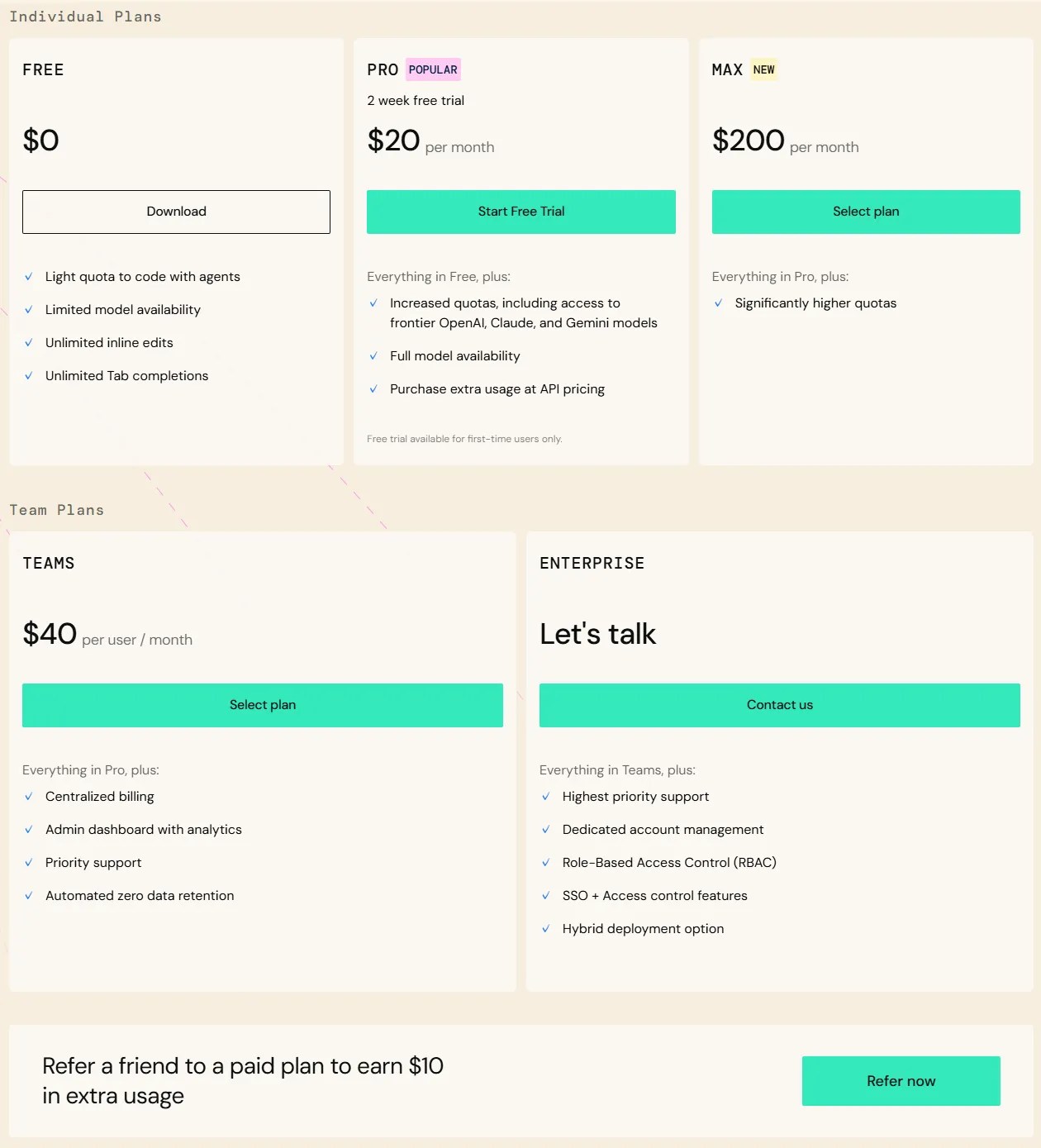
Windsurf overhauled its pricing on March 19, 2026. The old model (Pro at $15/month with 500 monthly credits) was replaced by a daily/weekly quota system. Existing subscribers at $15/month are grandfathered.
| Plan | Price | What You Get |
|---|---|---|
| Free | $0 | Light quota, unlimited Tab completion, all premium models, 1 deploy/day |
| Pro | $20/mo | Daily + weekly quota, SWE-1.5 & GPT-5.1-Codex at 0cr (other models 1–30cr), Fast Context, add-on credits $10/250 units (no expiry) |
| Max | $200/mo | Expanded quota, all Pro features — for power users who push limits daily |
| Teams | $40/user/mo | Pro features + SSO, admin dashboard, shared knowledge base |
| Enterprise | Contact sales | Custom quotas, RBAC, compliance features |
👉 Windsurf Pricing & Credit Costs: Complete Model-by-Model Guide
Risks and Considerations
Founder and Key Engineer Departures
⚠️ The Leadership Gap
- CEO Varun Mohan, CTO Douglas Chen, and roughly 40 senior engineers moved to Google in July 2025 as part of the acquihire deal
- Losing your founders is never a non-event — institutional knowledge, product vision, and technical direction walked out the door
- That said, Cognition AI acquired the remaining team (~210 people) and continues active development. Wave 13 in December 2025 was a major release including SWE-1.5, which signals real investment
Slower Pace of Major Feature Additions
⚠️ Post-Acquisition Development Velocity
- Wave release cadence has widened noticeably since the acquisition — Cursor and Claude Code have been moving faster on new capabilities
- Some of this is probably deliberate focus (Devin integration takes bandwidth), but for users who want the latest models and features immediately, Windsurf can feel slightly behind the curve
- The June 2026 rename shipped Devin integration as the headline differentiator, but the legacy Cascade EOL (July 1) forces some migration work for users with named automation
Performance on Very Large Files
⚠️ Large-File Accuracy
- Files in the 300–500+ line range can degrade Cascade’s response accuracy, according to community reports
- At enterprise scale (very large monorepos, complex dependency trees), Cursor still has an edge in consistency
- Fast Context is improving this over time, but it’s worth testing on your actual codebase before committing to Pro
Windsurf vs Other AI Editors
| Feature | Windsurf | Cursor | Claude Code | GitHub Copilot |
|---|---|---|---|---|
| Monthly price (individual) | $20 | $20–$200 | $100–$200 | $10–$39 |
| Agent system | Cascade | Composer / Agent | CLI-based | Copilot Chat |
| Proprietary model | SWE-1.5 | None | Claude family | None |
| IDE support | VS Code, JetBrains | VS Code | Terminal | VS Code, JetBrains |
| Key strength | Cost + speed | Accuracy + large-scale | Code quality | Enterprise + Microsoft |
| Devin integration | Built-in | None | None | None |
Quick recommendations:
- Light-to-medium projects using 0cr models → Windsurf Pro — still good value at $20/month if you stick to GPT/SWE-1.5. For heavy Claude usage, expect to need Max ($200/month)
- Large-scale projects needing precise control → Cursor Pro+ or Ultra
- Highest output code quality → Claude Code (Claude Max)
- Enterprise with Microsoft ecosystem → GitHub Copilot
👉 Cursor vs Windsurf: Complete Comparison
👉 AI Code Editor Comparison — Developer Guide
FAQ
Can I use Windsurf for free?
Yes. The Free plan gives you access to all premium models, unlimited Tab completion, Previews, and one deploy per day. The quota is intentionally limited, so for serious daily development you’ll want Pro — but Free is genuinely enough to evaluate whether Windsurf fits your workflow.
Is Windsurf safe to use after the acquisition?
Cognition AI acquired the full Windsurf entity: IP, product, brand, and ~210 employees. The product is under active development — Wave 13 (December 2025) shipped SWE-1.5 and Cascade Hooks, and in June 2026 it was renamed Devin Desktop with the Devin integration fully landed. There’s always some risk with a product that went through a complex acquisition, but the current trajectory looks stable.
How is Cascade different from GitHub Copilot Chat?
Cascade is a full autonomous agent: it edits multiple files, runs terminal commands, captures browser errors, deploys to Netlify, and maintains a persistent task plan across a session. Copilot Chat is primarily a suggestion and Q&A interface — it can help with code in context, but autonomous multi-step execution is limited. The gap in real-world agentic capability is significant.
Does SWE-1.5 cost extra?
No. SWE-1.5 is included at zero credit cost on Pro plans and above. It’s Windsurf’s own model, so there’s no external API charge. For most routine tasks, SWE-1.5 is fast enough and capable enough that you won’t need to reach for a premium model at all.
Does Windsurf work in JetBrains IDEs?
Yes, since Wave 7 (April 2025). IntelliJ IDEA, PyCharm, WebStorm, and other JetBrains IDEs all support full Cascade functionality. If you’re a Java or Python developer who prefers JetBrains over VS Code, Windsurf is one of very few AI editors that actually covers you.
Windsurf or Cursor — which should I pick?
For most developers, it comes down to priorities. If you want maximum cost efficiency and fast iteration on small-to-medium projects, Windsurf wins. If you’re working on a large, complex codebase and need the most reliable multi-file editing accuracy available today, Cursor still has an edge. The 2026 consensus is “use both and switch based on project” — but if you’re picking one, match it to your primary use case.
Has Devin been integrated into Windsurf (Devin Desktop)?
Yes — the integration shipped with the June 2, 2026 “Devin Desktop” rename. From the Agent Command Center’s Kanban view you manage local Devin Local, cloud Devin, and ACP-compatible third-party agents (Codex, Claude Agent, OpenCode) together. The rename arrived as an OTA update to existing Windsurf installs, with plans, extensions, and settings carried over unchanged.
Conclusion
Windsurf: a powerful AI agent in your editor
with flexible model choices
Cascade’s deep codebase understanding, SWE-1.5 at zero credit cost, Previews, Deploys, Memories, and Fast Context add up to a genuinely complete AI development environment at $20/month. With the June 2026 “Devin Desktop” rename, the Devin integration has fully landed — Agent Command Center, ACP, and Devin Local — and no other editor has that card to play at all. From personal experience, the model flexibility and credit control are what make Windsurf practical for sustained daily use — not just impressive demos. The Free plan lets you try Cascade, though its light quota limits you to a few interactions per day. For a proper evaluation, use the 2-week Pro free trial on a real project.
👉 Windsurf Pricing & Credit Costs: Complete Model-by-Model Guide
👉 AI Code Editor Comparison — Developer Guide
👉 Cursor vs Windsurf: Complete Comparison


Author
krona23
Over 20 years in the IT industry, serving as Division Head and CTO at multiple companies running large-scale web services in Japan. Experienced across Windows, iOS, Android, and web development. Currently focused on AI-native transformation. At DevGENT, sharing practical guides on AI code editors, automation tools, and LLMs in three languages.
📚 Related Articles

🔥 Most Popular
- Claude Pricing: Free, Pro, Max & Team Plans Compared (August 2026)
- Claude Desktop Won't Install? Windows & Mac Fixes That Worked (2026)
- Claude Cowork Automation — 5 Real Use Cases (2026)
- Cursor Pricing 2026: Plans & Real Costs After 3 Years of Pro
- How to Reduce Verbose Claude Code Comments with WHY Rules (2026)




Leave a Reply